How to credit music and sound effects in a video description
How to credit music in a video description sounds like a formatting question, but the first question is whether you need a credit at all. Some licenses make the credit a condition. Others do not ask for one. And a credit with no license behind it does nothing for you. This guide sorts out those three cases, shows what a clear credit says, and lays out the description for one real video.
A credit is not a license
Start with the most common mistake. YouTube's page of common copyright myths says that giving credit to the copyright owner does not automatically give you the right to use their content. It also says that lines such as "I do not own" or "no infringement intended" do not give you the rights either.
The same page names the case where credit does matter: content under the Creative Commons Attribution license (CC BY) can be used if you give credit. In other words, a credit counts when the license you hold asks for it. It is one of the terms, not a replacement for them.
So the order is always: find out what license covers the track or sound, then read what that license asks of you. On Wavecrate, each item's license cards say whether a credit is required, so you can check before you add the item to your edit.

When a credit is required, and when it is not
On Wavecrate, the answer sits on each item's license cards and in the table on the plans and licenses page.
- Free license, music and sound effects: "Online videos and podcasts, with credit" and "Credit text required in the description". Only items marked Free have it, and a free account gets 3 free downloads a month.
- Free license, photos and videos: "Online and social posts, with credit" and "Credit text required next to the photo or in the description".
- Standard and Extended: "No credit required". Pro gives a Standard license on everything, so no credit is needed under Pro either.
Paid licenses are not on sale yet: Wavecrate says purchases open soon, so any price on an item page is the listed price for when sales open. Items marked Free can already be downloaded with a free account.
Two things follow. If you use a Free item under its Free license, the credit is not optional: leave it out and you are outside the license. And if you hold Standard or Extended, you can still mention the item if you like, but nothing requires it.
What a clear credit includes
Wavecrate's pages say credit text is required but do not set out a fixed wording, so if your download gives you credit text, paste it as given. If it does not, a well known pattern helps. Creative Commons, whose licenses are a separate system from Wavecrate's, recommends in its attribution guide that a credit include four things, which it shortens to TASL:
- Title: the name of the track or sound.
- Author: who made it, as named on the item page.
- Source: where you got it, ideally with a link.
- License: which license you are using it under.
Those four parts answer the questions a viewer or a reviewer would ask. Do not borrow Creative Commons license names for Wavecrate items, though. Wavecrate keeps the copyright and grants a license; its pricing page says plainly, "You get a license to use it. We keep the copyright."
How to credit music in a video description, step by step
Here is one video worked through. You make a cooking video for your monetized channel. You use:
- a music track marked Free, under the Free license,
- Coin Pickup, a sound effect marked Free, under the Free license, for a little ding when a dish is done,
- Laser Blaster, a Premium sound effect, which has no Free license, so it needs Standard (listed at $3 on its page, for when sales open).
Now build the bottom of the description:
- Credit each Free item on its own line. Title, maker as shown on the page, Wavecrate as the source, and "Free license".
- Leave out a credit for Laser Blaster if you want. Its Standard license says no credit is needed.
- List the license codes. Every download gets a code. Paste all three, with the verify address, so anyone can check them.
- Check the description after upload. Open the video and read the description as a viewer would, so you know the credits and codes are there and easy to find.
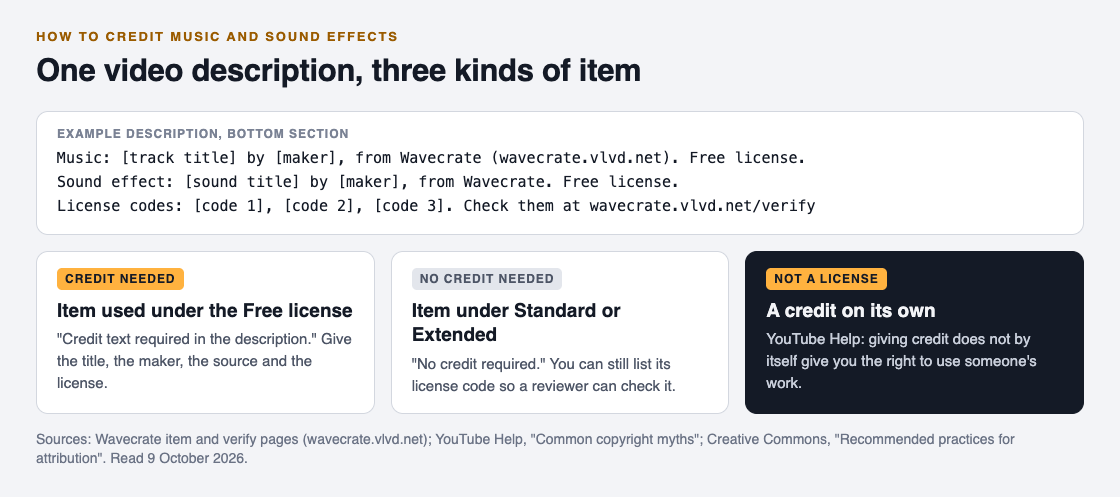
That gives you two credit lines and one line of codes. If you later want to drop the credit lines, Standard on the Free items, or Pro, would cover that once purchases open, and the codes alone would remain.
Add the license code as well as the credit
A credit says where something came from. A license code shows what you are allowed to do with it. Wavecrate's home page suggests pasting the code in your video description, and its verify page lets anyone enter it, with no account, to see who holds the license, for which item, and what it covers.
That is useful even when no credit is needed. If a question about your video comes up, a reviewer can check the code without contacting Wavecrate. It does not decide anything for a platform; it just puts the license where it can be read.
Credits outside YouTube
The same rules travel with you. The Free license on music and sound effects lists YouTube, TikTok, Instagram, Twitch and podcasts. On a podcast, the credit goes in the episode notes, the closest thing to a description. On a short clip, put it in the caption.
For photos and videos marked Free, the license gives you a choice: next to the picture or in the description. On a blog post, a line right under the photo is clearest.
Keep a simple list per video too: each item, its license and its code. When you reuse a track a year later, you will know at once whether it needs a credit line.
If you find an older video that used a Free item with no credit, fix the description now rather than later. Go back through your uploads with that list in hand, add the missing credit lines and codes, and note the date you did it. The Free license asks for credit text in the description, and a description is something you can edit after the video is live.
One last check before you publish: read each line out loud and ask whether a stranger could find the item from it. If the answer is no, the credit is missing a part.
Frequently asked questions
Do I have to credit royalty-free music?
Only if the license asks for it. On Wavecrate, the Free license requires credit text in the description, while Standard, Extended and Pro do not.
Does giving credit mean I can use any song?
No. YouTube Help says giving credit does not automatically give you the right to use someone's content; you need a license that covers your use.
What should a music credit say?
Use the credit text you were given, if any. Otherwise name the title, the maker, the source and the license, the four parts Creative Commons recommends.
Where do I put a credit for a photo?
Wavecrate's Free license for photos and videos asks for credit text next to the photo or in the description.
Get started
Browse Wavecrate: you can join free and download items marked Free now, paid licenses are not on sale yet (purchases open soon), and every download comes with a license certificate and a code anyone can check on its verify page.


Pick a track or sound, read its license cards, and decide whether the Free license with a credit line fits your video.
Comments
No comments yet.
Sign in or make an account to comment.