How to Evaluate Whether Your AI Feature Actually Works
You need to know how to evaluate whether your AI feature actually works before you show it to customers, not after. A demo that runs well on three inputs tells you almost nothing about the thousand inputs you have not seen. This post gives you a repeatable way to check, using a worked example you can copy for your own product.
The example: you run a small help desk tool and you add a feature that summarizes a support ticket into two sentences and suggests a category. We will evaluate it from first idea to live monitoring.
How to evaluate whether your AI feature actually works: why demos fool you
A demo is a handful of inputs you picked, run once, watched by someone who wants it to work. That is a weak test for any software. It is weaker for AI, because the output changes from run to run and the failures are quiet. The summary reads smoothly, so you assume it is right.
Three things hide problems in a demo:
- You choose the inputs. You pick tidy, typical examples. Real users paste in forwarded email chains, half sentences, and three languages at once.
- Fluent does not mean correct. A summary can sound confident while dropping the one detail that mattered, such as a refund deadline.
- One run is not a rate. If the feature is right 8 times out of 10, a lucky demo hides the 2.
A demo is useful for explaining an idea. It is not evidence that the feature holds up. Evals are the evidence.
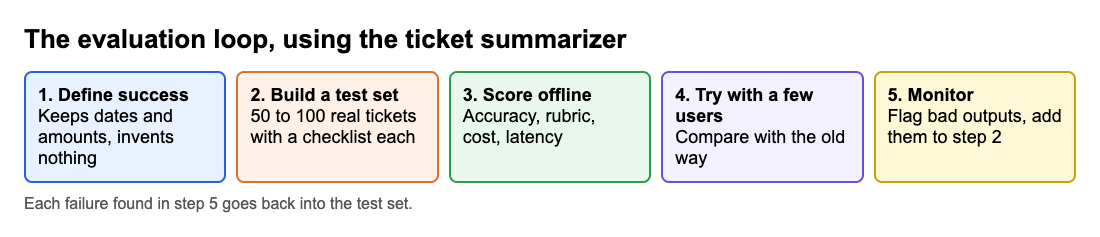
Define what success means for your AI feature
Before you test anything, write down in plain words what a good output is. Without this, every review turns into an argument about taste.
For the ticket summarizer, a good output might mean:
- It names the customer's actual problem.
- It keeps every date, amount, and order number that appears in the ticket.
- It does not add facts that are not in the ticket.
- It picks the right category from your fixed list.
- It is two sentences or fewer.
Then set a pass line before you look at results. For example: "No invented facts in any output we review, and the category is right at least as often as a new support hire would get it." Setting the bar first stops you from moving it to match what you got.
Also decide which failures cost the most. A wrong category is an annoyance. An invented refund promise is a real problem. Weight your checks to match.
Build a test set from real user inputs
Your test set is a folder of inputs, each paired with what a good answer looks like. It is the most valuable asset in the whole process, so build it from real material.
- Collect real inputs. Pull 100 past tickets if you have them. If you have no users yet, ask five people to send you the messages they would actually write, or use your own inbox from a similar job.
- Cover the spread. Include the common cases, but also the short ones, the very long ones, the angry ones, the ones in another language, and the ones that make no sense.
- Add known traps. Include tickets with two problems in one, tickets with numbers that are easy to garble, and tickets that contain instructions aimed at the AI itself.
- Write the expected result. For each, note the correct category and the facts that must survive in the summary. You do not need a perfect reference summary, only a checklist.
- Keep it fixed. Do not edit the set to make a bad result look better. Add new cases when you find new failures.
Remove names, emails, and anything private before you use real user text.
Choose metrics: accuracy, quality, cost, and latency
One number will not describe an AI feature. Track four kinds of measure side by side.
Accuracy
Anything with a right answer can be scored automatically. The category either matches your label or it does not. Count matches across the test set and you have a rate you can compare between versions.
Quality
Open-ended output, like the summary, needs a rubric. Score each output on a few yes or no questions from your success definition: facts kept, nothing invented, length respected. Yes or no questions are easier to apply consistently than a score from one to ten.
Cost
Work out what one call costs and what it will cost at the volume you expect. A feature that works but loses money on each use is not finished. Unit economics apply to AI features like any other cost in your product, as set out in how to calculate unit economics for an AI product, and the lesson Revenue, Costs and Unit Economics in the course Business Basics for Builders on Age of AI Entrepreneur covers that reasoning.
Latency
Measure how long users wait. A summary that arrives after eight seconds may be ignored even if it is perfect. Look at the slow cases, not only the average, because users remember the slow ones.
When you compare two prompts or two models, you will usually trade one of these for another. Writing all four down makes the trade visible.
Use human review and LLM judges together
Checking hundreds of outputs by hand does not scale. Having one model grade another scales, but it can be wrong in ways you will not notice. Use both.
- Start with humans. Read 30 to 50 outputs yourself and score them with your rubric. You will find failure types you did not predict, and you will sharpen the rubric.
- Then add an LLM judge. Give a model the ticket, the output, and your rubric questions, and ask it to answer each one with a short reason. This lets you rerun the whole test set every time you change something.
- Check the judge against yourself. Compare its scores with your own on the same outputs. If it disagrees often, fix the judge prompt before you trust it.
- Keep sampling by hand. Even after the judge works, read a fresh sample regularly.
A simple judge prompt:
You are checking a support ticket summary. Here is the ticket, then the summary. Answer yes or no for each question and give one sentence of reason. 1) Does the summary state the customer's main problem? 2) Does it keep every date, amount, and order number? 3) Does it contain any fact not in the ticket? 4) Is it two sentences or fewer?
Notice the judge sees the source ticket. A judge that only sees the summary cannot catch an invented fact.
Run offline evals, then A/B test with real users
Run your test set first. This is the offline eval. It is fast, cheap, and safe, so you can try ten prompt changes in an afternoon. Keep a simple log: version, date, accuracy, rubric pass rate, cost per call, and median and slowest response time.
Offline results have a limit. Your test set is only a sample of what users will do, and passing it does not mean people will find the feature useful. So take the best version to real users in a controlled way.
- Show the feature to a small share of users and keep the rest on the old experience.
- Pick a behavior that signals value. For the summarizer, that could be how often agents accept the suggested category without changing it, or how long a ticket takes to resolve.
- Run it long enough to see more than a few days of noise.
- Watch for harm too, such as more reopened tickets.
If the offline score rises but the real behavior does not move, your metrics were measuring the wrong thing. That is useful to learn early. Go back and revise the success definition.
Monitor your AI feature after launch
Launch is the start of evaluation, not the end. Inputs drift, the model behind your feature can change, and users find edge cases you never imagined. If you build on someone else's model, as the lesson Building on Someone Else's Model in the course Distribution and Moats discusses, you depend on a system you do not control, which is one more reason to keep checking.
A light monitoring routine:
- Log inputs and outputs (with private details handled properly) so you can look at real cases.
- Let users flag bad output with one click, and add every flagged case to your test set.
- Rerun the full test set on a schedule and whenever the model or prompt changes. A drop is your alarm.
- Review a random sample weekly. Twenty outputs read by a person catches problems that dashboards miss.
- Track cost and latency over time, not only quality.
Write your eval process down so a teammate can repeat it. Then ask the question behind all of it: are users coming back because the feature helps? That is the test described in what product-market fit is and how to measure it.
Frequently asked questions
How many test cases do I need?
Start with 50 to 100 real inputs that cover common, odd, and hard cases. Add every failure you find in production, so the set grows where your feature is weakest.
Can I trust an LLM to grade my AI feature?
Only after you check it. Score the same outputs yourself, compare, and fix the judge prompt until it agrees with you. Keep reading a sample by hand even then.
What if I have no users yet to build a test set?
Ask a few people from your target group to write the messages they would really send, and collect examples from similar work you have done. Replace them with real inputs as soon as you have any.
Is accuracy enough to decide if the feature works?
No. A feature can be accurate and still be too slow, too costly, or ignored by users. Track quality, cost, and latency with it, and confirm with real user behavior.
Get started
Evals are a skill you can practice. Age of AI Entrepreneur has an Advanced level with a course on evals, alongside agents and the economics of growing an AI company, and the lessons are short and hands-on with sources listed for each. You sign in with your email and an emailed code. Lessons are free to anyone with an account, as the terms page explains. You can also read longer posts on building with AI on the blog.
Start Age of AI Entrepreneur: short hands-on lessons on how to build a business in the age of AI, with every side of the debate and the sources to read next.
Comments
No comments yet.
Sign in or make an account to comment.