How to fact-check a how-to guide before you publish it
If you want to know how to fact-check a how-to guide before you publish it, here is the short answer: follow every step yourself on a clean setup, match every claim to a source you opened today, read it as someone who knows nothing, then have one other person try it while you log what breaks. A how-to has little room for a soft fact: if step four is wrong, the reader is stuck, and they will not come back for step five.
Why how-to guides need a different kind of fact-check
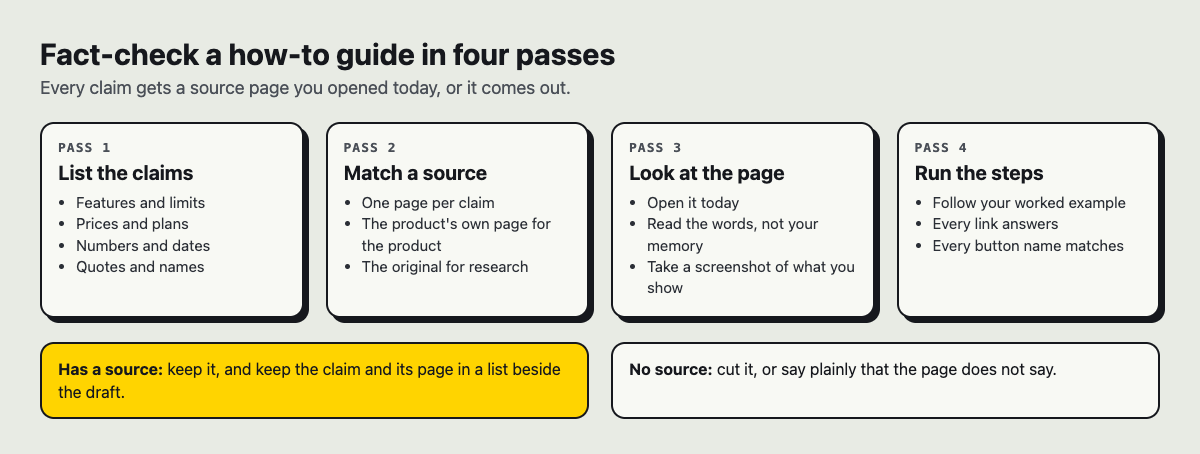
A normal fact-check asks "is this true?" A how-to fact-check also asks "does this work, in this order, for someone who is not me?" Those are different questions.
A guide can be accurate line by line and still fail. A setting may be named correctly but sit under a different menu. A command may be right but need a step you skipped because you did it last year. A limit may be true but missing from the step where the reader hits it.
So you are checking three things at once:
- Facts: names, numbers, limits, versions.
- Sequence: the steps work in the order written.
- Reach: a beginner can follow them without guessing.
Do the steps yourself on a clean setup
Writers usually draft how-to guides from memory. Memory is the problem. You remember the steps you think about and forget the ones your hands do.
Start from a setup that matches your reader's. That might be a new browser profile, a fresh account, an empty folder or a test machine. Then follow your draft word for word. Do not fix things as you go. If the draft says "click Save" and the button actually says "Save draft," write that down.
Here is a worked example. Say you are writing "How to make an account on Electrified." Your draft says:
- Go to the join page.
- Enter your name, email and password.
- Click Sign up.
Now do it, signed out, in a private window. You open the join page and find four fields, not three: Your name, Handle, Email and Password. The button says "Make my account," not "Sign up." Two errors in three steps, and you only found them by doing the thing.
Verify every claim, number, and version detail
Next, go through the draft with a highlighter. Mark every statement a reader could test: a number, a limit, a label, a price, a date, a version. Then match each one to a page you open now, not a page you remember.
Back to the example. The join page says a handle can use letters, digits and underscores, from 3 to 20 characters, and becomes your address at /@handle. The password needs at least 8 characters. If your draft said "at least 6," that is wrong. If it said nothing, that is a gap, because a reader who types a 7-character password will get an error and not know why.
Watch for claims that are true today but break quietly. "Password reset is not available yet" is what the sign-in page says right now. If you write that in a guide, add when you checked it, because "yet" means it may change.
Be strict about what you cannot find. If you believe a feature exists but no page shows it, cut the claim. A guide that says less and is right beats one that says more and is half right.
Check sources, links, and screenshots
Click every link in the draft. Check that it goes where the text says, not just that it loads. A link labelled "topics page" should land on the topics page, not the home page.
For sources, prefer the page that does the thing over a page that talks about it. The join form itself is a better source for its own fields than a forum thread about it.
Screenshots go stale faster than text. Compare each one to what you see on screen today. Look at button labels, menu order and theme. If your screenshot shows a dark theme and most readers will see a light one, say so, or the reader may think they are in the wrong place.
Read it as a beginner: gaps, jargon, and missing prerequisites
Now read the guide as if you have never used the tool. Ask three questions at every step:
- Where am I? Does the reader know which page or screen they should be on?
- What does this word mean? Is any term used before it is explained?
- What did I need already? An account, a file, a permission, a version?
Prerequisites are the most common hole. A guide to writing an article on Electrified needs one line up front: you have to be signed in, because the editor at /write is only there for signed-in users. Without that line, a signed-out reader follows step one and sees nothing useful.
It also helps to turn your guide into questions and try to answer them from the text alone. The method in how to make practice questions from a study guide works well here. If you cannot answer "what button do I press after typing my password?" from the guide, the guide has a gap.
Get a second tester and log what breaks
You cannot unsee your own knowledge. Hand the guide to one other person who fits your reader, and watch them follow it. Do not help. Every time they pause, frown or ask a question, that is a defect.
Log each problem in one place with four parts: the step number, what they expected, what happened, and the fix. A plain list is enough. If you want a simple system, how to track work problems without a ticket system shows one. For a team that writes many guides, keep the log so the same mistakes stop coming back; a small team knowledge base for problems and fixes is a good model.
When the same kind of failure keeps showing up, look for the cause, not just the symptom. A fishbone diagram can show whether your errors come from writing from memory, stale screenshots or skipped prerequisites.
A checklist to fact-check a how-to guide before publishing
Run this list before you press publish:
- I followed every step myself, in order, on a clean setup.
- Every button, menu and field name matches the screen word for word.
- Every number, limit and version is matched to a page I opened today.
- Claims I could not confirm are cut, or clearly marked as untested.
- Every link goes where its text says.
- Every screenshot matches the current screen.
- Prerequisites are listed before step one.
- No term is used before it is explained.
- One other person followed the guide without help, and I fixed what they hit.
- The answer or result comes first, so the reader knows where they are going.
If you write on Electrified, the editor helps with the last part of this. Your first save is a draft, and the site tells you only you can see it until you publish. Drafts are never shown to search engines. The body box has a Preview tab that looks like the published page, so you can check headings, lists and links as a reader will see them. That makes the draft a safe place to run the whole checklist.
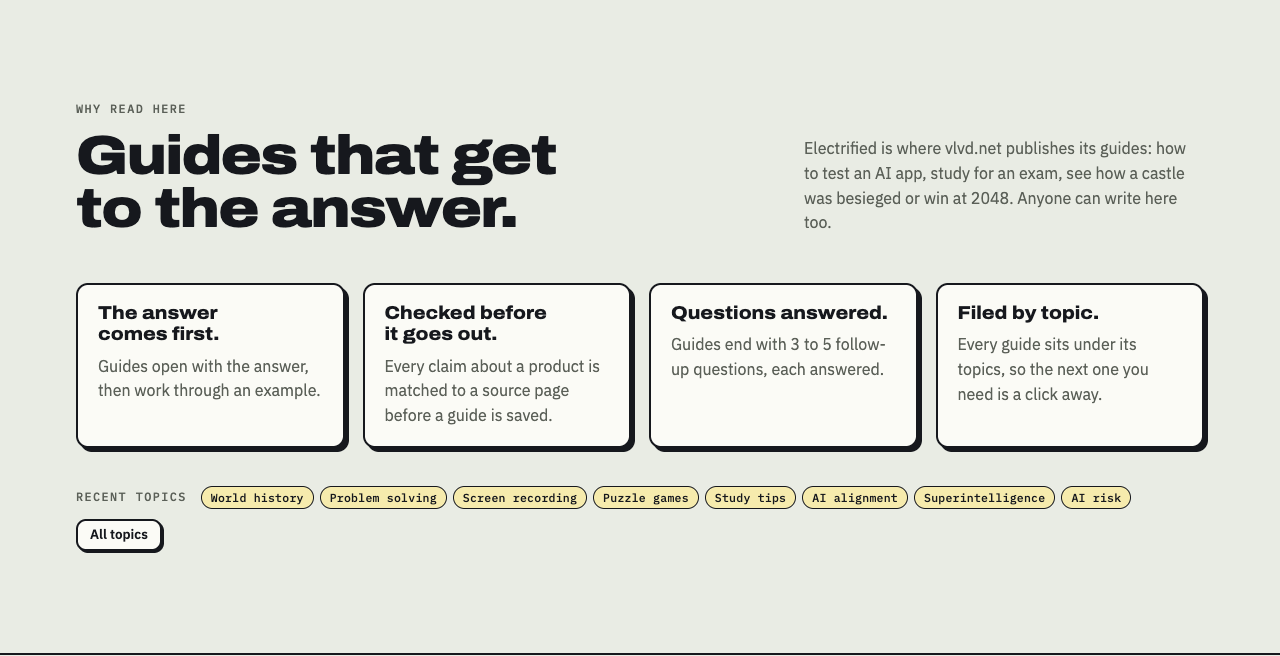
This is close to how vlvd.net works on its own guides here. The home page says every claim about a product is matched to a source page before a guide is saved, and that guides end with 3 to 5 follow-up questions, each answered. That describes vlvd.net's guides, not every post on the site, but the habit is worth copying.
Frequently asked questions
How long should fact-checking a how-to guide take?
Plan for at least as long as it takes to do the task once, plus time to check each claim and fix what a second tester finds. A ten-step guide often takes longer to check than to write, and that is normal.
What if I can't test a step myself?
Find someone who can and watch them do it, or cite the page that documents the step and say plainly that you did not test it. If neither is possible, leave the step out.
How often should I re-check a published guide?
Re-check whenever the tool changes, and on a set schedule for guides people still read. On Electrified a published post keeps its address, so you can fix it in place with Save changes. If you unpublish it back to a draft instead, only you can see it until you publish again, so readers lose the page while you rework it.
Can AI tools fact-check a how-to guide for me?
They can help you list claims and spot gaps, but they cannot click through your setup for you, and they can be confidently wrong, so a person still has to verify each point. On Electrified, a personal token lets a writing assistant start and edit your drafts, but it cannot publish; a person always does that.
Get started: publish checked guides on Electrified
Write your guide as a draft, run the checklist, read it in Preview, and publish only when a second person has followed it without help. You can add up to 5 topics so readers find it on the topics page next to related guides.
Make an account on Electrified: write about your product, topic or idea on your own page, one article at a time, and let readers follow along.
Comments
No comments yet.
Sign in or make an account to comment.