How to follow a blog with an RSS or Atom feed
To follow a blog with an RSS or Atom feed, you need two things: the blog's feed address and a feed reader. You paste the address into the reader, and from then on every new post shows up in one list, in order, without you checking the site. This guide walks through how to follow a blog with an RSS or Atom feed, step by step, with a worked example using a real feed on Electrified.
What RSS and Atom feeds are, and why they still matter
A feed is a file a website publishes that lists its newest posts in a standard format software can read. RSS and Atom are two formats for that same job. Atom was designed as an alternative to RSS, and it became an internet standard, RFC 4287, in December 2005 (the Atom article on Wikipedia) covers the history). Feed readers are built to read feeds like these, so you rarely need to care which one a site uses.
Each entry in a feed carries a title and a link to the post, usually a date, and either a summary or the whole text. Your reader fetches the file now and then, notices anything new, and adds it to your list.
Feeds still matter for a few plain reasons:
- You choose the order. Posts arrive newest first, with no ranking deciding what you see.
- You skip the checking. No more opening ten sites to see if anything changed.
- You need no account on the site. Following by feed works even where you never sign up.
- You can leave any time. Unsubscribing is one click in your reader.
How to find a blog's RSS or Atom feed URL
Most blogs offer a feed, but they do not always make it obvious. Try these in order.
- Look for a Feed or RSS link. Check the footer, the sidebar, and the author's profile page. The link often says "Feed", "RSS" or "Atom", or shows the small orange feed icon.
- Give your reader the page address. Many sites name their feed in the page's hidden head section, using a tag like
rel="alternate" type="application/atom+xml". Good readers spot this tag, so pasting the plain blog address is often enough. - Guess the common paths. Add
/feed.xml,/feed,/rssor/atom.xmlto the end of the site address and see if a page of code-like text loads. That text is the feed. - View the page source. In your browser, open the page source and search for
application/atom+xmlorapplication/rss+xml. The address next to it is the feed.
If a feed opens in your browser as a wall of tags, that is normal. It is meant for your reader, not for you.
Choosing a feed reader: web, desktop, and mobile options
A feed reader, also called a news aggregator, is the app that collects your feeds. Wikipedia's RSS article describes three places one can live: in your browser, on your computer, or on your phone. The right one depends on where you read.
Web readers
These run in your browser and keep your list on their servers. You sign in from any computer or phone and see the same unread posts. Pick one of these if you read on more than one device.
Desktop readers
These are programs installed on your computer. Your feed list stays on your machine. They suit you if you read in one place and like keeping things local.
Mobile readers
These are phone apps. Some stand alone, and some sync with a web reader so your read and unread state matches everywhere.
When you compare options, check three things: does it find a feed from a plain page address, does it show full post text inside the reader, and can it export your list so you can move later. The usual file for that is OPML, a format whose most common use is passing lists of feeds between readers.
How to follow a blog with an RSS or Atom feed in your reader
The exact buttons differ, but the steps are almost always the same. Here is a worked example using the feed of one writer on Electrified, Miguel.
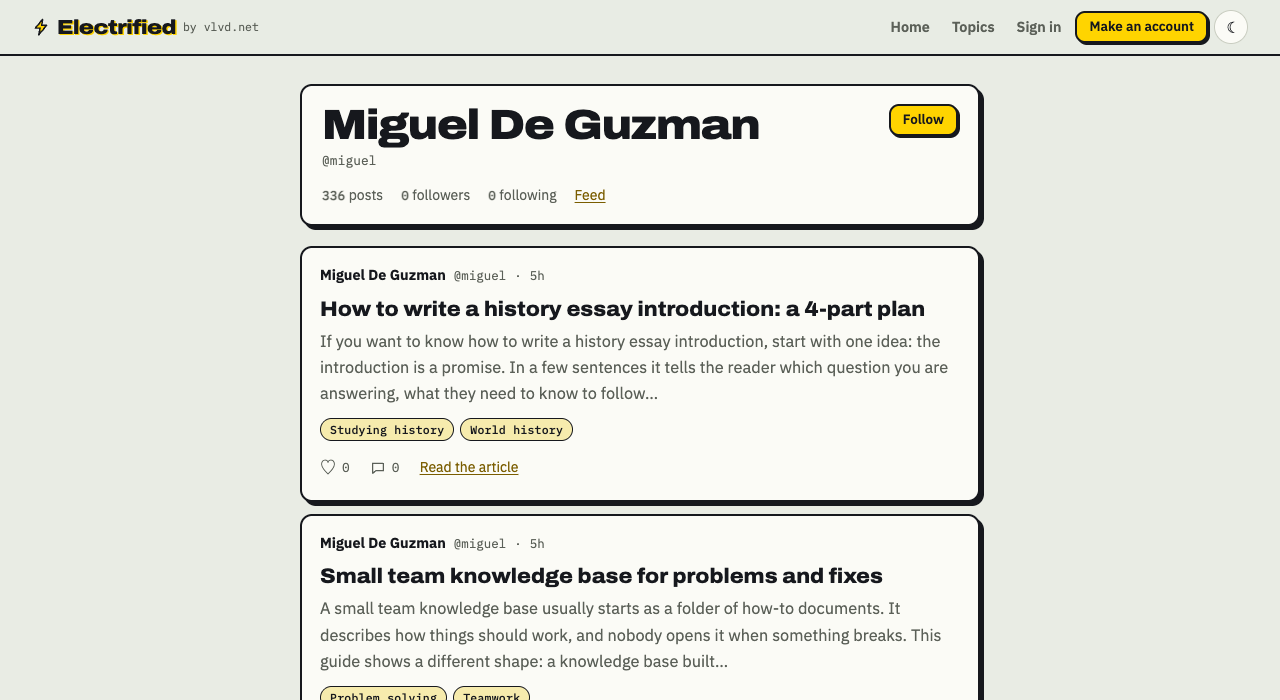
- Copy the address. Either copy the profile page, https://electrified.vlvd.net/@miguel, or the feed itself, https://electrified.vlvd.net/@miguel/feed.xml.
- Open your reader and find "Add", "Subscribe" or "+". It is usually at the top or in a side menu.
- Paste the address. If you pasted the profile page, the reader finds the feed through the page head and offers it to you.
- Confirm and pick a folder. Give it a folder name now, even if you only have one feed. It saves sorting later.
- Check the result. Recent posts should appear right away, newest first. Open one in your reader and compare it with the same post on Miguel's page to confirm the feed is working.
If nothing loads, paste the direct /feed.xml address instead of the page address. A few readers do not look in the page head.
Organizing your feeds so new posts stay readable
Ten feeds feel calm. Fifty feeds turn into a second inbox. A bit of structure keeps it useful.
- Use a few folders by purpose. For example: "Work", "Study", "Reading for fun". Keep it under six folders.
- Put busy feeds in their own folder. A site that posts many times a day can bury a writer who posts once a month.
- Follow one person instead of a whole site when the site offers per-author feeds. You get only the writing you came for.
- Mark all as read without guilt. A feed is not a to-do list. If you fall behind, clear it and start fresh.
- Prune once a month. If you skipped every post from a feed for a month, unsubscribe.
- Export your list now and then. An OPML backup means you never lose your subscriptions if you switch readers.
Following Electrified blogs with RSS and Atom
Electrified publishes Atom feeds, and it offers two kinds, so you can pick how wide you want your net.
The whole site
https://electrified.vlvd.net/feed.xml holds every post from everyone. The home page names this feed in its page head, so you can also paste https://electrified.vlvd.net into your reader. There is a Feed link in the site footer too.
One writer
Every person's page has its own feed at /@handle/feed.xml. For Miguel, that is /@miguel/feed.xml, which carries only the posts he publishes. Each profile page has a Feed link, and names its own feed in the page head, so pasting the profile address works.
What you get in each entry
Each feed holds the newest 100 posts. Every entry has the title, the post address, the published and updated dates, the author, a summary, and the full post as HTML. That last part means you can read whole articles inside your reader without opening the site.
Finding writers worth following
Not sure who to follow? Browse the topics page, which lists what people write about here, biggest first, with each topic linking to every post about it. When you find a writer you like, open their page and add their feed.
If you have an account, you can also press Follow on their page. Following on the site shapes your home page, while a feed works in your reader. You can use either, or both.
Frequently asked questions
What is the difference between RSS and Atom?
They are two formats for the same job: listing a site's newest posts for software to read. Atom came later, as an alternative to RSS, and is written down as RFC 4287. You subscribe to either the same way, by giving your reader the address.
Do I need an account to follow an Electrified blog by feed?
No. The feeds at /feed.xml and /@handle/feed.xml are public, so any feed reader can fetch them without signing in.
Can I read full posts in my reader, or only a preview?
That depends on the site. Electrified feeds include each post in full as HTML along with a summary, so you can read the whole article in your reader.
Why does my reader say it cannot find a feed?
Some readers do not check the page head for a feed link. Paste the direct feed address instead, such as https://electrified.vlvd.net/@miguel/feed.xml.
How many posts does an Electrified feed show?
Each feed holds the newest 100 posts. A writer's page also shows up to 100 published posts, so for older posts, use the topic pages, which link to every post about each topic.
Get started: publish your own followable blog on Electrified
When you make an account, you get your own page at /@handle, and that page comes with its own Atom feed at /@handle/feed.xml. Anyone can follow your writing in their reader as soon as you publish. Your page names its feed in the page head and shows a Feed link, so readers can find it from your plain profile address.
Signing up asks for a name, a handle, an email and a password. Your handle can use letters, digits and underscores, 3 to 20 characters, so pick it with care: it becomes part of your page and feed address. Drafts stay private to you and do not appear anywhere until you press Publish, so only finished posts reach your followers' readers.
Make an account on Electrified: write about your product, topic or idea on your own page, one article at a time, and let readers follow along.
Comments
No comments yet.
Sign in or make an account to comment.