How to know when a solution has really worked
You try a fix, the problem goes quiet, and you move on. Two weeks later it is back. This guide shows you how to know when a solution has really worked and when you just got a good week. You do not need a lab. You need a clear definition of solved, a baseline, a little patience, and an honest record of what you tried.
Why a fix that looks like it worked often has not
Most problems go up and down on their own. A slow laptop has fast days. A noisy neighbor has quiet weeks. Your inbox has light Mondays. If you try a fix on a bad day, the next day will probably be better anyway. That is not your fix working. That is the problem drifting back toward normal.
Three other traps make a fix look better than it is:
- You changed several things at once. You cannot tell which one mattered.
- You want it to work. After effort, you notice the good days and forget the bad ones.
- You fixed the symptom. The visible sign went away, but the cause is still there.
The steps below deal with each of these in turn.
Define what solved means before you start
Write down what "fixed" looks like before you try anything. If you decide afterward, you will set the bar wherever your results happened to land.
A good definition is specific and checkable. Compare these:
- Vague: "The weekly report should stop being late."
- Checkable: "The weekly report goes out by 3pm Friday for 6 Fridays in a row."
The second one tells you what to count, how long to count it, and what a pass looks like. It also makes room for a middle result. If the report goes out on time 4 Fridays out of 6, that is not a failure. It is a partial result, and you should record it that way.
If you can, test the idea small before you commit to it. We cover that step in how to test a solution before you commit to it.
Measure against a baseline, not against your memory
Your memory of "before" is a weak measure: the worst moment is the easiest to recall, which makes any change look like a big improvement. The Lean Enterprise Institute's page on plan, do, check, act starts from the same place: targets are set against a stable baseline of performance, and "check" measures the change against the target.
So count the problem before you change anything. Keep it simple:
- Pick one number you can see without effort. Late reports per month. Nights you woke before 5am. Times the build failed.
- Look back at the last few weeks, or count forward for a week or two before you start.
- Write the number down next to the problem.
Worked example: you look at the last 6 Fridays and the report was late on 4 of them. That is your baseline. You move the internal deadline to Thursday noon. Over the next 6 Fridays it is late once. Now you have a real comparison: 4 out of 6 before, 1 out of 6 after. That is far better than "it feels like it is on time more often."
Rule out luck, timing and other changes
Before you give your fix the credit, ask what else happened in the same window.
- Timing: Was it a holiday month? Did a busy project end? Did the season change?
- Other changes: Did a new person join? Did a tool update? Did you change two things that week?
- Regression to normal: Did you start the fix right after an unusually bad stretch?
In the report example, suppose two of your six "after" Fridays fell in a quiet holiday week. Those weeks would probably have been on time anyway. Take them out and look again. If the fix still holds on normal weeks, you can trust it more.
Two cheap ways to check:
- Change one thing at a time. Slower, but you learn what actually mattered.
- Undo it on purpose. If it is safe, stop the fix for a week. If the problem comes back, then goes away again when you restart the fix, that is strong evidence. If nothing changes either way, the fix was probably not the reason.
Check the root cause, not just the symptom
A symptom is what you notice. A cause is what produces it. The same symptom can come from very different causes.
Ask yourself: if this fix worked, why did it work? Then check whether that explanation holds, with the question the Lean Enterprise Institute puts at the heart of problem solving: how do you know that?
In the report example, moving the deadline to Thursday might work because people get their numbers in earlier. Or it might only work because you now chase people on Thursday, and the real cause is that one data source arrives late. If you stop chasing, the problem returns. A fix that only works while you keep pushing has not removed the cause. It has added a chore.
A useful habit is to write down what a solution needs in order to work. "Deadline moved to Thursday" needs "someone sends a reminder Wednesday." Once that dependency is written down, you can see how fragile the fix is. For more on telling the two apart, see root cause vs symptom.
Watch for relapse and side effects over time
A fix that worked for two weeks has not proven itself yet. Come back to it later:
- At one week: Is the effect there at all?
- At one month: Has it held through normal, busy weeks?
- At three months: Has it become how things work, or has it faded?
Also look for side effects. The Thursday deadline may get the report out on time and also make Thursdays miserable for the team. That is still worth knowing. A fix with a cost might be the right call, but you should make that choice on purpose instead of finding out later.
When a fix fades, do not delete it from your record. Change its result to partly or failed, and write one line about when and why it stopped working. That line is often the most useful thing you will record.
Map it to see if a solution has really worked
All of this is easier when your problems and attempts live in one place instead of scattered notes. Problem Graph is a personal problem and solution journal drawn as a graph, and it fits this process closely.
Here is how the report example would look:
- Write the problem in one line, with the baseline in it: "Weekly report late on Fridays, 4 of the last 6." Put it in the work lane. It appears on the graph when you press Enter.
- Attach solutions as ideas: "Move internal deadline to Thursday noon," "Automate the data pull," "Wednesday reminder." Mark the one you are trying now.
- Record the outcome: worked, partly, or failed. After six Fridays, the deadline change might be "partly." After the holiday weeks are removed and three more months pass, you update it.
- Add requirements: The app's map key names a requirement, so "someone sends a Wednesday reminder" can sit next to the solution that depends on it. This makes the cause question visible.
- Link related problems: If "Data from finance arrives late" is the real cause, link it to the report problem. Links work across lanes too, so a work problem can connect to a personal one like "No focus time on Thursdays."
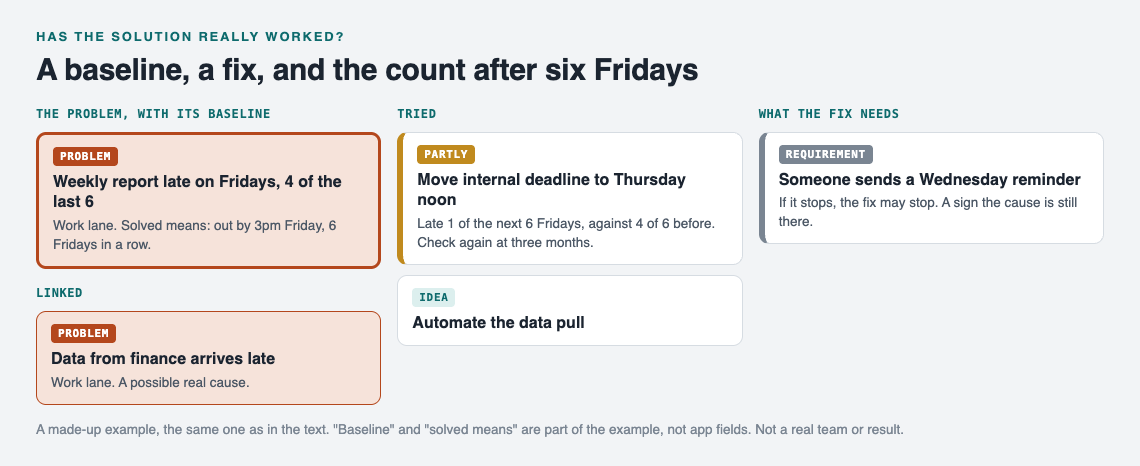
The made-up report example after six Fridays.
The point is honesty over time. The home page puts it this way: "A solution that failed three times stays on the map as a failed solution, and that is exactly what the next person needs to know." Often that next person is you, six months from now, about to try the same thing again.
Problems are private by default, so nobody else sees them. If you want, you can mark a problem as a main node and share it into a private network or put it out publicly. When you do, its solutions, their outcomes and their requirements go along. Others can then borrow a solution that worked, with a link back to where it came from. You can also ask the AI for suggestions based on what worked for others on similar problems. Treat those as ideas to test against your baseline, not as answers.
Frequently asked questions
How long should I wait before calling a solution successful?
Wait long enough to cover several normal cycles of the problem, not just one good stretch. For a weekly problem, that means at least four to six weeks, and check again after a few months.
What if the problem improved but did not go away?
Record it as a partial result and keep the numbers. A partial fix is useful information, and you can combine it with another solution or look for the cause it missed.
How do I tell if a solution worked or the problem fixed itself?
Compare against a baseline from before the fix and check what else changed in that time. If it is safe, pause the fix for a short while and see whether the problem returns.
What should I do when a solution stops working?
Change its outcome to partly or failed, and note when it stopped and what changed around then. Then look at what the solution depended on, because a missing requirement is often the reason.
Get started
Pick one problem you thought you had solved. Write down what solved should mean, count your baseline, and give the fix a fair test. Then keep the record somewhere you will see it again.
Try Problem Graph: it is free, and you can look around the public network without an account. Write one problem down in a line and attach the first thing you will try. If you want to see how it looks first, open the app and press "Load example set."
Comments
No comments yet.
Sign in or make an account to comment.