How to promote a side project by writing about it
If you have built something on nights and weekends, you know the hard part is not the code. It is getting people to understand what it does. This guide shows you how to promote a side project by writing about it: find the questions its users already ask, answer them in plain articles, and mention the project honestly where it fits. You will also see a worked example, the honest limits of what a post can do, and how to publish the articles on Electrified.
How to promote a side project by writing about it, and why it helps
Promotion here means explaining. A useful article tells a reader how to solve a problem, and if your project solves it, the article says so in plain words.
Writing also forces you to explain your project clearly. If you cannot say in two sentences what it does and who it is for, a reader will not work it out either. Each post is a small test of your own description.
The catch is that writing only helps if the posts are useful on their own. A post that exists only to say "try my app" gives a reader no reason to stay. A post that solves a problem, and mentions the tool you built for it, does.
Nobody can promise a post will be read. What you can control is whether each one is worth reading for the person who does find it. A good starting set is four kinds of article, each standing on its own:
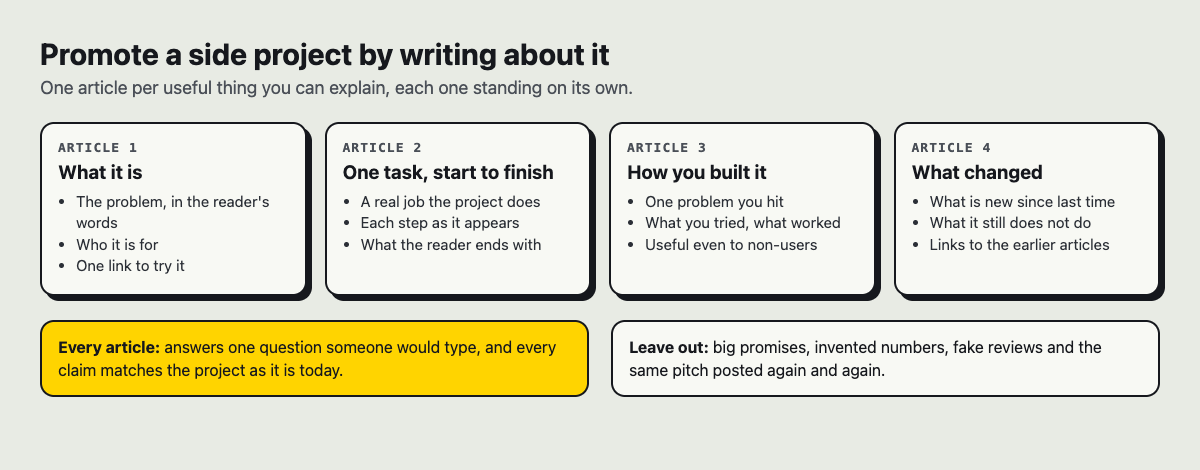
Four kinds of article a side project can carry, each useful on its own.
Find the questions your future users already ask
Start with the problem, not the product. For a worked example, say your side project is a small web app that reminds people when to water each houseplant. Call it Leafday (a made-up name for this example). Nobody searches for Leafday. They search for things like:
- how often should I water a snake plant
- why are my pothos leaves turning yellow
- how to remember to water plants when you travel
Each of those is an article. Only the third is directly about your app, and that is fine. The first two answer real needs of the people your app is for, and a single line at the end can mention the reminder tool.
To build your list, write down every question a user asked you, every question you asked yourself while building, and every search you typed while stuck. If you use an AI assistant, a prompt like this helps you brainstorm:
I built a web app that reminds people when to water each houseplant. List 20 questions a beginner plant owner would type into a search box. Group them by problem: watering, travel, sick plants, choosing plants.
Treat the output as a starting list, not as facts. Check every claim before you write it down, the same way you would check a claim about your own app.
Write about the building: logs, decisions and lessons
Your second source of posts is the building itself. People who make things often like reading how other people make things. Three formats work well:
- Build logs. What you shipped, what broke, what you fixed.
- Decisions. Why you picked one approach over another, with the trade-offs spelled out.
- Lessons. A mistake you made and what you would do differently.
A decision post might be titled "Why Leafday sends one email a day instead of one per plant." It is specific, it shows you thought about the user, and other builders can learn from it even if they never water a plant.
On Electrified you can mix short and long posts. A note is a short post of up to 500 characters with no title, good for "Shipped travel mode today: pause all reminders while you are away." An article has a title and as many sections as it needs. You start each section with ## and a heading, which keeps a long build log easy to scan.
Turn your launch into a post people actually read
The launch post is the one most people get wrong. They list features. Readers want to know what problem you solved and whether it is their problem too.
Open with the answer: what the project does, in one sentence. Then walk through one real task from start to finish. Then say who it is not for and what it does not do yet. That last part builds more trust than any feature list.
For Leafday, the opening might read: "Leafday sends you one short email each morning listing which plants need water today. Here is what a week of those emails looks like." Then show the week, using your own plants and your own real emails.
There is a full guide on how to write a product launch post people actually read, with a structure you can copy.
Draft the launch post days ahead. On Electrified, the first save makes it a draft that only you can see until you publish it, and a search engine never sees a draft. Use the Preview tab to check it, since the preview looks like the published page. When you are ready, press Publish. If you spot a mistake afterward, edit it and press Save changes; the post keeps its address.
Mention the project without sounding like an ad
The rule is simple: the post has to be worth reading even if the reader never clicks your link. Once that is true, you can mention your project honestly.
- Mention it where it fits the problem. In "how to remember to water plants when you travel," the tool is a natural answer. In "why are my pothos leaves turning yellow," it is a one-line note at most.
- Say what it does not do. "It will not tell you why a plant is sick. It only tracks watering."
- Put your link in your bio. In Settings you can write a Bio of up to 280 characters, shown at the top of your page, and add a Website. Your page also shows your posts, a Follow button and a Feed link.
- Use the same topics on each post. Each post can carry up to 5 topics you choose, and each topic links to a page of every post about it, so a reader who liked one plant post can find the next.
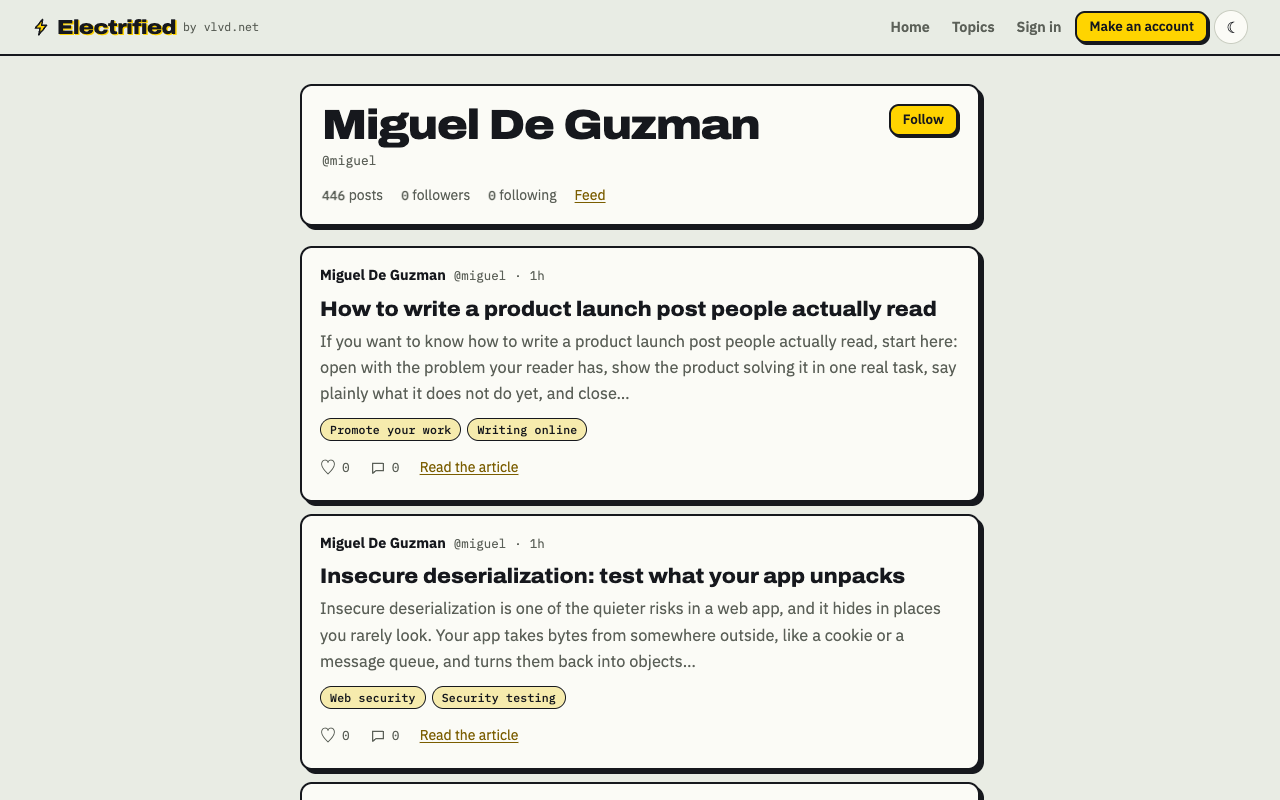
A writer's page on Electrified: posts, topics, a Follow button and a feed.
Be honest with yourself about what links do. Links in posts open for readers, and some carry a short note such as utm_source=electrified, as the privacy page explains, so the site at the other end can tell which post sent the visitor. Most writers' links carry rel="nofollow ugc", so do not expect a link in a post to help your project's search ranking. Write the link for the person reading it.
Never post the same pitch over and over, never buy likes or comments, and never pose as a happy customer. Readers notice, and it spends the trust your useful posts earned.
Share each post where it answers a question
Think about where your users already talk: plant owners in plant forums and local groups, developers in their own channels. Share a post when it answers a question someone asked there, and follow that place's rules about links.
Feeds help readers who want to keep up. Your page on Electrified has its own Atom feed at /@yourhandle/feed.xml, the same way Miguel's feed works. Each feed entry holds the post in full, and your page names the feed in its head, so a feed reader given your page address can find it. Signed-in readers can also follow you and see only the posts of people they follow on the home page.
Topic pages are another way in. The topics page lists what people write about, the biggest first, and each topic links to every post filed under it.
Learn what works and keep a pace you can hold
Electrified does not show writers visitor numbers, so learn from your own side. If your project's site counts where visitors come from, the utm_source note on a link can tell you which post sent someone. Published posts can collect likes and comments, and comments are often the best signal: a question in the comments is your next article.
Keep score simply. After each post, write down the title, the question it answered, and what happened afterward: replies, questions, sign-ups on your own side. After ten posts you will see which questions your readers care about.
Then pick a pace you can keep for a year, not a week. One article every two weeks, plus a short note when you ship something, is a pace many people can hold alongside a job.
Frequently asked questions
How often should I write about my side project?
Choose a pace you can hold for months, such as one article every two weeks. Fill the gaps with short notes when you ship or learn something.
Do I need an audience before I start writing?
No. Write each post for one person with one question. Whether anyone reads it is not something you control; whether it answers that question well is.
What should I write first?
Write the article that says what the project is, who it is for and one task it does, start to finish. Every later post can link back to it.
What if my side project is too niche to write about?
Write about it anyway. A narrow problem still has people who have it, and a clear answer is useful to them.
Get started
Pick one question from your list today. Write the answer, show one real example, and mention your project in a single honest line. Save it as a draft, read it in Preview, then publish it when it reads well.
Make an account on Electrified: write about your product, topic or idea on your own page, one article at a time, and let readers follow along.
Comments
No comments yet.
Sign in or make an account to comment.