How to Quiz Yourself on a Data Table From a Textbook
A data table in a textbook looks easy until an exam asks you what it shows. You read the rows, nod along, and turn the page. Then a question asks which value rose fastest, and you cannot say. This guide shows you how to quiz yourself on a data table from a textbook in five steps, with a worked example you can copy tonight.
How to quiz yourself on a data table from a textbook, and why
When you read a table, the numbers are in front of you, and agreeing with them feels like learning. It is recognition. In an exam the table may be missing, changed, or replaced by a question about what it means. In a classic study, students who tested themselves remembered far more after two days and a week than students who restudied, even though restudying made them feel more confident.
Knowing a table means you can do three things without looking. You can say what it measures and in what units. You can recall the key values roughly. And you can explain the pattern: what goes up, what goes down, and where it changes. Each step below trains one of those.
For the worked example, picture a biology table titled "Effect of temperature on enzyme activity." It has two columns: temperature in °C (10, 20, 30, 40, 50, 60) and rate of reaction in cm³ of oxygen per minute (2, 5, 9, 12, 6, 1).
Step 1: Read the title, units and headings before any numbers
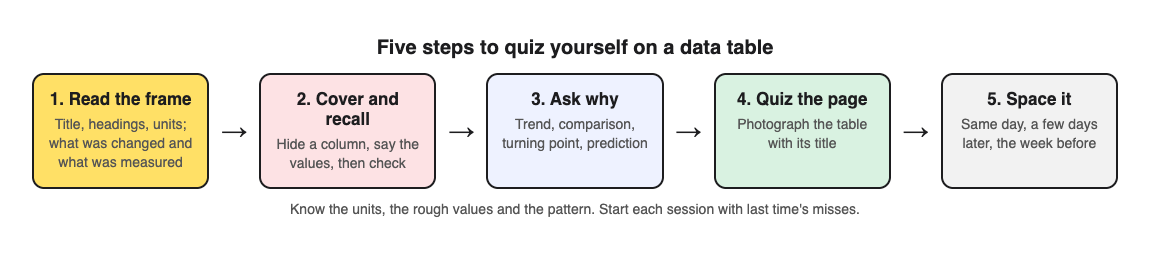
Start at the top and work down the frame of the table, not the middle. Read the title out loud. Then read each column heading and its units. Cover the numbers with your hand if you need to.
Now close the book and answer these:
- What is this table about, in one sentence?
- Which column is the thing that was changed? Which is the thing that was measured?
- What are the units for each one?
In the enzyme table, temperature was changed and rate was measured. Rate is in cm³ of oxygen per minute. If you get the units wrong, every later answer will be off, so this step is worth a full minute.
Step 2: Cover a row or column and recall the missing values
Take a sheet of paper and cover the measured column. Look at each temperature and say the rate you expect. Then slide the paper down and check. Mark each miss with a small dot in your notes, not in the book.
Do not try to recall every value exactly. Aim for the shape. For the enzyme table you want to know that the rate climbs to a peak near 40 °C and then falls fast. If you remember "about 12 at the top, close to zero at 60," that is enough for most questions.
Next, cover the other column. Look at a rate and say which temperature produced it. This reverse direction is harder, and it is often how exam questions are written.
Step 3: Ask trend and comparison questions, not just lookups
A lookup question asks "What is the rate at 30 °C?" That is the easiest kind. Write down three or four questions of each type below as well, and answer them from memory:
- Trend: What happens to the rate as temperature rises from 10 °C to 40 °C?
- Comparison: Is the rate at 50 °C higher or lower than at 30 °C? By how much?
- Turning point: Where does the pattern change, and why might it change there?
- Prediction: What rate would you expect at 70 °C?
Turning point and prediction questions force you to connect the table to the theory in the chapter. For the enzyme table, the theory is that heat speeds up reactions until the enzyme loses its folded shape, a change called denaturation). If you cannot link the numbers to that idea, reread the paragraph next to the table before you go on.
These are also the questions practice carries over to best: a review of 122 experiments found that testing transfers most to application and inference questions.
Step 4: Turn the table into exam-style questions you can answer cold
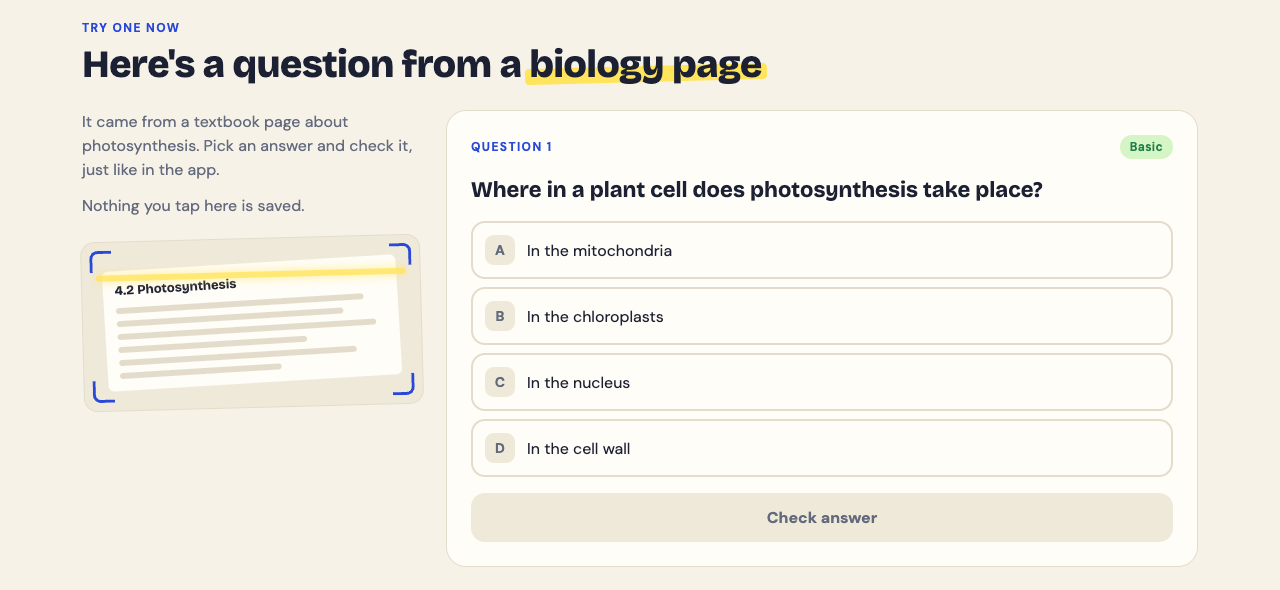
Writing good questions by hand takes time. You can do it with a pen, or you can photograph the page and let Study Shot write them. It turns a photo of a page into a multiple-choice quiz, and the app notes that textbooks, notes, diagrams and whiteboards all work.
Here is the workflow for the enzyme table:
- Open Study Shot in your phone or computer browser and log in.
- Tap Make a new quiz, then Take photo. Hold the page flat and fill the frame with the table and its title. If you already have a photo, use Choose photo instead. JPEG, PNG, WebP or GIF up to 5 MB all work.
- Pick 10 questions. You can choose 5, 10, 15 or 20.
- Leave the level on Tiered. It splits the questions as evenly as it can across Basic, Intermediate and Advanced, in that order. Basic covers key terms and facts. Intermediate asks you to explain and compare. Advanced asks you to apply and predict in new situations, which lines up with Step 3.
- Choose your quiz language, then press Create questions. You will see "Reading your page…" while it works. It can take up to a minute.
Each question has four choices, A to D, with one right answer. Pick one and press Check answer. You get Correct! or Not quite., the right answer, and a short explanation. If you need to see the table again mid quiz, press Show page. Try to answer first, then check. Peeking turns the quiz back into reading.
The questions are written by an AI model and can contain mistakes. Read the explanation and compare it with the table. If a question is wrong or unclear, use Report a problem with this question under it.
Step 5: Space your table quizzes and track what you miss
One quiz is a start. The pattern sticks when you come back to it after a gap. A simple plan: quiz yourself the same day, again two or three days later, and once more the week before the exam.
Study Shot saves each quiz in your library with a thumbnail of the page photo and your best score, so you can press Retake quiz without photographing the table again. The results screen gives you a right out of total score for each level. If you got every Basic question right but missed most Advanced ones, you know the values but not the meaning. Go back to Step 3.
Use the Look at these again list at the end. It shows each question you missed with your answer and the right answer. Copy those into a short list and start your next session with them. Grades run from Needs another try (below 50%) through Getting there and Good up to Mastered (90% and up). Aim for Mastered on the retake before the exam.
If you revise with a friend, Share this quiz makes a link they can open with their own Study Shot account. They get their own copy of the questions, without your photo.
Common mistakes when you quiz yourself on a data table from a textbook
- Skipping the units. You learn "12" but not "12 cm³ per minute." Many mark schemes expect the unit.
- Only doing lookups. You can read off any value but cannot describe the trend. Mix in comparison and prediction questions every time.
- Checking too soon. Looking at the table before you commit to an answer feels efficient but trains recognition, not recall.
- Cropping the title off the photo. If you photograph the page, include the title and headings so the questions have the full context.
- Quizzing once. Spread your sessions out instead of doing one the night before.
- Ignoring the misses. Your wrong answers are the most useful part. Review them first next time.
Frequently asked questions
Should I memorise every number in a textbook table?
Usually not. Learn the units, the rough size of the key values, and the pattern, such as where a peak or turning point falls. Check your syllabus in case it asks for specific figures.
How do I quiz myself on a table without a study partner?
Cover a column with paper, recall the values, then check. You can also photograph the page in Study Shot, which writes multiple-choice questions about it and explains each answer.
How often should I review a data table before an exam?
A good rhythm is the same day, a few days later, and again the week before the exam. Start each session with the questions you missed last time.
Can I use the same method for past exam paper tables?
Yes. Exam tables are a good source because they show the style of question you will face. For a full walkthrough, see how to quiz yourself with a past exam paper, step by step.
Pick one table from the chapter you are on. Read its title and units, cover a column, and recall the values. Then photograph it and take a Tiered quiz so you practise lookups, comparisons and predictions in one go.
Get started
Try Study Shot: it is free to start. Photograph the page you are studying tonight and get 10 practice questions on it, from basic to advanced.
Comments
No comments yet.
Sign in or make an account to comment.