How to Quiz Yourself on a Flowchart From Your Notes
If you want to know how to quiz yourself on a flowchart from your notes, start with this: a flowchart is a set of steps and choices, so your quiz should test steps and choices. Looking at the boxes until they feel familiar is not the same thing. This post walks you through five methods that make you produce the process from memory. It also shows how to turn a photo of your flowchart into a practice quiz with Study Shot.
We will use one example throughout. Say your business law notes have a flowchart called "Is this a valid contract?" It starts with "Was there an offer?" and moves through acceptance, consideration, capacity and legal purpose. Each question has a Yes arrow and a No arrow. Most of the No arrows end in "No contract." Contract rules vary by course and by country, so your own notes and your teacher decide what the boxes say; the method works the same for a biology process or a chemistry test sequence.
How to quiz yourself on a flowchart from your notes, not reread it
When you reread a flowchart, your eyes follow the arrows for you. The page does all the remembering. You see "Consideration?" and think "right, I knew that." But you never had to recall that consideration comes after acceptance, or what happens when the answer is No.
Flowcharts also look simple. Then the exam gives you a scenario, and you have to run the process yourself. In a 2006 study by Roediger and Karpicke, students who took recall tests on a passage remembered more of it two days and one week later than students who reread it, even though rereading made them feel more confident.
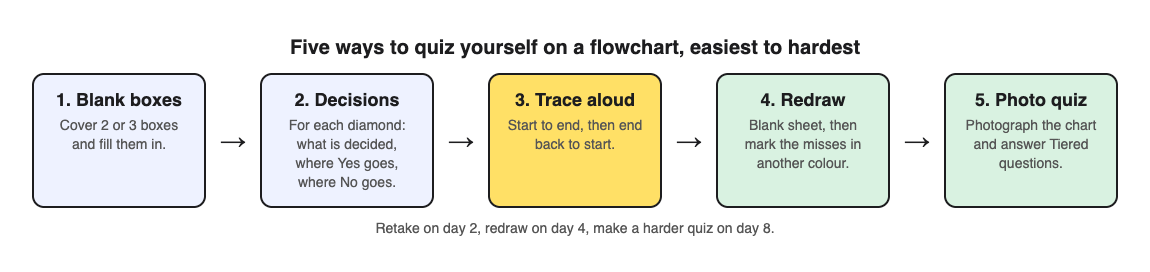
Every method below takes the page away and asks you to supply the missing piece.
Clean up your flowchart before you start quizzing
Quizzing a messy diagram teaches you the mess. Spend ten minutes fixing it first.
- Check that every arrow has a label. A diamond with two unlabeled arrows is a guess waiting to happen. Write Yes or No on each one.
- Use one shape per job. Rectangles for steps, diamonds for decisions, ovals for start and end.
- Write each box as a short question or action. "Capacity?" is better than a full sentence that wraps three times.
- Fill any gaps from your textbook. If one branch just stops, find out where it goes.
Blank out boxes and fill in the missing steps
This is the easiest method to start with. Make a copy of your flowchart, or lay sticky notes over it. Cover two or three boxes. Then try to fill them in.
For the contract example, cover "Acceptance?" and "Legal purpose?" Now look at the gaps. Can you say what goes in each one? Can you say why it sits in that position and not somewhere else?
Change which boxes you cover each round. Cover the start once, the end once, and the middle a few times.
When you can fill every gap on the first try, cover more boxes. When you can fill a page that is mostly blank, move on.
Quiz the decision points: ask what happens on each branch
The diamonds are where exam questions live. A teacher can describe a situation and ask you which branch it falls into. So drill each decision point directly.
For every diamond, write three questions on a card:
- What is being decided here?
- Where does the Yes arrow go?
- Where does the No arrow go?
Then go one level further and invent a small case. "Your notes say a promise of a gift, with nothing given in return, fails one box. Which one?" You should be able to point to "Consideration?" and follow the No arrow.
If you made a mistake, do not just note the right answer. Ask what made you pick the wrong branch. Usually it is a fuzzy definition, and that is worth fixing in your notes.
Trace a path from start to end out loud, then in reverse
Close your notes. Pick a starting point and talk through the process: "Start. Was there an offer? Yes. Was it accepted? Yes. Was there consideration?" Keep going until you reach an end box.
Out loud, a skipped step is harder to miss than in your head.
Then go backward. Start at "Valid contract" and name each box you had to pass through to get there. Reverse tracing is harder, and it shows whether you know the order or just a rhythm of words.
Do one more trace for each No branch. Start at "No contract" and ask which decisions could lead there. There are several, and you should be able to name all of them.
Redraw the whole flowchart from memory and check it against your notes
This is the full test. Take a blank sheet. Draw the flowchart with nothing in front of you. Include every box, every arrow and every label.
When you are done, put it next to your original and mark it with a different color pen:
- Missing boxes
- Boxes in the wrong order
- Arrows that go to the wrong place
- Missing Yes or No labels
Whatever you marked is your study list for the next session. Redraw again tomorrow and see if the marks shrink.
Let Study Shot write questions about your flowchart
Writing your own questions works, but it takes time, and you tend to ask yourself the questions you already know. Study Shot, a web app that turns a photo of a page into a multiple-choice practice quiz, can write them for you.
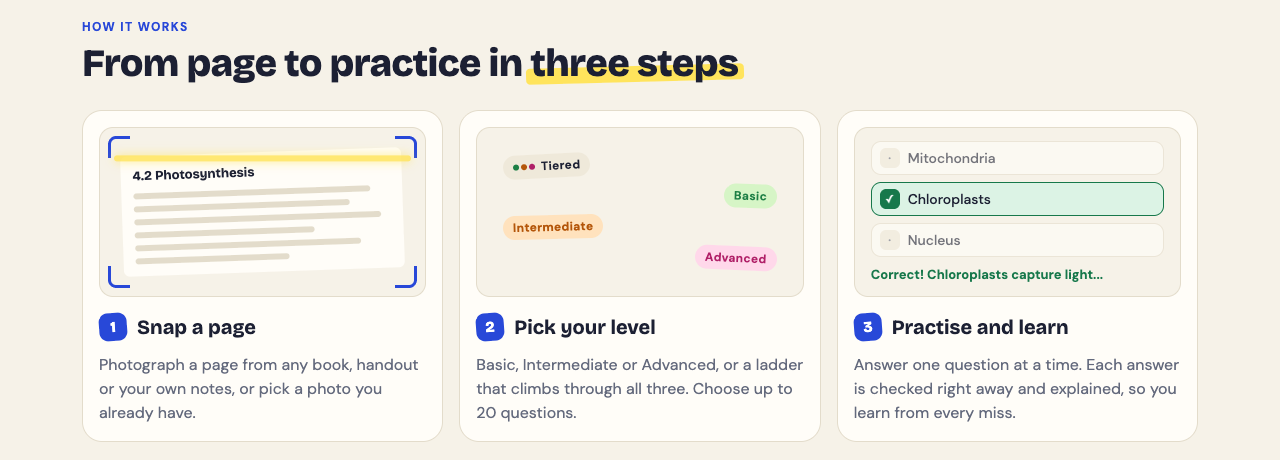
Here is the workflow. In the app, choose Make a new quiz, then Take photo or Choose photo. Hold the page flat and fill the frame. Diagrams, notes and whiteboards all work, so a hand drawn flowchart is fine as long as the writing is readable. Photos can be JPEG, PNG, WebP or GIF up to 5 MB.
Next, pick the number of questions: 5, 10, 15 or 20. The default is 10. Then pick a level. For a flowchart, Tiered is a good choice. It splits the questions as evenly as it can across Basic, Intermediate and Advanced, in that order. Basic questions cover key terms and facts, like what a box means. Intermediate questions ask you to explain, compare and connect ideas, like why one step comes before another. Advanced questions ask you to apply and predict in new situations, which is exactly the scenario drill from the decision point method.
Press Create questions. It can take up to a minute. Each question has four choices. You pick one, press Check answer, and see whether you got it right, the correct answer, and a short explanation. If you need to look at your flowchart mid quiz, Show page brings up your photo.
At the end you get a score for each level. If you scored well on Basic but poorly on Advanced, you know the boxes but not how to use them. The Look at these again list shows each question you missed, with your answer and the right one.
One honest note: the questions are written by an AI model and can contain mistakes. Use the explanation to check each answer against your notes. If a question is wrong, use Report a problem with this question under it.
Turn flowchart quizzes into a spaced review routine
One good session will not hold for a month. Space your reviews out. A simple pattern:
- Day 1: Clean up the flowchart, do the blank box method, and take a 10 question Tiered quiz.
- Day 2: Trace every path out loud, forward and backward. Retake the quiz.
- Day 4: Redraw from memory. Check it.
- Day 8: Make a new quiz from the same flowchart photo, this time with 20 questions on Advanced. Making a new quiz is how you change the count and the level.
- Before the exam: One final redraw and one retake of each quiz.
Study Shot saves each quiz in your library with the page photo and your best score, so retakes are one tap away. The grade tells you where you stand: Mastered is 90% and up, Good is 70% and up, Getting there is 50% and up, and Needs another try is below 50%.
The same method works for other pages. See how to quiz yourself on a map from a geography textbook, how to quiz yourself on a data table from a textbook, and how to quiz yourself on a case study handout. Case studies pair well with flowcharts, because a case gives you a scenario to run through the process.
Frequently asked questions
How often should I quiz myself on a flowchart?
Quiz yourself the day you make it, then again after one day, a few days, and about a week. Push the gaps longer once you can redraw it with no mistakes.
What if my flowchart is too big to memorize at once?
Split it into sections at natural break points, such as after a major decision. Learn and quiz each section on its own, then practice tracing across the joins. You can photograph each section separately and make a quiz for each one.
How do I know I really understand the process and have not just memorized the shapes?
Test yourself on new scenarios that are not in your notes. If you can place an unfamiliar case on the right path and explain why, you understand it. In Study Shot, your score on Advanced questions is a good check, since those ask you to apply the process.
Get started: turn your flowchart notes into quizzes with Study Shot
Study Shot runs in your web browser on a phone or a computer, and you need a free account to use it. Clean up one flowchart from your notes, take a photo, and pick Tiered with 10 questions.
Try Study Shot: it is free to start. Photograph the page you are studying tonight and get 10 practice questions on it, from basic to advanced.
Comments
No comments yet.
Sign in or make an account to comment.