How to Quiz Yourself on a Math Formula Sheet (Step by Step)
If you want to know how to quiz yourself on a math formula sheet, start with one fact: recognizing a formula is not the same as being able to use it. You can look at A = πr² a hundred times and still freeze when a problem gives you the diameter instead of the radius. This guide walks you through five steps that turn a passive sheet into active practice. It ends with a way to turn a photo of the sheet into a multiple-choice quiz.
How to quiz yourself on a math formula sheet: why rereading is not enough
Rereading feels productive because everything on the page looks familiar. Familiar is not the same as retrievable. On a test you have to pull the right formula out of memory, check that it applies, plug in the right numbers, and keep the units straight. Rereading trains none of those moves. In a 2006 study by Roediger and Karpicke, students who took recall tests on a passage remembered more of it two days and one week later than students who reread it, even though rereading made them feel more confident.
A formula sheet also hides the hard part. It shows you the equation but not the moment when you should reach for it. Many mistakes come from that gap: picking the wrong formula, using a variable that means something else, or forgetting a condition like "only for constant acceleration."
Quizzing fixes this because every question forces a decision. You either know it or you find out you do not. Both results are useful.
Step 1: Group your formulas by topic and when to use them
Before you quiz anything, reorganize the sheet. Most formula sheets are listed in the order the teacher covered them. That is not how you will meet them on a test.
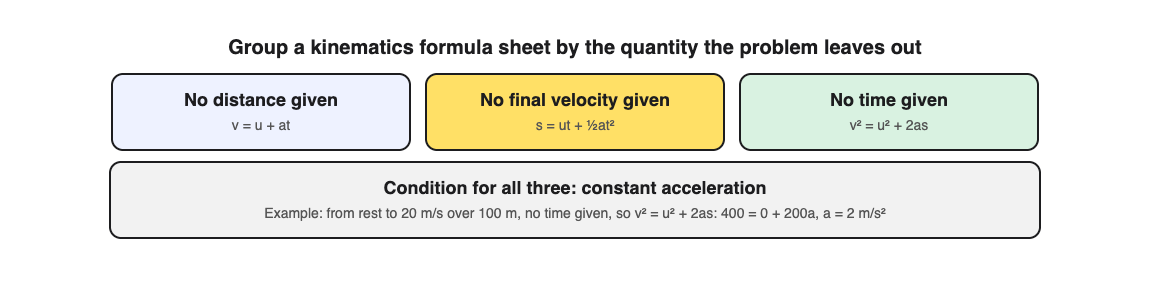
Group them by the question they answer. For example, a physics kinematics sheet might become:
- No distance given:
v = u + at - No final velocity given:
s = ut + ½at² - No time given:
v² = u² + 2as
Next to each group, write one line on when to use it. "Use this when the problem never mentions time" is more useful on exam day than the equation alone. If you like visual structure, a decision chart works well here. The method in how to quiz yourself on a flowchart from your notes applies directly: draw "which formula?" as a flowchart, then quiz yourself on each branch.
Keep groups small. Five to eight formulas per group is easier to drill than a full page.
Step 2: Blank out the formulas and write them from memory
Now make a blank version. Copy the sheet with the topic labels and "when to use" lines, but leave the equations empty. Then fill them in from memory.
Do it on paper, not in your head. Writing x = (-b ± √(b² - 4ac)) / 2a by hand shows you exactly where you stall. Maybe you forget the 2a goes under the whole numerator. Maybe you drop the plus or minus sign. Those small slips cost marks.
When you finish, check against the original. Mark each formula one of three ways:
- Got it: correct with no hesitation.
- Shaky: correct but slow, or you fixed it halfway.
- Missed: wrong or blank.
Only the shaky and missed ones go into your next round. Do not spend time drilling what you already know.
Step 3: Quiz the conditions, variables, and units, not just the equation
This step is easy to skip. Knowing the equation is only part of the job. You also need to know:
- Conditions: When is the formula valid? The kinematics equations above only work for constant acceleration. The simple interest formula is wrong for compound interest.
- Variables: What does each letter stand for? In
s = ut + ½at², issdistance or displacement? Isuinitial velocity? - Units: What comes out the other end? If
ris in centimeters,A = πr²gives square centimeters.
Write questions that target these directly. Some examples:
- "In the area of a circle, what happens to the area if the radius doubles?"
- "Which kinematics equation can you not use if acceleration changes over time?"
- "A problem gives the diameter. What do you do before using
A = πr²?"
Questions like these catch the errors that a clean recall drill hides. They also prepare you for multiple-choice tests, where the wrong options are often built from exactly these slips.
Step 4: Match formulas to practice problems you have never seen
Recall and conditions get you most of the way. The final test is transfer: can you pick the right formula for a problem you have not practiced?
Pull problems from a source you have not used yet, like the end of a later chapter or a past paper. For each one, do not solve it at first. Just write which formula you would use and why. Then solve a few fully to confirm.
A worked example. The problem says: "A car starts from rest and reaches 20 m/s over 100 m. Find its acceleration." Before you calculate, ask what you have and what is missing. You have u = 0, v = 20, s = 100. Time is not mentioned. From your Step 1 groups, "no time given" points to v² = u² + 2as. Now solve: 400 = 0 + 200a, so a = 2 m/s².
The choosing step took ten seconds, and it is the step a formula sheet cannot do for you. A 2018 review of 122 experiments by Pan and Rickard found that practice tests transfer to new questions, but least of all for problems with worked solutions, so keep solving full problems on paper as well as quizzing.
Step 5: Space your quizzes and track the formulas you miss
Spread the work out. A 2006 review of 317 experiments by Cepeda and colleagues found that spacing study sessions apart helps retention, and that the best gap grows the further away the test is. A simple plan:
- Day 1: Steps 1 to 3 for one group of formulas.
- Day 2: Blank recall again, only for shaky and missed formulas. Add Step 4 problems.
- Day 4: Full recall of the whole group. Note anything new you missed.
- Day 7: Mixed problems across all groups, so you practice choosing between topics.
Keep a short miss log. Write the formula, what you got wrong, and why. "Forgot to halve the diameter" is more useful than "got circle area wrong." Recording the cause tells you what to practise next.
For a full plan around a physics test, see how to study for a physics test with practice questions.
Using Study Shot for steps 3 to 5
Writing good questions about conditions and units takes time. Study Shot, a web app, can draft them for you. You photograph your formula sheet and an AI model writes multiple-choice questions about it, each with four options, then checks your answer and explains it.
Here is how to set it up for a formula sheet:
- Choose Make a new quiz, then Take photo or Choose photo. Hold the sheet flat and fill the frame. A photo of one group is often better than the whole page, because the questions stay focused.
- Pick 5, 10, 15 or 20 questions. Ten is the default.
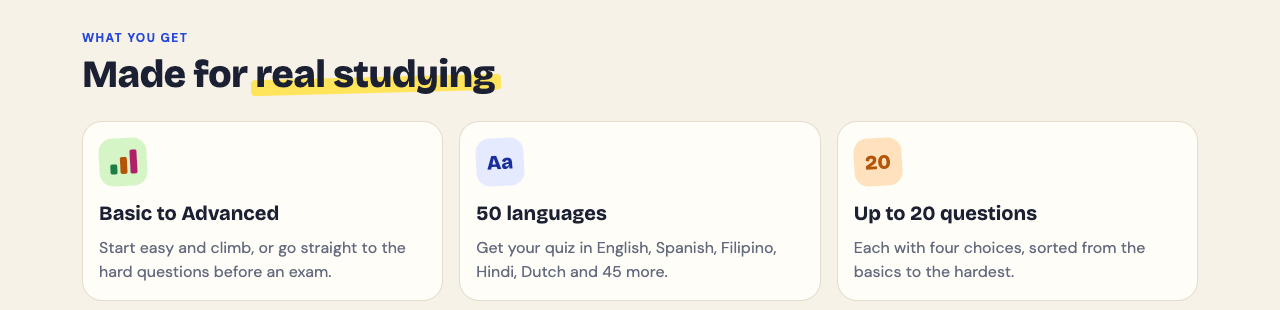
- Pick a level. Basic covers key terms, facts and definitions, which suits "what does this variable mean." Intermediate asks you to explain, compare and connect ideas. Advanced asks you to apply and predict in new situations, which is closest to Step 4. Tiered, the default, climbs from basic to advanced.
- Press Create questions. It can take up to a minute.
During the quiz, Show page brings up your photo if you want to check the sheet. When you finish, the results screen gives a score for each level in the quiz and a Look at these again list with your answer and the right answer for every miss. That list is a ready-made start for your miss log. Every quiz saves to your library with its photo and your best score, so you can retake it on Day 2, 4 and 7.
Two honest limits. Study Shot only writes multiple-choice questions, so it cannot mark a worked solution and does not replace the blank recall in Step 2 or the problems in Step 4. And the questions come from an AI model, so they can contain mistakes. Read each explanation to check the math. If a question is wrong, use Report a problem with this question under it.
Frequently asked questions
How many formulas should I quiz myself on at once?
Five to eight is a good range for one session. Group them by topic so you are practicing related choices, and only carry the shaky and missed ones into the next round.
Should I memorize formulas if my exam gives me a formula sheet?
You may not need to memorize every equation, but you still need to know when each one applies and what each variable means. Practising the choosing step, as in Step 4, is what the sheet cannot do for you.
How do I remember which formula to use on a word problem?
List what the problem gives you and what it asks for, then note which quantity is missing. Group your formulas by that missing piece, as in Step 1, and practice the choosing step on new problems before you solve them.
Get started: Turn your formula sheet into a quiz with Study Shot
Pick one group of formulas from your sheet tonight. Do the blank recall on paper first. Then photograph the same group and let Study Shot quiz you on the conditions and uses. It works in the browser on your phone or computer.
Try Study Shot: it is free to start. Photograph the page you are studying tonight and get 10 practice questions on it, from basic to advanced.
Comments
No comments yet.
Sign in or make an account to comment.