How to run a problem solving meeting that ends in decisions
Most meetings about a problem end the same way: a good conversation, a few ideas on a whiteboard, and nobody quite sure what happens next. If you want to know how to run a problem solving meeting that ends in decisions, the answer is mostly structure. You need a clear problem statement before anyone walks in, a short agenda that moves from facts to causes to options, and a record of what you decided that survives after the room empties. This guide walks through each step with one running example, and shows how to keep the result on a map instead of in a forgotten document.
What a problem solving meeting is for (and when not to call one)
A problem solving meeting has one job: turn a shared problem into a decision with an owner. It is not a status update, a brainstorm with no end, or a place to vent.
Call one when three things are true:
- The problem affects more than one person, so no single person can fix it alone.
- You do not already know the answer. If you do, write it down and assign it.
- The people who hold the facts can be in the room.
Skip the meeting when the problem belongs to one person, when the cause is already clear, or when what you really need is a look back at a finished project. That last case is a retrospective, which has its own shape. See how to keep the lessons after a team retrospective.
Before the meeting: write a one-sentence problem statement and invite the right people
Write the problem in one line (our guide to writing a problem statement in one line shows how). If you cannot, you are not ready to meet. A good problem statement names what is happening, to whom, and how you know.
Here is the example we will use for the rest of this post:
Support tickets wait three days for a first reply.
Notice what it leaves out. It does not say "we need more support staff." That is a solution dressed up as a problem, and it closes the conversation before it starts.
In Problem Graph, this is exactly how a problem begins. You type one line, put it in a lane (personal, work, expert or scientific), and it lands on the graph the moment you press Enter. For a team issue, the work lane fits. Doing this before the meeting gives everyone the same starting sentence.
Then invite people by what they know, not by title:
- Someone who does the work every day (a support agent).
- Someone who sees the data (whoever tracks ticket times).
- Someone who can approve a change (a lead or manager).
- One facilitator whose job is the process, not the answer.
Five or six people is plenty. Send the problem statement with the invite so nobody arrives cold.
Step 1: Agree on the problem and the facts in the first ten minutes
Open by reading the problem statement aloud and asking one question: "Is this the right problem?" Give it two minutes. Sometimes the room corrects you. Maybe the wait is three days only for billing tickets, and the statement should say so.
Then spend the rest of the ten minutes on facts only. What do we know for sure? When did it start? Is it getting worse? The Lean Enterprise Institute's page on problem solving asks for exactly this: everything claimed should rest on verifiable facts, not assumptions, tested with the question "How do you know that?" The facilitator should ask it more than once.
For our example, the facts might be:
- First reply time rose after the last product release.
- One person triages every incoming ticket.
- Billing tickets wait longest.
Facts settle quickly when you refuse to argue about solutions yet.
Step 2: Map root causes as a visual problem graph, not a list
This is where most meetings go wrong. People list causes in bullet points, and the list hides how they connect. A map shows it.
Ask "why does this happen?" for each fact, and write each answer as its own short problem. Then draw lines between the ones that belong together. In our example:
- "One person triages every ticket" links to the main problem.
- "Release notes did not reach support" links to "Ticket volume spikes after releases."
- "Ticket volume spikes after releases" links to the main problem.
- "Billing questions need finance access" links to "Billing tickets wait longest."
Problem Graph is built for this. You link problems that belong together, even across lanes, and as its home page puts it, "patterns show up on the map that never show up in a list." In the example, you might notice two separate branches both trace back to the release process. On a list, that is easy to miss.
Stop mapping when the room starts repeating itself. Then circle the one or two causes that, if fixed, would move the most.
Step 3: Generate options, then weigh them against effort and impact
Now, and only now, ask for solutions. Take five minutes of quiet first: everyone writes ideas alone before anyone speaks. This keeps the loudest voice from setting the direction.
Collect every idea. Then sort each one with two questions:
- Impact: If this works, how much does the wait time drop?
- Effort: How much time, money or approval does it need?
For our example, the options might land like this:
- Send release notes to support a day before launch. Low effort, medium impact.
- Rotate triage between three people. Low effort, high impact.
- Give one support agent read access to billing. Medium effort, medium impact.
- Hire another agent. High effort, uncertain impact.
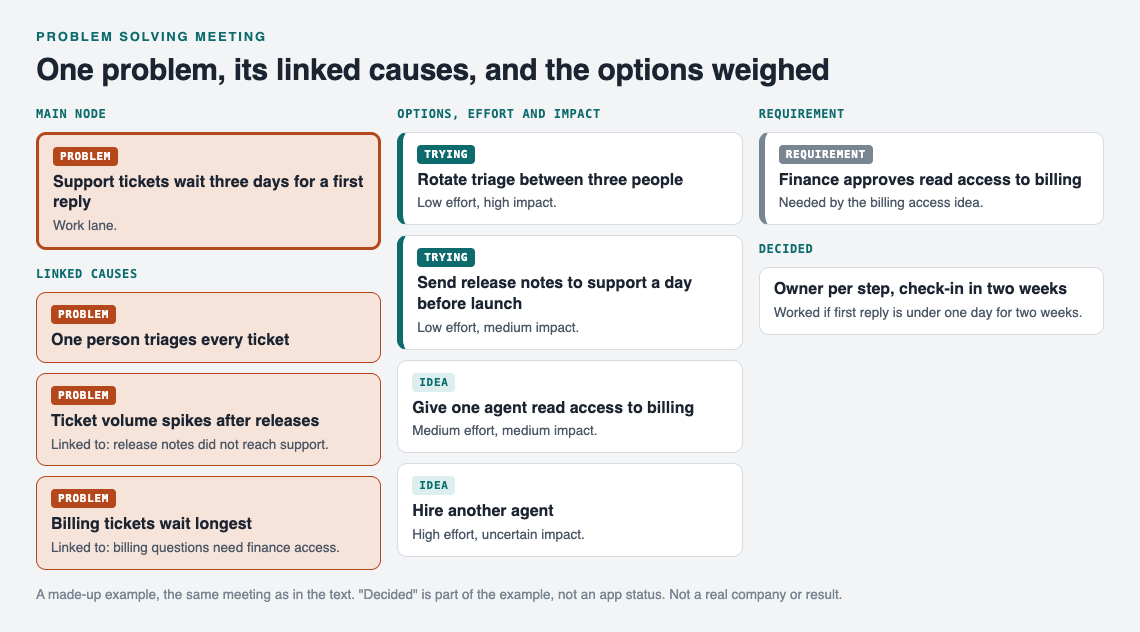
The made-up meeting example as a map, at the end of the meeting.
Look for low effort, high impact first. In Problem Graph you attach each idea to the problem as a solution, and things it depends on can sit on the map as requirements. Finance approving read access is a requirement for the third option, for example. If you want more ideas, the app can propose new solutions grounded in what worked for others on similar problems. Treat those as proposals to discuss, not answers.
Step 4: Decide, assign an owner to each next step, and set a check-in date
A meeting without a decision is a discussion. Before anyone leaves, say out loud:
- What we will try. "We will rotate triage and send release notes early."
- Who owns each step. One name per step. "The team" is not an owner.
- When we check. A specific date, usually one to three weeks out.
- How we will know. "First reply time under one day for two weeks."
Mark the chosen solutions as the ones you are trying. Leave the others on the map as ideas. You may need them if the first choice does not hold.
If the room cannot decide, decide what information would settle it, who gets it, and by when. That is still a decision.
The check-in date is the "check" in plan, do, check, act. At that meeting you either keep the change or begin the cycle again with the next option on the map.
After the meeting: keep the problem map alive so the work does not stall
The real failure point is two weeks later, when nobody remembers what was agreed. Keep the map where the team can see it.
In Problem Graph, the person who keeps the map marks the main problem ("Support tickets wait three days for a first reply") as a main node. Only a main node can be shared, and when it is shared, its solutions, their outcomes and the requirements they need go along with it. They create a private network, give the invite code to the people from the meeting, and share the main node into it. Members see it; nobody else does. Keep in mind that anyone with the invite code can join, so send it only to the people you mean.
At the check-in, the keeper updates each solution with its outcome: worked, partly, or failed. Do not delete the failures. The app's own line puts it well: "A solution that failed three times stays on the map as a failed solution, and that is exactly what the next person needs to know." When the same problem comes back next quarter, your team starts from what you learned instead of from zero.
Some smaller causes you linked during mapping are not worth sharing yet. A problem you only link to the main node stays private, like the rest of your graph, so you can keep rough notes for yourself.
Frequently asked questions
How long should a problem solving meeting be?
Aim for 45 to 60 minutes. Ten minutes for the problem and facts, about fifteen for causes, fifteen for options, and the rest for the decision and owners.
Who should facilitate a problem solving meeting?
Pick someone who does not own the outcome. Their job is to keep the meeting moving through the steps and to stop solutions from showing up before the causes are mapped.
What if the meeting does not reach a decision?
Decide on the missing information instead: what it is, who will find it, and the date you will meet again. That keeps the work moving without forcing a weak choice.
Can I use Problem Graph to share the meeting results with my team?
Yes. Mark the main problem as a main node, create a private network, and share that node into it with an invite code. The team then sees the problem, its solutions, their outcomes and the requirements they need.
Get started
Before your next meeting, write the problem in one line and put it on a graph. Open the app, try "Load example set" if you want to see how a filled map looks, then start your own in the work lane. It runs in your web browser, on your phone or computer.
Try Problem Graph: it is free, and you can look around the public network without an account. Write one problem down in a line and attach the first thing you will try.
Comments
No comments yet.
Sign in or make an account to comment.