How to test a solution before you commit to it
Most bad decisions are not bad ideas. They are untested ideas that someone committed to too early. If you want to know how to test a solution before you commit to it, the method is short: name the problem, list what has to be true, test the shakiest part cheaply, decide in advance what counts as a pass, then act on the result and write it down. This post walks through those six steps with one worked example, so you can run the same process on your own problem this week.
Why you should test a solution before you commit to it
Committing is expensive. You spend money, time, or other people's patience. And once you have committed, you start defending the choice instead of judging it. A small test made beforehand costs a few days and saves you from months of sunk cost.
Testing also changes the question. You stop asking "is this a good idea?", which you cannot answer by thinking harder. You ask "what would have to be true for this to work, and is it?", which you can answer by looking. The Lean Enterprise Institute's page on problem solving says the same: a plan is a theory of what will address the problem's cause, and trying it is how you learn what will actually be required.
Here is the example we will use throughout. You keep starting a side project and never finishing it. Your proposed solution: get up at 6:00 and work on it for an hour before your day job. It sounds sensible. It might also fall apart by Wednesday. Let's find out cheaply.
Step 1: Write down the problem the solution must solve
Write the problem in one line. Not the solution, the problem. "I need to wake up earlier" is a solution in disguise. The real line is closer to: "My side project stalls because I only work on it at night, when I'm tired."
One line forces you to pick. If you can't fit it in a line, you probably have two problems, and you should split them. A solution that has to fix both will fail at one of them and you won't know which.
In Problem Graph, this is the first move by design. You type the problem as one line, put it in a lane (personal, work, expert or scientific), and it lands on the graph when you press Enter. Our example goes in the personal lane.
Step 2: List the assumptions that have to be true
Every solution rests on a stack of beliefs. Write them all down, even the obvious ones. For the 6:00 plan:
- I can fall asleep earlier, so getting up at 6:00 doesn't cost me sleep.
- I'll be alert enough at 6:00 to do real work.
- One hour is enough time to make visible progress.
- Nobody else in the house needs me at that time.
- The real reason the project stalls is tiredness, not that I'm unsure what to build next.
That last one matters most. If it's false, the whole plan fixes the wrong thing.
Some assumptions are really conditions the solution needs to run at all. "In bed by 22:30" is one. Problem Graph has a node type for exactly this, called a requirement, so you can attach it to the solution and see what each idea depends on.
Step 3: Find the riskiest assumption and design the smallest test
Score each assumption on two things: how likely it is to be false, and how badly the plan fails if it is. The one that scores high on both is your riskiest assumption. Test that one first. Don't test the easy ones just because they're easy.
In the example, two stand out. You may not fall asleep earlier just because you go to bed earlier. And "tiredness is the cause" could quietly be wrong. You can test both in one go.
The smallest test is the cheapest thing that could prove you wrong. Not a full rollout. For us:
- Five weekdays, lights out at 22:30, alarm at 6:00.
- Each morning, note the time you actually started and one line on what you got done.
- Before starting, write the single task for that session the night before. If you can't, that's data about the "unsure what to build" assumption.
Five days, no purchases, no announcements. If it fails, nobody but you has to know.
Step 4: Set success and kill criteria before you run it
Decide what "worked" means before you see results. If you wait, you will move the goalposts to match whatever happened. Write two lists.
Success criteria: started by 6:10 on at least 4 of 5 days, and finished the planned task in at least 3 sessions.
Kill criteria: started on time fewer than 3 days, or felt foggy at work on 3 or more days, or couldn't name the next task on 3 or more nights.
Anything in between counts as partial. Partial is a real result, not a failure to decide. It usually means the solution is close but one piece needs to change.
Numbers help because they're hard to argue with at 6:15 on a Thursday. You can also give the criteria to a friend to hold.
Step 5: Run the test, then decide: commit, change, or drop
Run it as written. Don't improve the test halfway through, or you won't know what you measured. When it ends, compare results to the criteria you set. This is the "check" and "act" of plan, do, check, act, which the Lean Enterprise Institute describes as a cycle based on the scientific method: keep the change, or begin the cycle again, depending on the results. Pick one of three moves:
- Commit if you hit the success criteria. Now scale up: more weeks, more ambition.
- Change if the result was partial. Keep what held and swap what broke. Maybe 6:00 works but only three days a week.
- Drop if a kill criterion fired. Go back to your assumption list and try a different solution.
Say the result was partial: you were up on time four days, but on two nights you couldn't name the next task, so you finished the planned task in only two sessions. Tiredness was only half the problem. Your next solution might be a fifteen-minute Sunday planning session, tested the same way.
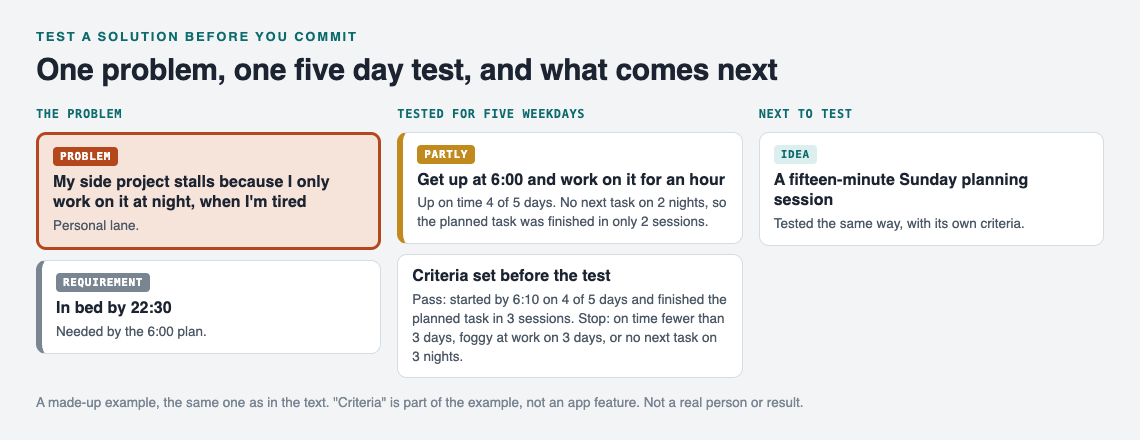
The made-up example after the five day test, kept as a map.
In Problem Graph, you'd mark the 6:00 plan as partly worked, and add the planning session as a new idea on the same problem. You can mark which solutions you're currently trying, so the map shows what's live and what's done. If you're stuck for the next idea, you can ask for suggestions: the AI proposes new solutions based on what worked for others on similar problems. Treat those as more candidates to test, not answers.
Common mistakes when testing a solution (and what to do if it fails anyway)
Most failed tests fail for boring reasons. Watch for these:
- Testing the safe assumption. You confirm what you already knew and skip the one that could sink you.
- No criteria up front. Every result then looks like a success.
- A test too big to abandon. If quitting feels embarrassing, the test was too big.
- Changing two things at once. When it works, you won't know which change did it.
- Forgetting the result. Six months later you try the same idea again, from scratch.
That last one is why there is a sixth step.
Step 6: Record the outcome, especially when it failed
Write down what you tried, what happened, and why you think it happened. A failed test is the most useful record you own, because it tells you and anyone after you where not to dig. The Problem Graph home page puts it plainly: "The graph is honest. A solution that failed three times stays on the map as a failed solution, and that is exactly what the next person needs to know."
When something fails, a short structured reflection helps you extract the lesson instead of just feeling bad. The Japanese practice of hansei is a good template for it.
Finally, link related problems. If "side project stalls" and "always tired at work" turn out to share a cause, linking them puts that on the map. Links work across lanes too, so a personal problem can connect to a work one. Patterns show up on a graph that you'd miss in a list.
Frequently asked questions
How small should a test be before committing to a solution?
Small enough that you'd be fine walking away from it. A few days, little or no money, and no public promises is a good default. If a failed test would hurt, shrink it.
How do I test a solution when I can't run an experiment?
Imagine the solution has already failed and list the reasons why, then look for someone who has already tried it. On Problem Graph, the public network can be browsed without an account, and when others have shared similar problems you can see which of their solutions worked and borrow one with a tap, keeping a link back to where it came from.
How long should I test a solution before deciding?
Long enough for the riskiest assumption to show itself, and no longer. For a daily habit that's often one working week. For something with a monthly cycle, like a billing change, you need at least one full cycle.
Get started
Pick one problem you're about to throw a solution at. Write it in one line, list the assumptions, and attach the solution as an idea before you commit. Your problems stay private by default, so only you see them unless you choose to share a main node with a private network or the public.
Try Problem Graph: it is free, and you can look around the public network without an account. Write one problem down in a line and attach the first thing you will try.
Comments
No comments yet.
Sign in or make an account to comment.