How to write a post asking for feedback on your project
To write a post asking for feedback on your project, start with one fact: people answer posts that are easy to answer. A vague "thoughts?" asks a stranger to do your thinking for you. A clear request with one small, specific task is far easier to reply to.
This guide walks through the parts of a feedback post, with a worked example and a template to copy. The example project is a made-up tool that turns meeting notes into a task list; the tool, its limits and its tests are invented for this guide and assert nothing about a real product. Swap in your own project.
Decide what kind of feedback you want
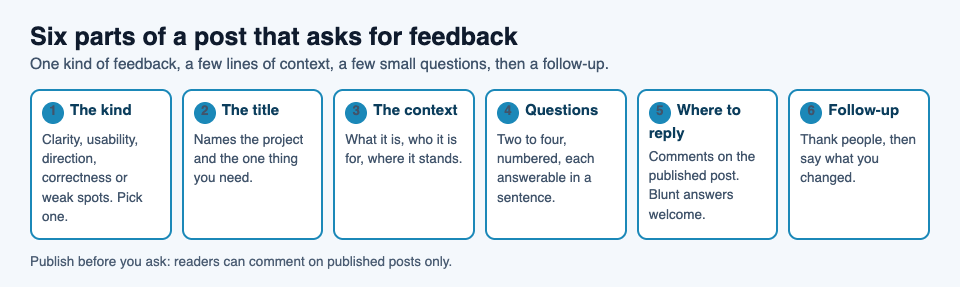
"Feedback" covers very different things, and a request that tries to cover them all asks for work. Pick one main kind for this post:
- Clarity: can a newcomer tell what the project does?
- Usability: where did someone get stuck while trying it?
- Direction: which of two or three next steps matters most?
- Correctness: is the idea, the method or the code sound?
- Weak spots: how could this break or be misused?
For the meeting notes tool, say you pick clarity: "Does the first screen make it obvious what this does?" That is one kind of feedback, and a reader knows right away whether they can help.
If you want people to look for flaws, say so. "Try to break it. What would you try first?" invites a different kind of reading than "Do you like it?"
Write a title that tells people what you need
On Electrified, an article title can be up to 140 characters. You do not need that many. A good feedback title names the project, the need and, if it helps, the reader you want.
- Weak: "My new project"
- Better: "I built a tool that turns meeting notes into tasks. Is the first screen clear?"
- Better for a narrow ask: "Looking for feedback on the first screen of a meeting notes tool"
A direct question or the word "feedback" in the title sets the expectation. Someone scanning a list of posts then knows what you want before they open it.
Give just enough context about your project
Open with the answer to "what is this?" in two or three sentences. Then say who it is for, what state it is in and what you have already tried. Stop there.
Here is the context block for the example:
It is a small web tool. You paste in raw meeting notes and it returns a list of tasks with owners. It is for people who run weekly team meetings. It works for English notes only, and I have tried it on a dozen of my own meetings.
Look at what is in it: what it does, who it is for, a known limit and how much testing it has had. Look at what is not: an origin story, a tech stack, a roadmap. Add those only if they relate to your question, and write a separate article for the longer story. The post on editing your own article before you publish it helps you cut a context block down to what a reader needs.
Ask specific questions that are easy to answer
This part decides how many replies you get. Give readers two to four numbered questions, each answerable in a sentence or two.
- After reading the first screen, what do you think the tool does?
- What would you expect to happen after you paste your notes?
- Is there any word on the page that you do not understand?
Compare these with "What do you think?" The numbered set tells people what to look at and roughly how long it will take. It also gives you answers you can set side by side, because everyone answered the same questions.
Ask about decisions, not only reactions
If you are stuck between options, name them: "Should the next step be calendar import or a shared team view?" A choice is easy to answer. Add a line asking for the reason behind it, because the reason is often more useful than the vote.
Say what you do not need
If the logo and colors are placeholders, say so. If you already know the mobile layout is broken, say so. Then readers will not spend their reply on things you have already decided to fix.
Make it easy to reply
Tell readers exactly where to reply. On Electrified, readers with an account can comment on a published post, and a comment can be up to 1000 characters. That is plenty for a short answer, so say "reply in the comments" and nothing more complicated.
Likes and comments work on published posts only, so a draft cannot collect feedback. Click Save draft, read it once more in the Preview tab, then Publish when it reads cleanly.
Set the tone with one line near the end:
Blunt answers are welcome. I would rather hear that the first screen is confusing than hear nothing.
Then keep your word. If someone replies with criticism, answer with a question or a thanks, not a defense. A reader deciding whether to comment can see how earlier comments were met.
Make your own page easy to find too. Every writer has a page at /@handle that shows a name and a bio of up to 280 characters, and a feed at /@handle/feed.xml for anyone who prefers a feed reader. Put one line about the project in your bio, so a reader who likes the post can follow you and see the next one.
Follow up and share what changed
A feedback post is the first of two. Plan the second one now.
- Reply to every comment. A short thank you plus a follow-up question is enough.
- Edit the original if it needs it. If several readers misread the same sentence, fix the sentence. On a published post the button is Save changes, and the post keeps its address.
- Write the follow-up article. Say what you heard, what you changed and what you chose not to change, with reasons.
The follow-up shows readers where their time went, and it gives them a reason to answer your next request. When you write its closing section, the advice in how to write an article conclusion that sticks applies: end with one clear next step.
Over time a run of posts like this builds up on your page, and each post can carry up to 5 topics of your choosing, so related posts are grouped. You can see how topic pages gather posts on the Promote your work and Knowledge building pages.
A template to write a post asking for feedback
Fill in the brackets and delete anything that does not apply.
Title: [What it is] and I need feedback on [one thing] What it is. [Two or three sentences: what it does and who it is for.] Where it stands. [Stage, known limits, how much testing it has had.] What I want from you. [One kind of feedback: clarity, usability, direction, correctness or weak spots.] Questions. [Two to four, numbered, each answerable in a sentence or two. One can be a choice between two options.] Already decided. [Things you do not need feedback on.] How to reply. Leave a comment below. Short answers are fine. Blunt answers are welcome. What happens next. I will post a follow-up on what I changed.
In the editor, choose Article, start each section with ## and a heading, and use the Preview tab to see the page as readers will. If you only have one quick question, choose Note instead: a note is up to 500 characters with no title, which is enough for a question and a link.
Frequently asked questions
How long should a feedback request be?
Short enough to read in a minute or two: a few short sections and two to four questions. If your context runs long, link to a longer write-up instead.
How many questions should I ask?
Two to four. A longer list reads like a survey, so put the most important question first and cut the rest.
Should I use a note or an article?
Use a note for one quick question, since it is capped at 500 characters. Use an article when you need context, several questions or a description of what you want checked.
What if nobody replies?
Do not post the same request again. Reread it: is the title clear, and are the questions small? Edit it with Save changes, then write a different post with something new to share, such as what you learned while building.
Can I ask for feedback on a draft?
You can save and edit a draft, but only you can see it until you publish. Readers cannot comment on a draft, so publish when you are ready to hear back.
Get started
Pick one kind of feedback, write three questions and publish. Then reply to everyone who answers.
Make an account on Electrified: write about your product, topic or idea on your own page, one article at a time, and let readers follow along.
Comments
No comments yet.
Sign in or make an account to comment.