How to write a project update post people want to read
To write a project update post, start from the reader: they give you a minute or two, and they want to leave knowing something. Most updates are written as a log for the writer, not as a note for the reader. This guide shows how to fix that, with a template you can copy and a worked example.
Why project updates get skipped
Think about the last update you skipped. It probably opened with "Hi all, here is what happened this month" and then listed ten tasks in the order they were done. You could not tell which one mattered, so you closed the tab.
Three habits cause this:
- The news is buried. The one important thing sits in paragraph four.
- Activity stands in for progress. "Worked on the login page" says what you did, not what changed.
- The reader has no job. They finish the post and do not know whether to reply, wait or act.
Fix those three and the update is already clearer. The sections below take them one at a time.
Start with the one thing readers need to know
Put the answer first. Before you write anything else, finish this sentence: "The main thing since last time is..."
Then make that your opening line. Compare these two:
Weak: "This month I did a lot of work on the app, including some refactoring and a few bug fixes."
Strong: "The app now saves your work offline, and a small test group starts on Monday."
The second line says what changed and what it means for the reader. If they stop there, they still got the point. If they keep going, they have a reason to. To close the post the same way, see how to write an article conclusion that sticks.
Show progress with specifics, not a task list
A task list tells readers you were busy. Specifics tell them where the project is. Swap each vague item for a fact a reader could check or picture:
- Instead of "improved performance," write what the page does now compared with before, using numbers you measured yourself.
- Instead of "worked on onboarding," write how many steps a new user takes to reach their first result now.
- Instead of "did research," write who you talked to and the one thing they told you that changed your plan.
Pick two or three, not fifteen. If you have more to say, group the rest under one short line such as "Smaller fixes: a login bug, two typos, a broken link." A one-sentence story about a real user, a real error or a real decision often does more than a paragraph of summary.
Be honest about setbacks and what you learned
An update that only reports wins reads like an advertisement. Say what went wrong, plainly, and then say what you learned. A good setback paragraph has three parts:
- What happened. For example, "The export failed on large files."
- Why. "I had only tested with small samples."
- What you will do differently. "From now on I test with the biggest file I have first."
Do not apologise at length and do not hide the problem in the middle of a long sentence. One honest paragraph gives people following the project a true picture, which is the point of an update. If the setback needs outside help, that leads straight into your ask. For a post that is only an ask, see how to write a post asking for feedback on your project.
Tell readers what happens next and what you need
End with the future. Give two short pieces of information:
- What is next. One to three items in plain words, with a rough time only if you have one you can keep.
- What you need. A question, a test, some feedback, or nothing at all. Say which.
"I need nothing right now, I will post again after the test group finishes" is a good ending. So is "Can you try offline mode and tell me where it breaks?" What matters is that the reader knows their part.
Keep the ask small and specific. "Let me know your thoughts" asks the reader to do your thinking. "Tell me which of these two layouts is easier to read" gives them a question they can answer in a sentence.
Write a project update post from this template
Here is a structure to paste into a new article and fill in. In the Electrified editor, choose Article and start each section with ## and a heading.
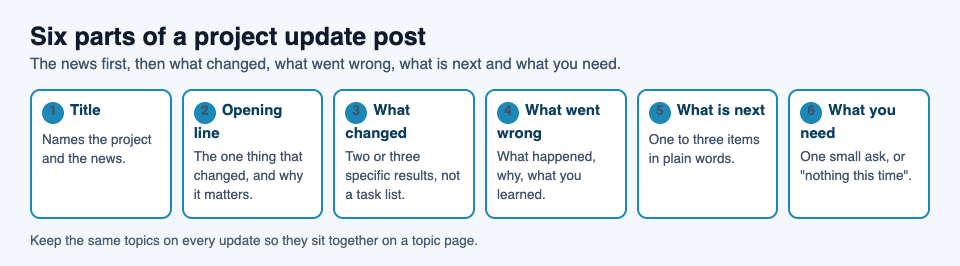
- Title. Name the project and the news. A title can be up to 140 characters.
- Opening line. The one thing that changed and why it matters.
- What changed. Two or three specific results, each in one or two sentences.
- What went wrong. One honest paragraph: what, why, what you learned.
- What is next. One to three items.
- What I need. One clear ask, or "nothing this time."
Here is the template filled in for a made-up project, a notes app. The app, the test group and every detail are invented for this example, so no real result is claimed:
Notes app: offline mode is ready for testing. The app now saves your work without a connection, and a small test group starts on Monday. What changed. Notes save on the device and sync when you are back online. Opening a saved note no longer needs a connection. What went wrong. Sync failed when two devices edited the same note. I had only tested with one device. I now test with two from the start. What is next. Fix the sync conflict, then open the test to more people. What I need. If you take part, tell me the first thing that confuses you.
That is short, and a reader knows exactly where the project stands and what, if anything, to do.
How often to post and how long to make it
Pick a rhythm you can keep. A steady monthly update beats a daily one you drop after two weeks. Some projects suit a post after each real milestone instead of a fixed date. Either works, as long as readers can guess when the next one comes.
Aim for the length the news deserves. A single result can be a few short paragraphs. A larger update with a setback and a decision needs more. If a post keeps growing, split it, or move the detail into a second article and link to it. Electrified allows articles up to 60,000 characters, but a status update rarely needs that room.
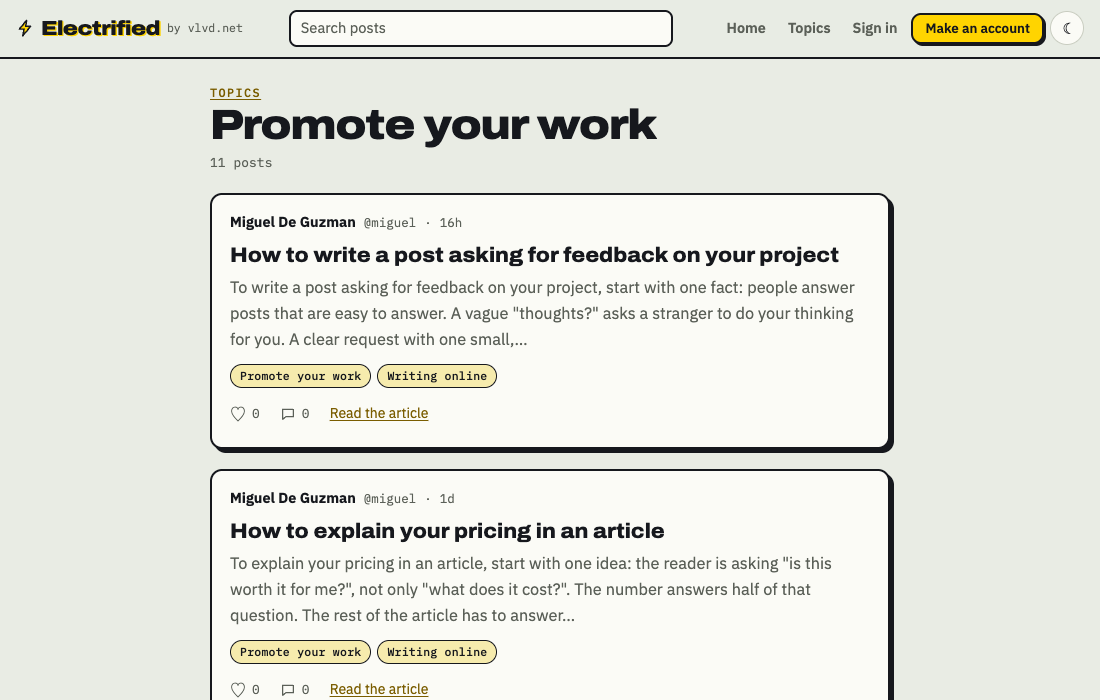
Use the same topics on every update. A post carries up to 5 topics, separated by commas, and each topic links to a page of every post filed under it, so someone new can find your earlier updates in one place. You can see how that looks on the topics page and on Promote your work.
Frequently asked questions
How long should a project update post be?
Match the length to the news. One result needs only a few short paragraphs. If the post keeps growing, split it into two posts and link them.
Should I include bad news in a project update?
Yes. Say what went wrong, why, and what you will do differently. An honest update gives followers a true picture of the project.
What should I put in the first line?
The single most important change since your last post, and what it means for the reader. If they read only that line, they should still know where the project stands.
Can I save an update as a draft before I publish it?
Yes. In the Electrified editor, Save draft keeps the post private to you until you press Publish. The Preview tab shows how the published page will look.
How do I keep my updates together?
Give each update the same topic or topics. Every topic links to a page of all the posts filed under it, so your updates sit in one place.
Get started
Write your next update with the template above: one clear opening line, two or three specifics, one honest setback and one small ask. On Electrified your posts live on your own page, and people can follow you, like and comment on published posts.
Make an account on Electrified: write about your product, topic or idea on your own page, one article at a time.
Comments
No comments yet.
Sign in or make an account to comment.