How to write a step-by-step list in an article
If you want to write a step-by-step list, the answer is short. Give each step one action, start it with a verb, number the steps in order, and say what the reader should see when the step works. Then follow the list yourself and fix every place you stumble.
If you write guides, Electrified gives you your own page to publish them on, and its editor reads numbered lists and shows a Preview tab so you can check the list the way readers will see it.
A clear list lets a person do the task without guessing. They never ask "did I already do that?" or "what am I supposed to click?" Four things create that effect: one action per step, a fixed order, exact names for what is on screen, and a visible result. Everything below is a way to get those four things into your draft.
Decide the goal and the reader before you write
Write the goal as one sentence: "After these steps, the reader has X." If you cannot finish that sentence, the list is not ready.
Then decide what the reader already knows. A list for someone who has never opened the tool needs "Open the settings page". A list for an experienced user can skip that. Pick one reader and write for them. A list that tries to serve both ends up slow for one and confusing for the other.
Put the goal and any requirements before step 1. A sentence such as "You need an account and some time to read the preview" lets the reader check they are ready before they start. This also fits the habit of opening with the answer. If you want more on that, see how to write a short article people finish reading.
Break the task into single-action steps
Do the task once and write down every action as you go. Do not tidy it yet. You want the raw sequence, including the small things you do without thinking.
Then check each line. If a line contains "and", it is probably two steps. If a line hides a decision ("choose the right option"), it needs its own explanation.
Compare these two:
- Too big: "Set up your page and write your first post."
- Split: "Open the editor." "Choose Article." "Type a title."
The split version is longer, but each line takes seconds to read and one action to do. That is the trade you want in a list.
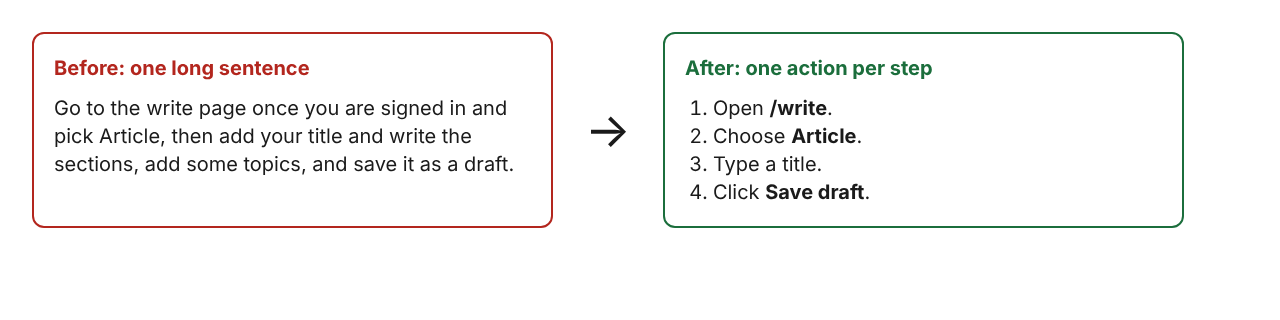
A good size test is this: if a reader could stop in the middle of a step, the step is too big. If the list grows long, group the steps under short ## headings such as "Prepare" and "Publish", with a separate numbered list in each.
Start each step with a verb and keep it short
Begin with a command: Open, Click, Type, Choose, Copy, Check, Save. The first word of each line tells the reader what kind of action is coming.
Keep each step to one or two sentences. Put the action first and the detail second.
- Weak: "The next thing you will want to do is probably to go ahead and look at the preview."
- Strong: "Open the Preview tab to see the page as readers will see it."
Name things exactly as they appear on screen. If the button says "Save draft", write "Save draft". If you paraphrase, the reader has to translate, and may click the wrong thing. Put button names in bold and stay consistent. If your guide is about software, the same habit applies to release entries: the post on how to write a changelog for your project covers writing short, exact entries.
Add context, warnings, and expected results
A bare list works until something goes wrong. Three small additions make it hold up.
Say what the reader should see
After a step that changes something, add a short result line: "You should see a message that says the draft is saved." This lets the reader confirm progress without guessing.
Put warnings before the risky step
A warning after the step is too late. If a step cannot be undone, say so inside that step or on the line just above it. Save warnings for the steps that need them, so each one stands out.
Explain a choice only when there is one
If the reader must pick between two options, say how to choose in one sentence. If there is no real choice, do not invent one. Keep the background reasoning in the paragraph above or below the list, not inside it.
Number the steps and format them for scanning
Use a numbered list when order matters. Use a bulleted list when it does not. A bulleted list of ordered steps hides the order, and the reader has to work it out.
- Keep one step per list item. Do not stack several actions in one numbered line.
- Put extra detail in a short sentence under the step, not in a long paragraph.
- Set the list apart from the paragraphs before and after it, so the reader sees where it starts and ends.
- Do not restart numbering halfway unless you start a new section.
In the Electrified editor you can type a numbered list as plain text, with lines like 1. Open the editor., and the Preview tab shows how it will look on the published page. Check the preview before you publish.
How to write a step-by-step list: a before and after example
Here is a task from Electrified: saving an article as a draft and then publishing it. First, the version most people write on a first try.
To post an article, you will want to go to the write page once you are signed in and pick Article, then add your title and write the sections, using ## for headings, and add some topics, and when you are ready you can save it as a draft and later publish it.
It is accurate, but it is one breath. The reader cannot tell where one action ends, and nothing says what success looks like. Here is the rewrite.
You need an account and to be signed in.
- Open
/write. - Choose Article. A note has no title and is limited to 500 characters, so an article is the right choice here.
- Type a title of up to 140 characters.
- Write the body. Start each section with
##and a heading. - Add up to 5 topics, separated by commas.
- Open the Preview tab and read the page as a reader would.
- Click Save draft. You should see "Saved as a draft. Only you can see it until you publish it."
- When you are happy with the draft, click Publish.
What changed: every step starts with a verb, the buttons are named as they appear, the limits sit next to the step they affect, and step 7 tells you what success looks like. The draft step also gives the reader a safe pause point, because a draft is seen only by its author.
Test your list by following it yourself
You wrote the list, so you know what you meant. That makes you a poor first tester. Use a different method.
- Wait a day if you can, or at least switch to another task for a while.
- Start from a clean state, with no open tabs or saved settings.
- Follow the list exactly as written. Do not fill in anything from memory.
- Mark every place you hesitate, reread, or have to guess.
- Fix those lines, then run the whole list again.
If you can, hand the list to someone who has not done the task. Watch them without helping. Every question they ask is a missing line in your draft.
Finally, check the surrounding article. Does the opening answer come first? Does the list sit where the reader needs it? Does something after the list say what to do if a step fails? A short "If it did not work" paragraph is often the most useful part of a how-to.
Frequently asked questions
How many steps should a step-by-step list have?
As many as the task needs, one action each. If the list grows long, split it into short sections with their own headings.
Should I use a numbered list or bullets for steps?
Use a numbered list when the order matters, which is the case for nearly all steps. Use bullets for items that can be done in any order, such as a list of requirements.
How long should each step be?
One or two sentences. Lead with the action, then add the detail the reader needs, such as a limit or the result they should see.
Should I explain why a step matters?
Only when the reader would otherwise skip it or get it wrong. Keep the reason to one short clause, and put longer background in the paragraph before or after the list.
How do I know my list works?
Follow it exactly as written from a clean state, or watch someone else try it without helping. Every pause or question points to a line that needs fixing.
Get started
Pick a task you know well and write it as a list: goal first, one action per step, a verb at the start of each line, and a result where it matters. Then follow it once and fix what trips you up.
Make an account on Electrified to write about your product, topic or idea on your own page. You can save your list as a draft, check it in Preview, and publish when it is ready. For more on how-to writing, browse the writing guides topic.
Comments
No comments yet.
Sign in or make an account to comment.