How to write an article conclusion that sticks
To write an article conclusion that sticks, do three things in a few sentences: name the one idea the reader should keep, give them one step they can take today, and point to where they go next. Then stop. This guide explains each move, lists what to cut, rewrites one weak ending line by line, and ends with a check you can run on your own draft.
What a conclusion is for
By the time a reader reaches your last section, they have the details. What they do not have yet is the shape: which part matters most, and what to do with it. The conclusion gives them that shape.
A weak ending skips the job. It opens with "In conclusion", repeats every heading in one long paragraph, and signs off with "Thanks for reading". None of it is wrong. It just hands the reader back what they already read and leaves them with nothing to do.
The usual causes are easy to spot in your own draft:
- Fatigue. You spent your effort on the body and wrote the ending to be done.
- A recap in place of a point. You list five sections because you are not sure which one matters most.
- No next step. You explained something useful, then never said what to try first.
- A trailing line. Your best sentence sits in the middle of the paragraph, and a polite filler line comes after it.
Each of these is a planning problem, not a talent problem. You can fix all of them with a few choices made on purpose.
Three moves to write an article conclusion
You can check any ending against these three moves. Each one is usually a single sentence.
- The one thing to keep. If the reader forgot everything else, which sentence should stay? Write that sentence. It is not a summary of your sections. It is the idea they all point toward.
- One step for today. Give an action small enough to take right now: open a page, change one line, try one setting. One step, not a list.
- Where to go next. Point to the natural next thing: a related article, a page to bookmark, a person to follow. Again, one.
If an ending has all three, it can be very short. If one is missing, adding more sentences rarely fixes it.
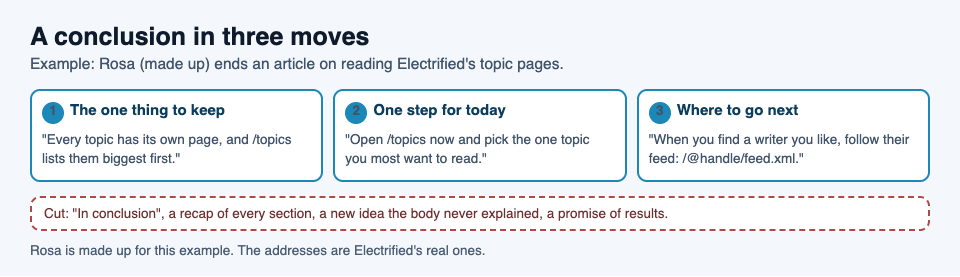
The three moves, filled in for one made-up article about reading Electrified's topic pages.
What to cut from your last section
Most endings get better by losing words, not gaining them. Go through your last section and cut these:
- "In conclusion", "To sum up", "All in all". Your heading, or the fact that the page is ending, already says so. Start with the point.
- The full recap. If you list every section again, the reader has to find the important one twice.
- A new idea. A fresh claim in the last paragraph raises a question the article never answers. Move it into the body, or save it for its own article.
- A promise of results. "Follow these tips and you will see better results" claims something you cannot check. Say what the reader can do, not what will happen to them.
- A stack of requests. Read this, follow that, share it, sign up. Pick the one that helps the reader most.
- The hedge at the very end. If a point needs a caveat, put the caveat next to the point, in the body, where it belongs.
Return to the opening, then end on the strongest line
A good test for an ending is to read it straight after your introduction. If your opening named a task, the ending should show that task done, or one step closer. If your opening asked a question, the ending should hold the answer in one plain sentence.
That is why the introduction and the conclusion are easiest to write as a pair. In how to write an article introduction that gets to the point, the opening names the task, gives the answer, says who it fits and says what comes next. The conclusion closes the same loop from the other side: here is what to keep, here is what to do, here is where to go.
Then look at the order of your last few sentences. Move the line you most want remembered to the end. If a sentence comes after it only to be polite, cut it. "Happy writing!" after a strong line is a step down.
Before and after: rewriting a weak conclusion
Here is a worked example. Rosa, a made-up writer for this guide, has written an article on Electrified about finding posts on a subject you care about. The body explains the topics page, which lists "What people write about here, the biggest first", each topic with its post count and a link to a page of every post about it. It also explains how to follow a writer. This is Rosa's first draft of the ending:
In conclusion, there are lots of ways to find good posts on Electrified. We looked at the topics page, topic pages, following people and feeds. Each one has its own benefits. Hopefully this helps you find great content to read. Happy reading!
Check it against the three moves:
- The one thing to keep: missing. Four ways are listed, and none is picked.
- One step for today: missing. "Hopefully this helps" asks the reader to work it out.
- Where to go next: missing. No page, no address.
- Last line: a sign-off, not an idea.
Before rewriting, Rosa opens each page she will name to check it. The topics page answers signed out. A writer's page has a Follow button and a Feed link, and their posts are in an Atom feed at their page address with /feed.xml on the end, such as /@miguel/feed.xml. The home page says: "Sign in to follow people and see only their posts." Now the rewrite:
Every topic on Electrified has its own page, and /topics lists them all, the biggest first. Open /topics now and pick the one topic you most want to read about. When a writer there keeps answering your questions, follow them, or add their feed, /@handle/feed.xml, to your reader.
What changed:
- The first sentence is the one thing to keep, stated as a fact the reader can check.
- The second is one step, small enough to take before closing the tab.
- The third says where to go next, with a real address pattern.
- The recap, the "hopefully" and the sign-off are gone. Nothing in the ending is new to the body, and nothing promises the reader a result.
The rewrite is about the same length as the first draft. It is better because every sentence does a job.
Check your ending in the preview
Read your conclusion the way a reader meets it: at the bottom of the finished page, right after your last section. If your article has a questions section, decide where the ending goes. vlvd.net's own guides on Electrified put the answer first and the questions near the end, as the home page says:
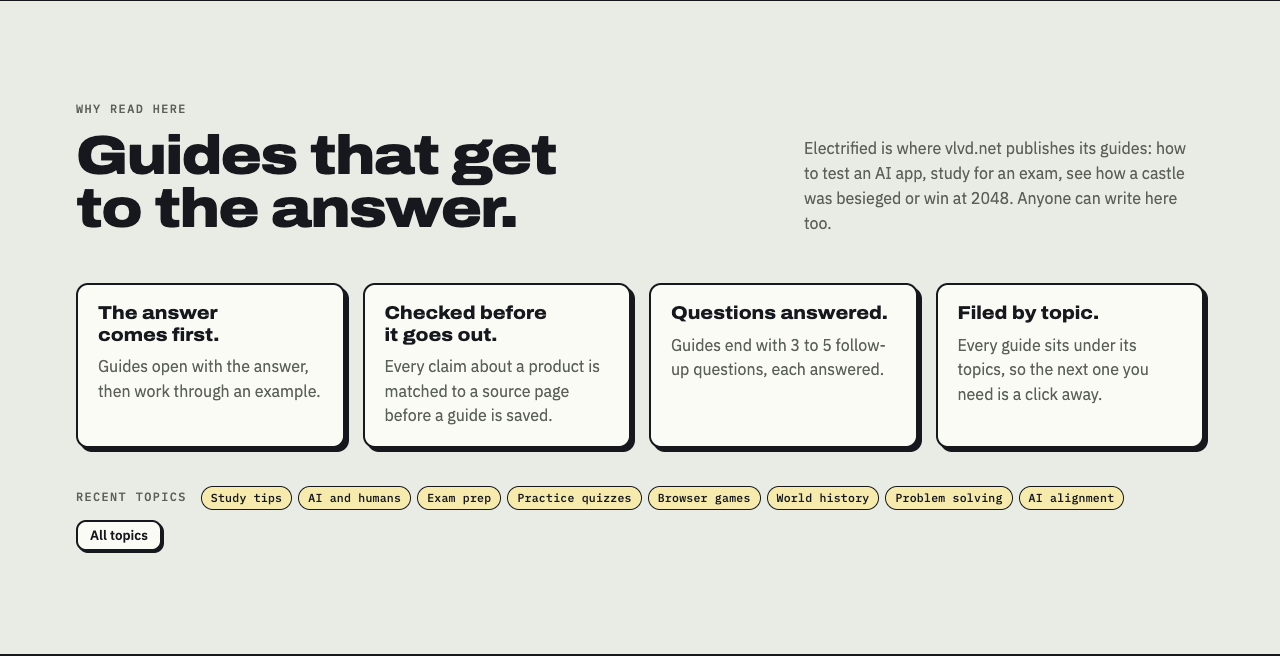
Electrified's home page: guides open with the answer and end with 3 to 5 follow-up questions, each answered.
A questions section works well before a short final section, because it clears the reader's last doubts before you hand them the next step. There is more on writing those in how to write an FAQ section that answers real questions.
On Electrified, the editor's body box has Write and Preview tabs, and the preview looks like the published page. Start your last section with ## and a heading, read it in the preview, then run this check:
- Can you point to the one sentence the reader should keep?
- Is there exactly one step the reader could take today?
- Does it say where to go next?
- Is the last sentence the strongest one?
- Did you cut the recap, any new idea, any promise and any sign-off?
Press Save draft and the post stays private: "Saved as a draft. Only you can see it until you publish it." Come back the next day and read only the first and last paragraphs. If they do not belong to the same article, fix the ending.
Frequently asked questions
How long should an article conclusion be?
Long enough for the three moves, which is often three sentences. If it repeats points the reader just read, it is too long.
Should I summarize my main points in the conclusion?
Pick the one idea your points share and state it in a sentence instead. A full recap makes the reader find the important part twice.
Is it okay to end an article with a question?
Yes, if it is a question the reader can act on, such as "Which of your drafts needs this fix first?" A question that only sounds thoughtful leaves them with nothing to do.
Can I change my conclusion after I publish?
Yes. On Electrified, open the post, edit the ending and press Save changes. A published post keeps its address, so a link you shared still leads to the new version.
Get started
Open the last article you wrote and rewrite only its final section with the three moves: the one thing to keep, one step for today, and where to go next. Cut the recap and the sign-off, and read it straight after your introduction.
On Electrified, choose Article in the editor, start each section with ## and a heading, and add up to 5 topics, separated by commas, so the post sits on a page with every other post about that topic. Save a draft, check the ending in the preview, and publish when the last line is the one you want remembered.
Make an account on Electrified to get your own page, where your notes and articles live, and write about your product, topic or idea one article at a time.
Comments
No comments yet.
Sign in or make an account to comment.