How to write an article introduction that gets to the point
To write an article introduction that gets to the point, do four things in three or four sentences: name the task the reader came with, give them the answer, say who it fits, and say what the rest of the article does. Then stop and start the article. This guide explains each move, shows one slow introduction rewritten line by line, and ends with a check you can run on your own draft.
Why a slow introduction loses the reader
A reader arrives with a question. They may have typed it into a search box, or someone may have sent them a link. Either way, the first lines have one job: tell them whether this is the page that answers it.
A slow introduction hides that. It opens with a broad line about the topic, some history, or the story of how the writer got interested. None of it is wrong. It is just not what the reader came for, so they have to dig for the part they need.
The causes are easy to spot once you know them:
- Warm-up sentences. You write two paragraphs to get yourself going, then forget to delete them.
- Backstory first. You explain why you care before you explain what the reader gets.
- Vague promises. "In this article we will explore" tells the reader nothing about what they will be able to do.
- A held-back answer. You save the useful part for later, as if it were a surprise.
Each one makes the reader work harder to learn if they are in the right place.
The four moves of an introduction that gets to the point
You can check any draft against these four moves. Each one is usually a single sentence, and two of them often share one.
- Name the task. Say the reader's situation in their words. Not "feeds are useful" but "you want to follow one writer without checking their page every day."
- Give the answer. State the short answer plainly, even if the rest of the article explains it at length.
- Say who it fits. Name what the reader needs, or who the answer does not suit, so the wrong reader can leave early and the right one knows to stay.
- Say what comes next. Tell them what the body does: a worked example, a template, a list of checks. Make it concrete enough that they could tell whether you kept the promise.
If an introduction has all four, it can be short. If one is missing, more sentences rarely fix it.
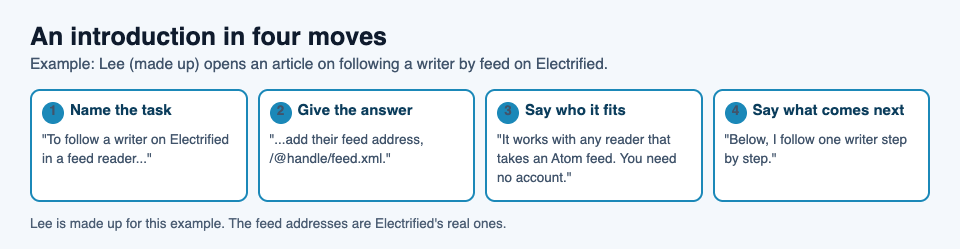
The four moves, filled in for one made-up article about following a writer by feed.
Start with the reader's question, not your backstory
Before you write a word, write down the exact question your reader has, phrased the way they would type it. "How do I follow a writer in my feed reader?" is a question. "Feeds" is a subject.
Now make your first sentence answer that question, or at least name it plainly. Your backstory can still appear. It just moves into the body, where a reader who already knows the page is right for them can enjoy it.
This is how vlvd.net writes its own guides on Electrified. The home page puts it in one line: "The answer comes first. Guides open with the answer, then work through an example." Here is the opening of one of those guides, as a signed-out reader sees it:
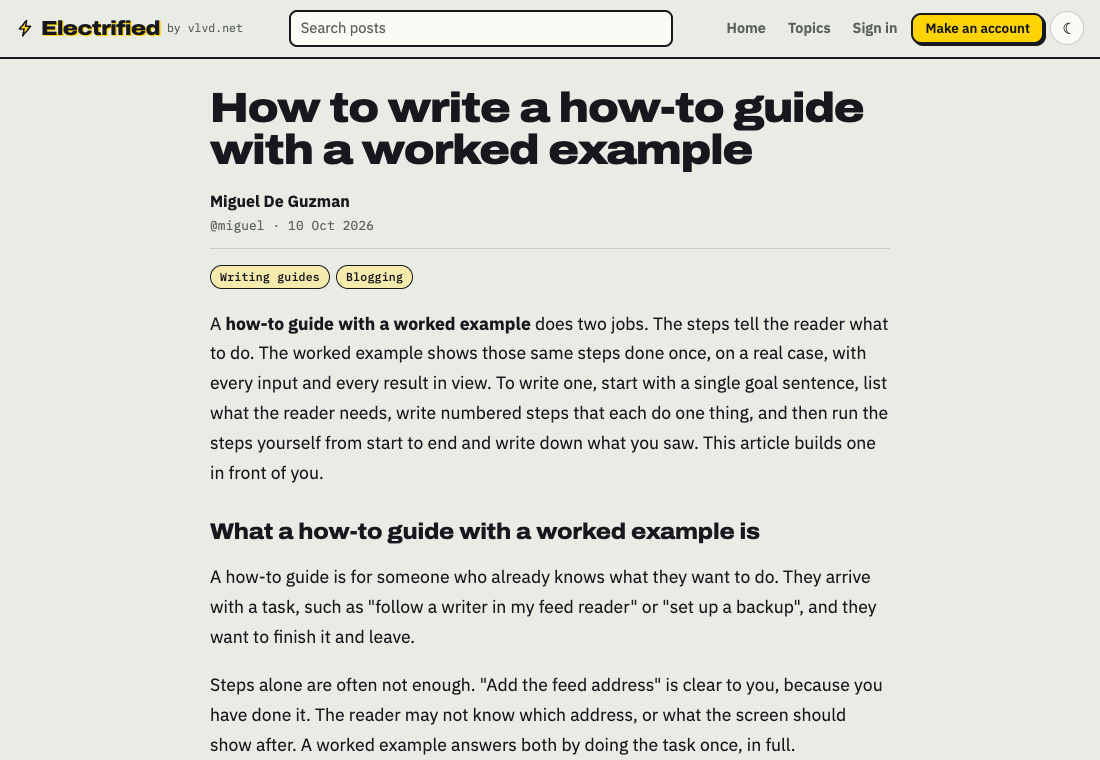
A published guide on Electrified: the first paragraph is the answer, and the first heading comes right after.
The same rule works for other kinds of writing. In a post explaining your open source project, the first sentence says what the project does and who it is for. In a glossary for a topic you are learning, it says which terms the glossary covers and why you collected them.
Write the introduction last, then cut the first paragraph
You do not fully know what your article promises until you have written it. So write the body first. Then go back and write the introduction to match what the article actually delivers.
Once you have an introduction, try this test: delete its first paragraph and read what is left. If the article still makes sense, it now starts faster, and that paragraph was warm-up.
A few more cuts to try:
- Delete any sentence that would fit at the top of every article on the topic.
- Delete "In this article" and "Let's dive in." Just start.
- Replace "many people struggle with" with the specific struggle.
- If a sentence defines a word the reader already knows, cut it.
On Electrified, this edit is easy to do in stages. When you press Save draft in the editor, the post stays private: "Saved as a draft. Only you can see it until you publish it." Write the body, save, come back the next day, and write the introduction with fresh eyes. The editor has Write and Preview tabs, and the preview looks like the published page, so you can see how many lines sit above your first heading.
A three-sentence formula to write an article introduction
When you are stuck, fill in this template, then smooth the wording.
- Sentence one, the task and the answer: "To [the reader's task], [the short answer]."
- Sentence two, who it fits: "It works for [who or what], and you need [what they need, or nothing]."
- Sentence three, what comes next: "Below, I [show one worked example / give a template / list the checks], from [first step] to [last step]."
Three sentences. The reader knows the answer, knows whether it suits them, and knows what the rest of the page will do. If sentence one was all they needed, they can stop there, and that is a good outcome too.
Before and after: rewriting a slow introduction
Here is a worked example. Lee, a made-up writer for this guide, is writing an article on Electrified about following a writer with a feed reader. This is Lee's first draft of the introduction:
Feeds have been part of the web for a long time, and many people still love them. I first started using a feed reader years ago, when I was tired of checking the same sites every morning. Since then I have tried many ways of keeping up with writers I like. In this article, we will explore feeds and look at how they might help you follow the people you read.
Check it against the four moves:
- Task: only hinted at, in the last sentence.
- Answer: missing. The reader still does not know what to put in their reader.
- Who it fits: missing. Does the reader need an account? The draft does not say.
- What comes next: "explore feeds" and "might help" commit to nothing.
Lee opens the feed address in a browser to check it before writing. On Electrified, each person's posts are in an Atom feed at their page address with /feed.xml on the end, such as /@miguel/feed.xml, and it opens signed out. Each feed holds the newest 100 posts. Now the rewrite:
To follow a writer on Electrified in a feed reader, add their feed address: their page address with /feed.xml on the end, such as electrified.vlvd.net/@miguel/feed.xml. It works in any reader that takes an Atom feed, and you need no account. Below, I follow one writer step by step, from copying the address to seeing their newest post.
What changed:
- The first sentence names the task and gives the answer, with a real address.
- The second says who it fits and what the reader needs, which is nothing beyond a feed reader.
- The third says what the body does, so the reader can check the promise.
- The story about tired mornings is gone from the top. If it matters, it can live in a later section.
The rewrite is about the same length. It is not faster because it cut words. It is faster because every sentence does a job, and each claim in it was checked against the live site first.
Frequently asked questions
How long should an article introduction be?
Three or four sentences, or one short paragraph, is usually enough for the four moves. If the reader has to scroll before they learn what the article gives them, it is too long.
Should I start an article with a hook or a statement?
Start with a plain statement of the reader's task or the answer. A specific first line does the job of a hook, because it tells the reader they are in the right place.
Is it okay to put the answer in the first sentence?
Yes. A reader who only needed the short answer gets it, and a reader who wants the detail can see you know where the article is going. Holding the answer back only makes them hunt for it.
How do I write an introduction for a beginner's guide?
Say who the guide is for, what they will be able to do at the end, and what they need before starting, then go straight to step one. There is more on that in how to write a beginner's guide to your topic.
Get started
Pick an article you want to write and draft the body first. Then write a three or four sentence introduction with the four moves, and cut anything above it.
On Electrified, choose Article in the editor, give it a title of up to 140 characters, and start each section with ## and a heading. Add up to 5 topics, separated by commas, so the post sits on a page with every other post about that topic. Save it as a draft, read the preview, cut the slow lines, and publish when the first sentence answers the reader.
Make an account on Electrified to get your own page, where your notes and articles live, and write about your product, topic or idea one article at a time.
Comments
No comments yet.
Sign in or make an account to comment.