How to write an FAQ section that answers real questions
If you want to write an FAQ section that people actually use, start with one rule: every question on the list should be one a real person asked, and every answer should start with the reply. An FAQ built from questions the writer wished people asked, answered with a pitch, helps nobody. This guide shows you where to find the real questions, how to word them, how to answer them, and how to keep the list current. It ends with a before-and-after example you can copy.
Five ways an FAQ section lets readers down
A reader opens an FAQ with one question in mind. They scan for it, read the first line of the answer, and go back to what they were doing. That is the whole job.
An FAQ fails that reader in five common ways:
- The questions are invented. "Why is our service so popular?" is not something a reader asks.
- The questions use the writer's words. The page says "onboarding flow" when the reader is asking "how do I start?"
- The answers bury the reply. The reader has to get through two sentences of context before they learn yes or no.
- The list has no order. Billing sits next to setup, which sits next to a question about the company's history.
- The list is stale. It answers what people asked at launch, not what they ask now.
Each section below fixes one or more of these.
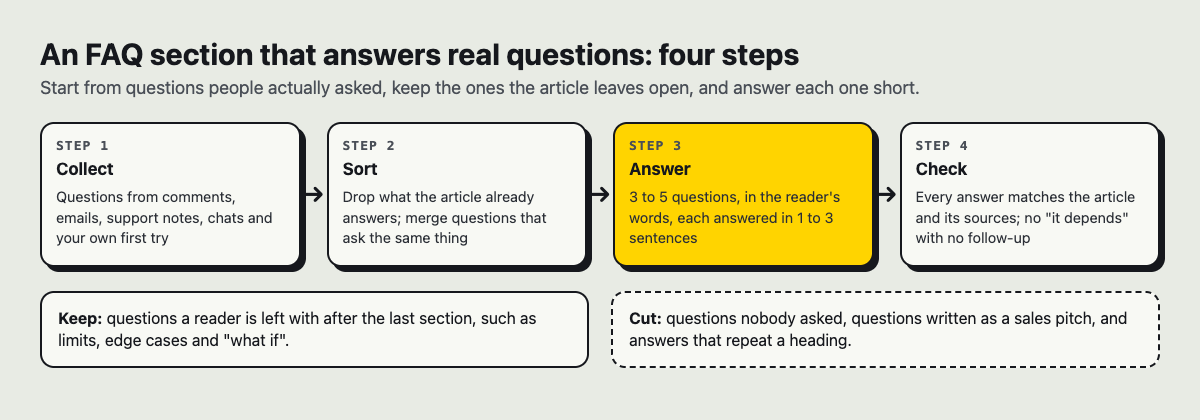
Collect, sort, answer, check: the whole method on one page.
Where to find the questions people actually ask
You do not need to guess. Real questions are usually already written down somewhere. Look in these places:
- Your inbox and support replies. Search for question marks. Any question you have answered more than once belongs on the list.
- Comments on your posts. When a reader asks something under an article, that is a gap in the article.
- Search suggestions. Type your topic into a search box and read the phrases it suggests. Copy the wording as you see it.
- Calls and chats before someone decides. Write down what people ask before they try your product. These questions are often about cost, limits and risk.
- Your own notes. If you kept a list of confusing moments while building or learning something, each one is a likely question.
Collect more raw questions than you need before you write anything. You will cut most of them, but a long raw list shows you which questions repeat, and the repeats are the ones that matter.
How to phrase each question in the reader's own words
Write the question the way the reader would say it out loud. Keep their verbs and nouns, even if they are not the terms you would choose.
Three checks for each question:
- Would someone type this? "Can I cancel anytime?" yes. "What is our flexible cancellation policy?" no.
- Is it one question? "How do I sign up and what does it cost?" is two questions. Split it.
- Is it short? Readers scan questions; they do not read them. Cut every word the question can lose.
Most good questions start with how, can, does, what or where, the words people use when they are stuck. If your question starts with "why should I", you are probably writing a sales line, not a question.
Write answers that lead with the direct reply
The first words of each answer should be the answer. If the question is yes or no, start with yes or no. If it asks for a number, give the number first. If it asks how, give the first step.
Then add only what the reader needs to act. One to three sentences is enough for most answers. A good shape is:
- The direct reply.
- The one condition or limit that changes it.
- Where to go next, if there is a next step.
Be honest about limits. If something is not possible, say so plainly. Electrified's own sign-in page does this in one line: "Password reset is not available yet." That is more useful than a vague line that sends the reader hunting, and a clear no can save you a support email.
If an answer needs more than three sentences, it probably needs its own article. Answer briefly in the FAQ and link to the longer piece. The same split works when you write a how-to guide with a worked example: the FAQ handles the quick question, and the guide handles the full walk-through.
Order and group questions so readers find them fast
Put the most-asked question first. Your raw list tells you which one that is.
On a long FAQ page, group the questions under short labels a reader would recognize, such as "Getting started", "Limits" and "Your account". Keep the groups in the order a reader meets them: before they start, while they use it, when something goes wrong.
Inside each group, order by how often the question comes up, not by how much you like the answer.
At the end of a single article, keep it simple: three to five questions need no groups at all. Electrified's home page describes vlvd.net's own guides this way.
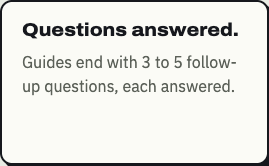
The card on Electrified's home page that describes how vlvd.net's guides end.
A before-and-after example: write an FAQ section for an app
Here is an FAQ for a small habit-tracking app. The app is made up for this example, and so are its features. First, the version that is easy to write.
Before
What makes our app different? Our app was built by a team passionate about helping people grow. We believe habits are the foundation of a better life. What about data? We take privacy very seriously and follow best practices. How does the onboarding flow work? Our streamlined onboarding flow guides you through a series of intuitive steps.
None of these answer anything. The first is a pitch. The second dodges. The third uses an internal term and never says what the steps are.
Now imagine the team reads its support emails and finds four questions that keep coming back. The rewrite:
After
Does it work offline? Yes. You can check off habits without a connection, and they sync the next time you are online. Can I export my data? Yes, as a CSV file from the Settings screen. The export has every habit and every check-in date. How do I add my first habit? Tap the plus button on the home screen, type a name and pick how often you want to do it. Can I share a habit with a friend? Not yet. Each account tracks its own habits only.
Look at what changed. Each question is one a user asked. Each answer starts with yes, no or the first step. The last answer admits a missing feature in one line. If you are writing about your own product, the same approach fits the rest of the page too; see how to write an article that explains what your app does.
Keep your FAQ current as new questions come in
An FAQ is never finished. Set a habit: every time you answer the same question twice, add it. Every so often, read the list and remove anything nobody asks anymore.
On Electrified, readers can like and comment on published posts, and a comment can be up to 1000 characters, so comments are one place new questions show up. When one does, open the post in the editor, add the question and its answer, and press Save changes. A published post keeps its address, so links you have already shared still work.
A few tips for writing the FAQ in the Electrified editor:
- Choose Article, not Note. A note is up to 500 characters with no title, which is too small for most FAQs.
- Start the FAQ with
## Frequently asked questions. An article starts each section with##and a heading. - Put each question in bold with
**double asterisks**, the answer below it, and use[link](https://...)to point to longer guides. - Check the Preview tab before you publish. It looks like the published page, so you can see whether the questions are easy to scan.
- Add up to 5 topics, separated by commas. Each topic links to a page of every post about it, such as Writing guides.
Frequently asked questions
How many questions should an FAQ section have?
Three to five is enough at the end of an article. A standalone FAQ page can hold more, but group them once the list gets long, and cut any question nobody has actually asked.
How long should each FAQ answer be?
One to three sentences for most answers. If you need more, give the short answer and link to a full article.
Where should the FAQ section go on a page?
Near the end, after the main content. A reader who skims can jump straight to it, and a reader who reads the whole page arrives there with their leftover questions.
Can I add a question after the post is published?
Yes. On Electrified you open the post in the editor and press Save changes; the post keeps its address, so links you shared still work.
Get started
Pick one article you have already written. Find three questions people asked about it, answer each with the reply first, and add them as a closing FAQ. On Electrified you can save it as a draft, which only you can see, check it in Preview, then publish when it reads well.
Make an account on Electrified to write about your product, topic or idea on your own page, one article at a time.
Comments
No comments yet.
Sign in or make an account to comment.