How to write article headings that tell readers what is next
A heading is a promise. It tells the reader what the next few paragraphs will give them, and a reader who only skims sees nothing else. If you want to write article headings that tell readers what is next, each one has to name its section and hint at what kind of thing follows.
This guide shows what a forward-pointing heading looks like, gives five patterns you can copy, and walks through a six-step method. It ends with a before and after example and a short FAQ.
Why headings need to say what comes next
Headings do two jobs. They let a reader see the shape of the article before reading it, and they let a reader come back later and find one part. A list such as "Overview", "Details" and "Conclusion" does neither, because it would fit almost any article.
Think of each heading as a signpost: it says where the reader is and what is down the road. The title makes the same kind of promise for the whole piece. If you have not read it yet, how to write an article title that tells readers what to expect covers the top-level promise. Headings make it one section at a time.
Electrified's own topic pages show the idea at work: a reader sees a list of titles first and decides what to open. Headings do that job inside one article.
What a good heading promises
A forward-pointing heading does three things:
- It names the subject of the section. The reader knows what the section is about.
- It hints at the form. A list, a method, a comparison, an example or an answer to a question.
- It keeps its promise. The first lines under it deliver what the heading said.
The third point matters most. A heading that promises "3 ways to cut your draft" and then opens with a long story lets the reader down. Write the heading, then check that the first sentence under it pays it off.
Five heading patterns that point forward
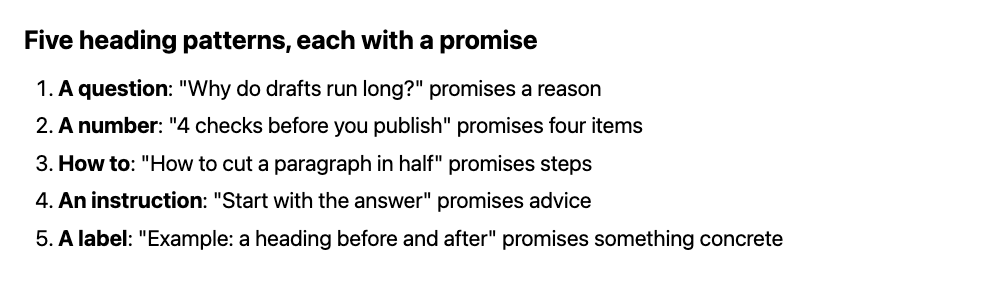
The diagram below sets the five patterns side by side. Each one is explained after it.
1. The question the section answers
Write the heading as the question the reader would ask. "Why do drafts run long?" tells the reader the next paragraph gives a reason. This pattern suits explainers and answers.
2. The numbered promise
"4 checks before you publish" tells the reader there are four items. Use a number only when the section really has that many parts, and count them before you publish.
3. The how-to heading
"How to cut a paragraph in half" promises steps. The reader expects an action and a result, so it fits guides.
4. The verb-first instruction
"Start with the answer" or "Name the reader's problem" speaks to the reader directly. It is short, and it signals that advice follows.
5. The label for what you will show
"Example: a heading before and after" or "A worked prompt" tells the reader the section is concrete. Someone who wants to see the idea in use can jump straight to it. The same habit helps in a write-up such as a project retrospective, where headings like "What went wrong" and "What we changed" tell the reader which part is which.
How to write article headings step by step
- Write the point of each section first. Put one sentence under each planned section: "This section shows that...". If you cannot write the sentence, the section is not ready. Picking what to cover is its own skill, and how to choose topics for your article gives a method.
- Turn that sentence into a heading. Keep the subject and drop the filler. "This section shows why drafts run long" becomes "Why drafts run long".
- Pick one pattern. Choose from the five above: a question, a number, a how-to, an instruction or a label.
- Read the headings alone. Copy them into a list with nothing else. Do they tell the story of the article in order? If not, rewrite the weak ones.
- Check the first sentence under each. It should answer or begin what the heading promised.
- Trim. Cut words that do not help the reader choose. If a heading has grown into a sentence, move the detail into the text underneath.
On Electrified, the editor helps with the check in step 4. In an article you start a section by typing ## and a heading. The body box has Write and Preview tabs, and the preview looks like the published page, so you can see how your headings read as a column before you publish.
Before and after: vague headings rewritten
Here is a made-up short article about setting up a home study space. It is an example for this guide, not a real article. The first set of headings is vague. The second tells you what is next.
Before:
- Introduction
- Background
- Setup
- Tips
- Conclusion
After:
- Why a fixed spot helps you start
- What you need on the desk
- How to set it up in one evening
- 3 habits that keep the space useful
- What to change if it stops working
Read alone, the second list already tells you the plan: a reason, a list of items, a short method, three habits and a fix. Nothing in it needed clever wording, only a specific subject and a hint of form.
Try one more, from a made-up piece about a bio:
- Before: "Length"
- After: "How long should a bio be?"
The question form tells the reader a direct answer follows. If you write bios, how to write a bio that explains what you do applies the same idea to a short piece of text.
How to keep headings consistent across the article
Consistency lets the reader predict what a heading will do. If three headings are questions and the fourth is a single noun, the fourth feels off. You do not need every heading in the same pattern, but avoid switching at random.
- Group by type. If the middle of your article is a method, make those headings instructions or steps. Put the explainer headings together at the start.
- Keep the same grammar. If one heading starts with a verb, make its neighbours do the same.
- Use the same case. Pick sentence case or title case and keep it.
- Keep the level of detail even. Do not give one section a heading of two words and the next a full sentence.
A useful test is to read your list of headings aloud. If it sounds like an outline you could follow without the text, you are close.
Common heading mistakes to avoid
- Single generic words. "Overview", "Details", "Notes" and "Misc" say nothing about what is next.
- Cute headings. A pun may amuse you, but someone scanning for an answer cannot tell what it points to.
- Headings that give nothing away. "More thoughts" does not help a reader decide whether to read on.
- Promises the section does not keep. "5 tips" followed by three tips is worse than a plain heading.
- Headings as full sentences of advice. Long headings turn into paragraphs. Keep the detail for the text underneath.
If you write about other people's work, the same discipline applies. How to summarize an article in your own words is a good companion: read the headings of the original first, and your summary can follow its order.
Frequently asked questions
How long should an article heading be?
Long enough to name the subject and hint at the form, and no longer. If a heading starts to read like a sentence of advice, move the detail into the text under it.
Should every heading be a question?
No. Questions suit sections that give an answer. Use how-to headings for steps, numbers for lists and labels for examples, and keep similar sections in the same style.
How many headings should an article have?
One for each main idea. If a section has no point you can state in one sentence, merge it with a neighbour.
How do I add headings in the Electrified editor?
Choose Article in the editor, then start a section with ## and a heading. Use the Preview tab to see how the headings look on the published page.
Get started
Take an article you are drafting and copy out only its headings. If they do not tell the story on their own, rewrite them with the patterns above, then check that the first sentence under each one keeps its promise.
Make an account on Electrified to write about your product, topic or idea on your own page, one article at a time.
Comments
No comments yet.
Sign in or make an account to comment.