HSTS: make browsers always use HTTPS for your app
When someone types your domain without https:// or clicks an old http:// link, their first request can travel in plain text, where an attacker on the same network can tamper with it. HSTS (HTTP Strict Transport Security) closes most of that gap. This guide follows the OWASP HTTP Strict Transport Security Cheat Sheet and MDN: what the header does, how to check yours, and how to roll it out without locking anyone out.
What HSTS does and the threats it stops
HSTS is a response header your app opts into. The OWASP HSTS Cheat Sheet explains that once a supporting browser receives it, the browser sends everything for that domain over HTTPS, and stops users clicking through certificate warnings. OWASP lists three threats it handles:
- A user types or bookmarks
http://and an attacker sits in the middle. HSTS sends the request over HTTPS instead. - Your HTTPS app still contains an HTTP link or loads something over HTTP by mistake. HSTS upgrades it.
- An attacker presents an invalid certificate and hopes the user accepts it. With HSTS, the user cannot override the warning.
OWASP notes the header is supported by all modern browsers, with Opera Mini the notable exception.
How browsers apply the header
The MDN page on Strict-Transport-Security fills in the details that matter when you set it:
- Only over HTTPS. Browsers ignore the header on a plain HTTP response, so a man in the middle cannot forge or shorten it.
- The redirect stays plain. Your HTTP address should answer with a permanent redirect, such as a
301, to HTTPS, without the header. The HTTPS response then carries it. - The clock restarts. Each response adds
max-ageseconds to the current time. - Whole host. HSTS works by domain name, for every port. It rewrites
httptohttpsand port 80 to 443. - The first visit is exposed. Until the browser has seen the header once, an insecure first request can still be attacked. Preloading, covered below, is the fix for that.
Check your HSTS header in two minutes
From a terminal, on each host you run, including www, your API host and an address that returns a 404:
curl -sI https://staging.your-app.example | grep -i strict-transport-security
Then check the plain HTTP address:
curl -sI http://staging.your-app.example
You want a permanent redirect to the HTTPS address, with no HSTS header on that redirect, and the header on every HTTPS response. MDN points out that subdomains should send the header themselves too, because a browser may reach www or api before it ever visits your main domain.
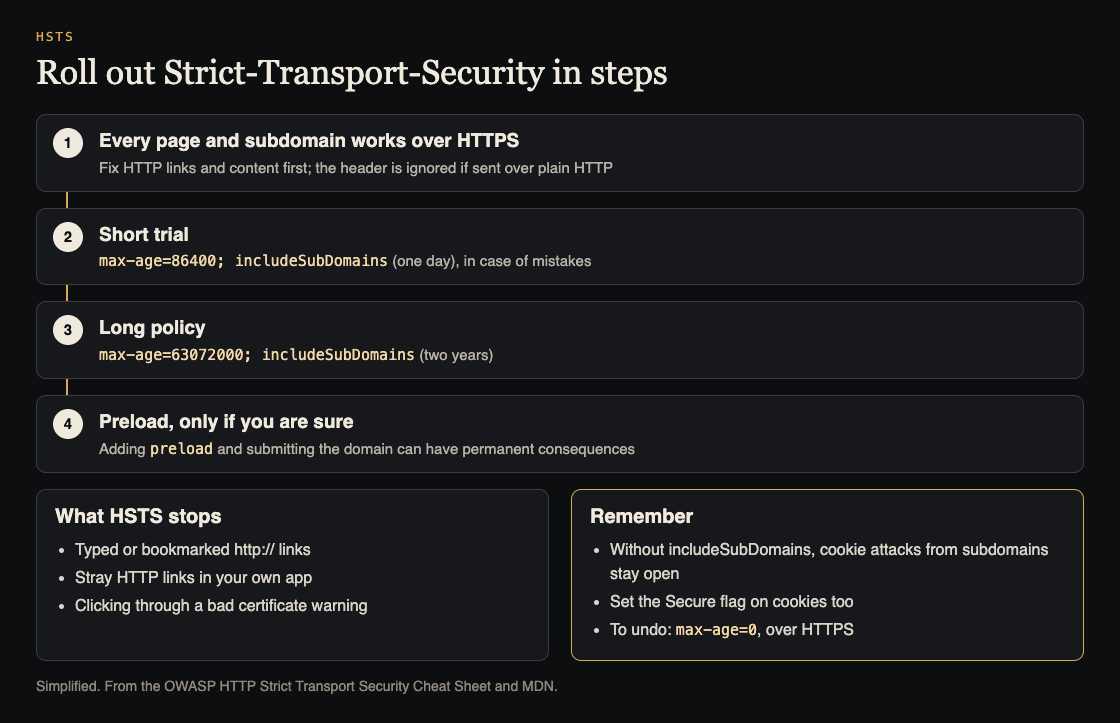
A staged roll-out, and what HSTS stops. Simplified from the OWASP HTTP Strict Transport Security Cheat Sheet and MDN.
Worked example: roll out HSTS in stages
HSTS is easy to turn on and slow to turn off, because browsers keep the rule for the whole max-age. OWASP's examples give you a safe path:
- Make every host work over HTTPS. List every subdomain from your DNS, not from memory, and fix any page or asset still served over HTTP.
- Trial for a day. OWASP suggests a short value during the first roll-out, in case of mistakes:
Strict-Transport-Security: max-age=86400; includeSubDomains. Watch errors and support messages. - Go long. When nothing broke, move to two years:
Strict-Transport-Security: max-age=63072000; includeSubDomains. - Consider preload last, and only after reading the warning below.
If something does break, MDN describes the way back: send max-age=0 over HTTPS, and each browser drops the rule the next time it gets that response. Users who do not come back keep the old rule until it expires, which is why the first step is short.
Subdomains and cookies
OWASP's example without includeSubDomains covers only the host that sends it. It also warns about what that leaves open: cookies can be manipulated from subdomains, so leaving out includeSubDomains allows a range of cookie attacks that HSTS would otherwise block by requiring a valid certificate on each subdomain.
The catch is that includeSubDomains blocks access to any subdomain page that only works over HTTP. Find those before you add it. OWASP adds that setting the Secure flag on every cookie prevents some, but not all, of the same attacks, so do both; see session cookie security.
HSTS preload: treat it as permanent
Browsers ship with a built-in list of domains that are HTTPS only, which removes the exposed first visit. OWASP gives the header for it:
Strict-Transport-Security: max-age=63072000; includeSubDomains; preload
Two points from the sources matter most. OWASP warns in capitals that sending preload can have permanent consequences, and can stop users reaching your site and every subdomain if you ever need HTTP again. And the directive is only your consent: you still have to submit the domain to the list. MDN adds that preload needs a max-age of at least one year and includeSubDomains.
Where HSTS fits with your other headers
HSTS protects the connection, not what your pages load or what your app does with data. It sits beside your other security headers and a Content Security Policy. OWASP also notes a privacy side: site owners can misuse HSTS to recognize users without cookies, so set it for security and nothing else.
Frequently asked questions
Does HSTS replace the HTTP to HTTPS redirect?
No. Keep both. The redirect handles a browser that has not seen your header yet, and HSTS stops later requests from using HTTP at all.
Why does my header seem to be ignored?
Browsers ignore it on plain HTTP responses. Check that it arrives on an HTTPS response, on the exact host the browser visits.
Can I turn HSTS off?
Yes, by sending max-age=0 over HTTPS. Browsers that never get that response keep the old rule until it expires, and preloaded domains are much harder to reverse.
What max-age should I use?
Start with a short trial, such as OWASP's one day, then move to a long value such as its two-year example once everything works over HTTPS.
Does HSTS work for an app reached by IP address?
No. MDN explains that HSTS identifies a host only by its domain name, and an IP address cannot be an HSTS host. Serve your app on a domain name to get the protection.
Get started
Run the two curl checks on each of your hosts today. Fix what still needs HTTP, ship the one-day header, and put the step up to two years on your calendar.
If you want a second pair of eyes, whitehatstoic's security testing covers web app and API review, with a written report, fixes and a retest after fixes. It is scoped after a short call, and no test can promise to find every weakness.

Building something that has to be safe? Book a meeting with whitehatstoic: tell us the product, the deadline and your biggest worry, and we reply with a plan and a price.
Comments
No comments yet.
Sign in or make an account to comment.