HTML5 security: check storage, messaging and iframes
HTML5 security is about the features modern browsers give your front end: messaging between windows, storage on the device, background workers, new tabs and embedded frames. Each one is useful. Each one also has a mistake that is easy to make and hard to spot in a code review. This guide walks through the OWASP HTML5 Security Cheat Sheet feature by feature, with a check you can run for each.
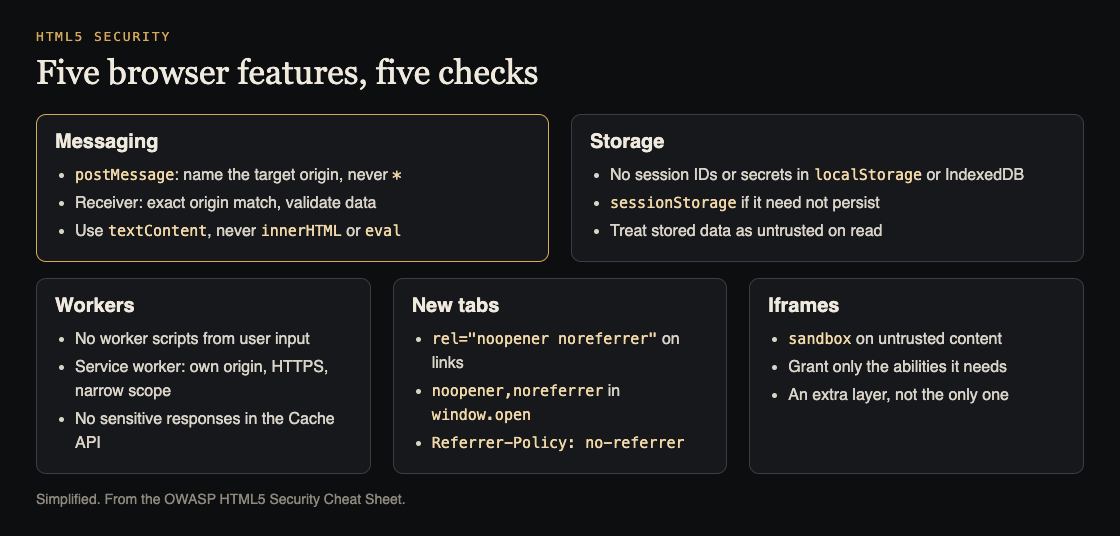
Five features, five checks. Simplified from the OWASP HTML5 Security Cheat Sheet.
HTML5 security starts with postMessage
The postMessage function lets a page talk to a window or frame from another origin. OWASP calls it generally safer than the old tricks it replaced, but it has rules on both ends.
When you send a message:
- Give the expected origin as the second argument. Never use
*. If the target window is redirected, a*message goes to whoever is there now.
When you receive one:
- Check the sender's origin exactly. OWASP shows a check that the origin contains
.owasp.org, and points out thatowasp.org.attacker.compasses it. Compare against the full names you expect. - Validate the data. Check it has the shape you expect. A single cross-site scripting flaw in the sending page lets an attacker send any message they like.
- Treat it as data, never code. Never pass it to
eval()or insert it withinnerHTML. That creates DOM-based cross-site scripting. SettextContentinstead.
Search your code for addEventListener("message" and read every handler you find. Each one should start with an origin check.
Cross-origin requests and Server-Sent Events
The cheat sheet's CORS advice lines up with our guide to CORS misconfiguration. The short version:
- Allow specific, trusted domains in
Access-Control-Allow-Origin. Do not use*, and do not echo back the request's Origin header without checking it. - Use
*only on chosen addresses that hold nothing sensitive, never across the whole domain. - CORS does not replace CSRF protection, and ordinary GET and POST requests must still do their own access control.
- Do not rely only on the Origin header. A browser always sends it, but a script outside a browser can fake it.
- Validate any address passed to
XMLHttpRequest.open, especially absolute ones.
Server-Sent Events, the EventSource stream, get the same treatment as messages. Validate the address you connect to, check event.origin against an allow list, and treat event.data as data, never as HTML or script. For two-way real-time traffic, see our post on WebSocket security.
Local storage and IndexedDB: nothing secret
Browser storage is convenient and very exposed. OWASP's points about localStorage:
- Anyone with local access to the machine can read it, whatever sign-in your app requires.
- A single cross-site scripting bug can steal everything in it, or plant false data in it. Do not trust what you read back.
- Never store session identifiers there. JavaScript can always read it, while a cookie can be marked HttpOnly. Our post on cookie theft mitigation covers what to do when a session cookie does get stolen.
- Use
sessionStorageif the data does not need to outlive the tab. - Every app on one origin shares the same storage. Host separate apps on separate subdomains.
IndexedDB, the current standard for structured storage in the browser, has the same limits. OWASP says not to assume it keeps anything confidential, to keep tokens, credentials and other secrets out of it, and to treat what you read from it as untrusted input. Web SQL is deprecated and removed from major browsers; do not use it.
A quick check: search the code for localStorage.setItem and getItem, and list every key. Anything that looks like a token, a password or personal data is a finding.
Web Workers and service workers
Web Workers run scripts in the background. They cannot touch the page, but OWASP notes they can make cross-origin requests and can burn CPU. Never build a worker script from user input, validate messages passed to and from workers, and never send code to a worker to run with eval().
Service workers deserve more care, because they sit between your pages and the network and can answer requests from a cache. OWASP's rules:
- Register them only from your own origin, and serve the worker script over HTTPS.
- Keep the worker's scope narrow, so a compromised worker cannot intercept unrelated paths.
- Have a written way to update or unregister a bad worker and clear its caches. Letting cached data expire does not remove the worker.
- Keep sensitive responses out of the Cache API. It ignores HTTP caching headers and its entries never expire on their own. Keep sending
Cache-Control: no-storeas well.
The old Application Cache is gone from major browsers; move any leftover use to service workers.
Links that open a new tab
When your page opens another page in a new tab, the new page can get a handle back to yours and change its location. OWASP calls this tabnabbing. A user returns to what looks like your tab and finds a fake sign-in page.
The fix is small:
- Add
rel="noopener noreferrer"to every link that opens a new tab. - For
window.open, addnoopener,noreferrerto the window features. - Send the
Referrer-Policy: no-referrerheader so no referrer information leaks with requests from your pages.
Sandboxed iframes for untrusted content
If you must show content you do not control, put it in an iframe with the sandbox attribute. With it set, OWASP lists what happens: the content gets a unique origin, forms, scripts and plugins are off, links cannot target other windows, and features that start on their own are blocked.
You can give back single abilities through the attribute's values. Give back only what the content truly needs. OWASP also says to treat the sandbox as an extra layer, since very old browsers ignore it.
The opposite problem, your own page being framed by someone else, is clickjacking. OWASP points to the X-Frame-Options header for that, and advises against JavaScript frame-busting tricks. A Content Security Policy can also say which sites may frame you.
One last note from the sheet: autocomplete="off" and similar attributes are hints. Browsers may still offer to save login details, so do not treat them as a guarantee that nothing is stored.
Worked example: an HTML5 security pass in one afternoon
Here is how to run these checks on a single-page app before a release.
- Messages (30 minutes). Search for
postMessageandaddEventListener("message". Confirm every send names an origin and every handler checksevent.originexactly and never usesinnerHTMLoreval. - Storage (30 minutes). In the browser's developer tools, open Application, then Local Storage, Session Storage and IndexedDB while signed in. Write down every key. Move tokens and personal data out.
- Workers (30 minutes). List registered service workers and their scope. Check which responses go into the Cache API, and whether any carry account data.
- Links (20 minutes). Search for
target="_blank"andwindow.open. Addnoopener noreferrerwhere it is missing, and check theReferrer-Policyheader. - Frames (20 minutes). List every iframe. Any showing outside or user content gets
sandbox, with the fewest abilities that still work. - Write it up. One line per finding, the file it is in, and who fixes it.
Frequently asked questions
Is it safe to keep a JWT in localStorage?
OWASP advises against storing session identifiers in local storage, because any script on the page can read it. A cookie marked HttpOnly keeps the value away from JavaScript.
Does a sandboxed iframe make untrusted content safe?
It removes most of what the content could do, but OWASP calls it an additional layer. Give back only the abilities the content needs.
Why name an origin in postMessage?
With *, the message goes to whatever page the target window holds now, even after a redirect. Naming the origin makes the browser drop it otherwise.
Get started
Open your app's developer tools now and list what sits in local storage. If you find a token, that is your first fix.
whitehatstoic's cybersecurity and AI safety testing includes a web app and API review, a written report with fixes, and a retest after you apply them, scoped after a short call. No test finds every weakness, but a review covers these browser features alongside the server.

Building something that has to be safe? Book a meeting with whitehatstoic: tell us the product, the deadline and your biggest worry, and we reply with a plan and a price.
Comments
No comments yet.
Sign in or make an account to comment.