LLM red team plan: a first round for your AI app
An LLM red team plan is a short, written plan for attacking your own AI feature before someone else does. You pick the feature, list what could go wrong, try to make it go wrong on purpose, and write down what you find. It sounds like a big-company exercise, but a small team can run a useful first round in a few days.
This guide turns the OWASP GenAI Red Teaming Guide into a first round you can run on one app. It covers scope, likely attacks, what to test, how to record it, and what to keep afterwards.
What an LLM red team plan is for
Normal testing asks whether your feature works. Red teaming asks how it breaks when someone pushes on it. With a language model, that matters more than usual, because the same input that helps one user can be bent by another.
OWASP's own entry on prompt injection says it is unclear whether any method fully prevents it. Its advice is to run adversarial tests and attack simulations, treating the model as an untrusted user, to see whether your trust boundaries and access controls hold. That is what a red team round does.
OWASP frames the goal in three parts: the security of the people running the system, the safety of its users, and the trust users place in it. A good plan touches all three, not only data leaks.
Step 1: pick one app and write the scope
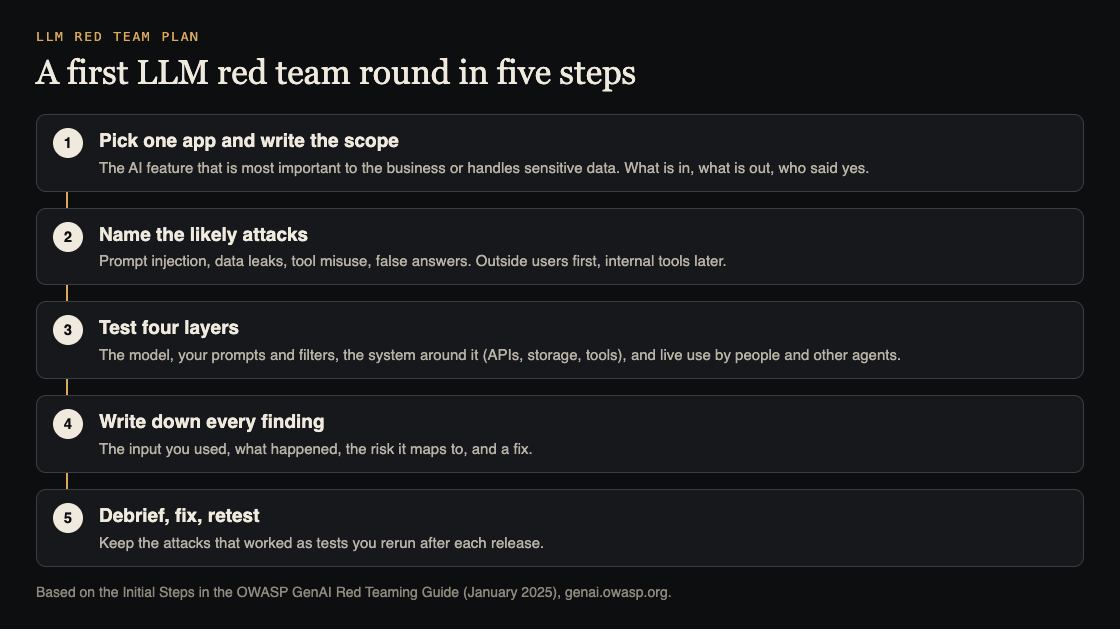
The guide's first step is to define objectives and scope, starting with the AI uses that matter most to the business or handle sensitive data. It also says the point of the first round is to get started and show value, not to cover everything.
So pick one feature. Then write half a page that answers:
- Which feature, which environment, and which test accounts.
- What is out of scope, such as production data or third-party systems you do not own.
- Who approved the test, and who to call if something breaks.
- Where findings and test data go, and when test data is deleted.
The last two items come straight from the guide, which says scoping should follow normal standards for test authorization, logging, reporting, communication and what happens to the data afterwards. Run the round against a staging copy wherever you can.
Step 2: name the likely attacks
Next is threat modeling: how would someone actually abuse this feature? The guide's list of key risks is a good starting menu:
- Prompt injection: getting the model to break its rules or leak information.
- Data leakage: pulling private data out of the model or the app.
- Data poisoning: changing what the model learns from or retrieves.
- Hallucinations: confident, wrong answers that users act on.
- Agentic weaknesses: attacks that chain tools and decisions.
- Supply chain: models, packages and data you did not make.
- Harmful or biased output.
Rank them for your feature. The guide notes that internal tools can be less risky than features open to the public, so test what outsiders can reach first. If you have never mapped the feature, our threat modeling for a small team guide does it in one afternoon.
Step 3: test four layers, not just the chat box
Most first attempts only type tricky prompts into the chat. The guide asks you to cover the whole application stack, in four layers:
- The model. Its own weak spots, such as harmful output or bias, before your app adds anything.
- Your implementation. The system prompt, guardrails and filters. Do they hold when the request is reworded, split up or hidden in a file?
- The system around it. APIs, storage and integration points. Can a model reply reach a database query, a tool call or another user's data?
- Live use. How real users or other agents could steer the model during normal use, including people trusting it too much.
The second and third layers are usually where small teams find the most. Our guides to prompt injection testing and LLM output handling have checks for each.
Step 4: record every finding the same way
The guide says to record every weakness and turn it into a report with clear fixes. A finding nobody can reproduce gets argued about instead of fixed. Use one short format for every attempt that worked:
- Input: the exact prompt, file or sequence of steps.
- Result: what the app did, with a screenshot or log line.
- Risk: which entry of the OWASP LLM Top 10 2026 it maps to.
- Impact: who could do this and what they would get.
- Fix: what to change, and how you will know it worked.
Keep the attempts that failed too. A short list of what you tried and what held is useful the next time someone asks whether you tested something.
Worked example: a three-day round
Say you run a support assistant that answers from your help docs and can look up a signed-in customer's orders. Here is one way to spend three days on it.
Day 1, morning: write the scope. Staging only, two test customers, A and B, no real orders. One engineer and one person who knows the support process. Afternoon: list attacks. Top three: customer A seeing customer B's orders, instructions hidden in a help article, and the assistant inventing a refund policy.
Day 2: test the layers. As customer A, ask for B's orders directly, then by order number, then by asking the assistant to "check the last order placed". Add a test help article with a hidden line that asks the assistant to show all orders. Ask ten refund questions whose answers you know. Look at the logs to see what the order lookup tool actually received.
Day 3: write up each finding in the format above, fix the ones you can, and rerun the exact inputs. Then hold a short debrief.
The output is a short report, a list of fixes, and a set of saved inputs you can rerun later.
Step 5: debrief, fix and keep the tests
The guide ends with a debrief: talk through what was tried, what worked, what was learned, and what to improve. For a small team, the most useful outcome is that every attack that worked becomes a test you rerun after each release. Prompts and models change, so a fix that held last month may not hold after the next update.
Then plan the next round. Widen the scope a little: the next feature, a new tool the model can call, or the layer you skipped this time.
Frequently asked questions
How is red teaming different from a penetration test?
A penetration test usually looks at the whole app and its infrastructure. An LLM red team round focuses on how the AI feature can be steered or misused, though OWASP's guide also covers the APIs and storage around the model. Many teams run both; our penetration test checklist covers the other side.
Who should be on a first red team?
OWASP's guide suggests AI engineers and security people, plus someone from ethics or compliance where possible. For a small team, one engineer who knows the feature and one person who knows how users behave is a workable start.
Does a red team round prove the app is safe?
No. It shows what held against the attacks you tried, on the day you tried them. Rerun the saved tests after each change.
Can we red team in production?
Use staging and test accounts wherever you can. If something can only be tested in production, write that into the scope and get approval first.
Get started
Want an outside team to run the first round with you? whitehatstoic's cybersecurity and AI safety testing covers web apps, APIs and AI systems, including prompt injection tests, with a written report, fixes and a retest after fixes. It is scoped after a short call.
Book a meeting about AI safety testing, or book a meeting with whitehatstoic: tell us the product, the deadline and your biggest worry, and we reply with a plan and a price.
Comments
No comments yet.
Sign in or make an account to comment.