Illustrations for a self-published ebook: a practical guide
Finding illustrations for a self-published ebook comes down to a few decisions: what art the book needs, what stays readable on a small screen, where the pictures come from, and what the license lets you do with a book you sell. This guide walks through each step and ends with one picture followed from a blog post to a book on sale.
Wavecrate licenses royalty-free music, sound effects, photos and videos, and every download comes with a license certificate and a code anyone can check on its verify page.

What art does the book need?
Write a short list before you look at a single picture, split into four groups:
- Cover: one image, seen as a small thumbnail and full screen. It matters most.
- Interior art: scenes or small spot pictures inside chapters.
- Diagrams: charts, steps, maps. These must be clear, not pretty.
- Chapter headers: a repeated motif or texture that gives the book a look.
Then rank it. The cover and one or two key diagrams usually do most of the work, so spend there first and fill the rest with simpler art or none. A diagram can replace three paragraphs; a header tells readers where one part ends.
A style that survives phones and grey screens
Your reader might open the book on a phone held upright, a tablet turned sideways, or a black and white e-reader. A style that works on all three shares a few traits:
- Strong contrast. Flat colors and clear outlines survive grey; soft pastel blends often turn into one muddy grey.
- Few small details. Fine lines shrink to noise on a phone.
- No words inside the picture. Put captions and labels in the book text, where they resize.
- One look. A painted cover with flat diagrams inside feels assembled from parts.
Test on day one: put a draft picture in a test file, open it on the smallest screen you own, and convert a copy to grey. If two colors become the same grey, change one.
Files: size, format and color
Each store publishes its own image rules and changes them, so read the current guidance for every store you upload to before you export. A few habits hold everywhere:
- JPEG for painted art and photos; PNG for line art, diagrams and flat color.
- RGB color, because an ebook is read on a screen.
- Compress each picture until you see the quality drop, then step back one notch; every picture adds to the download.
- Keep the full size originals in a separate folder for a print edition later.
Finding illustrations for a self-published ebook
There are three paths, and many books mix them. Hiring an artist suits a cover with a specific scene or recurring characters; get a written agreement on where you may use the art, whether they can reuse it, the credit, and how many rounds of changes the fee covers. Drawing your own suits simple diagrams. Stock suits headers, textures and general scenes, though other books can use the same picture.
On Wavecrate, the photos page has an Illustrations category with filters for orientation, color and resolution. On 10 October 2026 it held ten pictures, from flat landscapes such as Countryside Cottage Illustration and Green Hills Flat Illustration to a set of friendly robots and space scenes.
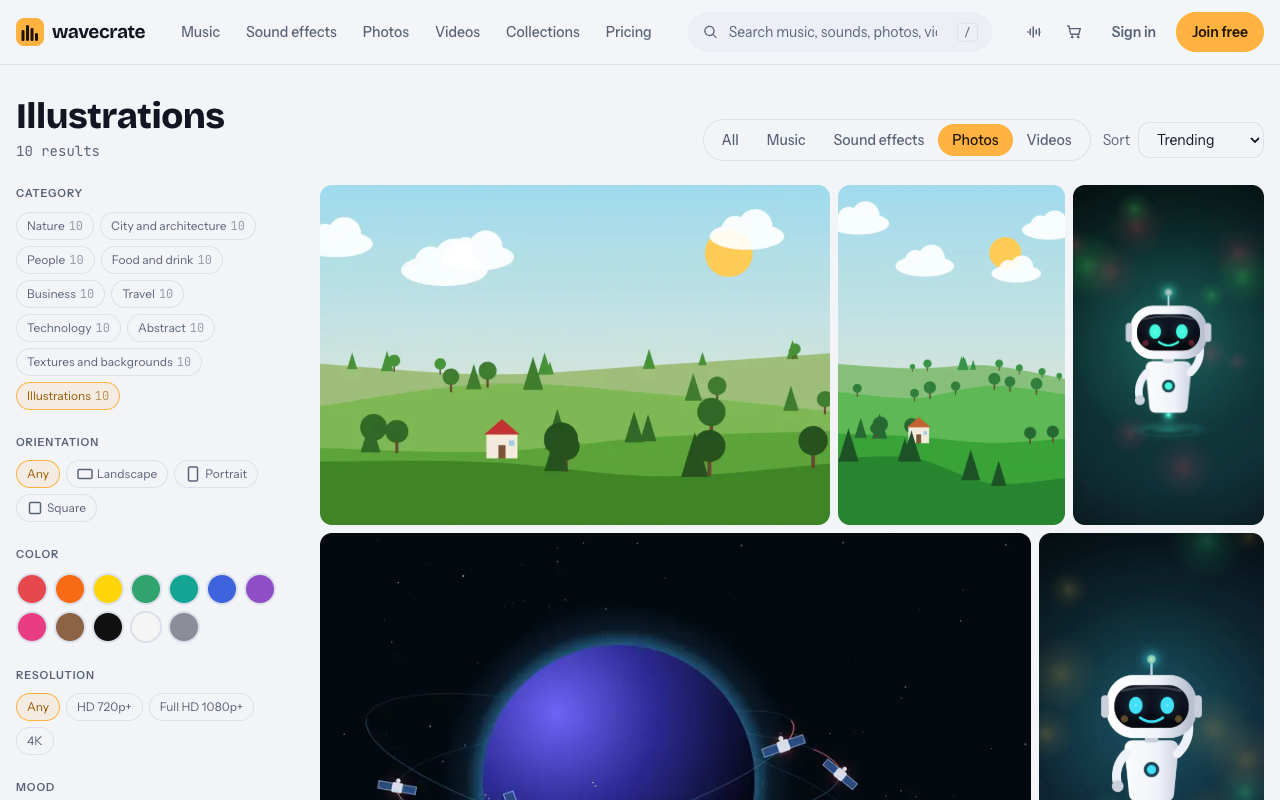
Countryside Cottage Illustration is "a flat illustration of a small cottage among green hills, trees and clouds", in three JPEG sizes: 4000 x 2667, 1920 x 1280 and 1024 x 683. Flat color like this survives a grey screen well. For chapter headers, a texture can sit behind a title: Warm Paper Texture, in Textures and backgrounds, was marked Free when read. Previews carry one small watermark; licensed files are clean and full size.
Which license a book needs
You get a license to use the picture; Wavecrate keeps the copyright. The pricing page table for photos says:
- Free, only on items marked Free: websites, blogs, social media posts and monetized channels, with credit next to the picture or in the description.
- Standard: no credit, apps, presentations and your own marketing, and print up to 500,000 copies. Countryside Cottage Illustration lists it at $9.
- Extended: paid advertising and TV broadcast, products for resale (merchandise, templates, prints and packaging), unlimited print runs and client work. It lists Extended at $39.
No row names a book or an ebook, and the site has no full license agreement page to settle it. A book you sell is a product you sell, and Extended is the only license that names products for resale, so the cautious reading is to treat a sold ebook as Extended. Pro (listed at $99 a year, or $12 month to month, and not on sale yet) gives Standard only. The pricing page says that once purchases open, someone who holds Standard will pay only the difference for Extended.
Paid licenses are not on sale yet (Wavecrate says purchases open soon), so the prices here are the listed prices for when sales open. Items marked Free can already be downloaded with a free account.
Worked example: one picture, three uses
Say you are writing a cozy rural novel and want Warm Paper Texture behind each chapter title, and Countryside Cottage Illustration as the header for chapter three. You crop the cottage from the 1920 x 1280 file to your header shape, check a grey copy, and export a JPEG. Now follow the paper texture, marked Free on the day this was written (read the page on the day you download, because items change), through three uses:
- A blog post announcing the book, with credit under the picture: the Free license lists blogs, with credit.
- A free sample guide you give away to grow your mailing list: your own marketing, which needs Standard ($9 listed) or Pro.
- The ebook you sell: treat it as a product for resale, so Extended ($39 listed on these pages), even though the texture is marked Free. The cottage needs Extended too.
Then keep a rights log: picture name, chapter, source, license, date and proof. For a Wavecrate download the proof is the license code from its certificate; anyone can enter it on the verify page to see who holds the license, for which item and what it covers, with no account.
Frequently asked questions
How many illustrations does a self-published ebook need?
As many as the content needs. A novel often needs a cover and perhaps chapter headers; a how-to or children's book may need art on most pages.
Do illustrations work on black and white e-readers?
Yes, with strong contrast. Convert each picture to grey before you export, and fix any two colors that become the same grey.
Is a picture marked Free enough for an ebook I sell?
No. The Free license lists websites, blogs and social posts. A sold book is closest to a product for resale, which only Extended names.
Does Pro cover my ebook?
Pro gives Standard only. Standard covers your own marketing, such as a free sample guide, but not a product you sell.
Get started
Rank the pictures your book needs, filter the Illustrations category by color and orientation, test each pick on a small grey screen, and plan to cover what goes inside a book you sell with Extended once purchases open.
Browse Wavecrate: you can join free and download items marked Free now, paid licenses are not on sale yet (purchases open soon), and every download comes with a license certificate and a code anyone can check on its verify page.


Comments
No comments yet.
Sign in or make an account to comment.