Infrastructure as code security: check your templates
Infrastructure as code security matters because your servers, networks and permissions are now defined in templates, and a mistake in a template is deployed as faithfully as a good line. The OWASP Infrastructure as Code Security Cheat Sheet describes infrastructure as code as a way to set up infrastructure faster, consistently and repeatably across environments. That repeatability cuts both ways. This guide follows the cheat sheet's checks from the moment you write a template to the day it runs, and ends with a review of one change.
Infrastructure as code security: why templates need their own checks
Before infrastructure as code, a wrong firewall rule lived on one machine until someone noticed. Now it lives in a file, gets copied into every environment and comes back every time you deploy. The same goes for a password written into a template, a role with far more access than it needs, or a resource nobody tagged and nobody remembers.
The good news is that templates can be checked like any other code: in your editor, in review, in the pipeline and against the running cloud. OWASP groups its checks into three stages: develop and distribute, deploy, and runtime.
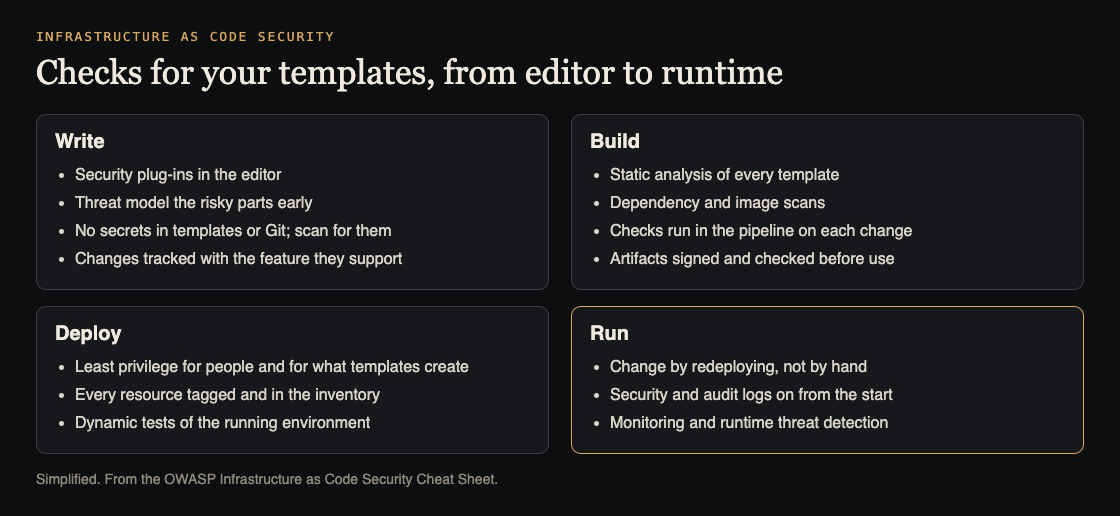
Checks from editor to runtime. Simplified from the OWASP Infrastructure as Code Security Cheat Sheet.
While you write: plug-ins, threat models and secrets
The cheapest place to catch a problem is the editor. OWASP suggests security plug-ins in your development environment, naming tools such as TFLint and Checkov, so risks show up while you type rather than late in the cycle. For the parts of your setup that are high-risk or used heavily, build a threat model early, so the team sees where the sensitive assets are; threat modeling for a small team shows one way.
Secrets are the classic template mistake. The cheat sheet puts it plainly: the problem is not the secrets, but where you store them. Tokens, passwords and SSH keys in a plain text file or in Git are easily exposed. Scan for them with tools such as truffleHog, git-secrets or GitGuardian, and keep them in a proper store; see secrets management.
Finally, version every change with enough detail to roll it back, and check infrastructure changes in with the feature they support, in the same branch or merge request, not separately.
Least privilege for people and for what templates create
OWASP applies least privilege twice. First to people: decide who may create, update, run or delete the scripts and the inventory, and limit each person's rights to what their work needs. Second to the templates themselves: the permissions a template grants to the resources it creates should be limited to what those resources need to do their work.
The second point is easy to miss. A template that gives a storage bucket, a function or a server a broad role because it was quicker to write is a standing gap that ships with every deploy.
In the pipeline: analysis, scans and signed artifacts
The cheat sheet lists the checks to run on every change:
- Static analysis of the templates themselves, for risks and misconfigurations.
- Dependency checks on the open source packages and libraries the templates pull in.
- Container image scans for known flaws in the images your templates deploy.
- Pipeline integration, so every change is analyzed without someone remembering to run a tool, with results gathered in one report.
- Artifact signing at build time, with the signature checked before use, so nothing is swapped between build and run.
These fit into the same pipeline you protect in CI/CD security.
When you deploy: inventory, tags and dynamic tests
Every deployed resource should be labeled, tracked and logged in your inventory. When a resource is removed, OWASP says to erase its configuration, delete its data securely and take it out of the inventory too.
Tagging is the cheat sheet's practical warning. Untagged cloud assets become ghost resources: hard to find, hard to see, adding to the bill and causing drift from what your templates say. Its only fix is careful tagging and monitoring for anything untagged. Then test the running environment, not only the files, with dynamic analysis of the services your infrastructure exposes.
At runtime: immutable infrastructure, logs and monitoring
OWASP recommends immutable infrastructure: build each component to an exact specification, and when the specification changes, provision a new set and retire the old one, instead of changing running systems by hand. Hand changes are how the cloud drifts from the code.
Turn on security logs and audit logs while you provision, not after an incident, so you can trace the cause when something goes wrong. Add continuous monitoring for security violations and runtime threat detection that alerts on unexpected behavior.
Worked example: reviewing one template change
Say a pull request adds a new storage bucket and a small function that writes to it. Review it against the cheat sheet in this order:
- Secrets. Search the diff for keys, passwords and tokens. Any found must come out of the template and move to a secrets store.
- Permissions. Read the role the template gives the function. It should allow writing to this one bucket, not every bucket or every service.
- Feature link. Confirm the change sits in the same branch as the feature that needs the bucket, so they ship and roll back together.
- Pipeline results. Read the static analysis output for the new resources. Do not merge with findings nobody has looked at.
- Tags and logs. Check that both resources carry your standard tags and that logging is switched on in the template.
- After deploy. Confirm the new resources appear in your inventory, and that no one changed them by hand afterwards.
Turn each recurring finding into a pipeline rule, so the next pull request is checked automatically.
Frequently asked questions
Where should secrets for my templates live?
Not in the templates and not in Git. OWASP says secrets in text files or source control are easily exposed; keep them in a secrets store and scan your repositories for leaks.
What is a ghost resource?
A cloud resource with no tags, so nobody can easily see what it is for. The cheat sheet says these add cost, make maintenance harder and cause drift; tag everything and watch for untagged resources.
Why redeploy instead of fixing a server by hand?
Immutable infrastructure keeps what runs identical to what the templates say. A hand fix makes the running system drift from the code, and the next deploy may undo it.
Get started
Run the six-step review on your next infrastructure pull request. If you want an outside look at the app your infrastructure runs, whitehatstoic's cybersecurity and AI safety testing covers web app and API review, with a written report, fixes and a retest after fixes. whitehatstoic's full-stack development builds apps from database to deploy. No test can promise to find every weakness; the work is scoped after a short call.

Building something that has to be safe? Book a meeting with whitehatstoic: tell us the product, the deadline and your biggest worry, and we reply with a plan and a price.
Comments
No comments yet.
Sign in or make an account to comment.