Input validation: check what your API accepts
Every API makes a promise about what it will accept. Most teams never write that promise down, and attackers are happy to find the gaps for you. Input validation is how you keep the promise: a check, on the server, that each value matches rules you wrote before your code uses it. This guide shows you how to map every input, write those rules, and send the broken requests that expose missing checks. The running example is one endpoint you probably already have: a profile update.
What input validation does, and what it does not
Your front end is polite and sends tidy JSON. An attacker skips the front end and sends whatever they like straight to the endpoint. Input validation is the check at that door. It rejects malformed data, impossible business operations and requests big enough to tie up your server.
The OWASP Input Validation Cheat Sheet is clear about its limits. Validation does not replace parameterized SQL queries or output encoding against cross-site scripting. It also does not replace authorization: a valid account ID does not mean the caller may open that account. Validate at the door, then still handle data safely where it is used.
Map every input your API accepts
You cannot validate inputs you forgot exist. For each endpoint, list every place data comes in:
- Path parameters, such as the
42in/api/orders/42. - Query strings, such as
?sort=created_at&limit=50. - Headers your code reads, such as a custom tenant header or
Content-Type. - Cookies your code parses beyond the session.
- Request bodies, in JSON, form data or XML, including nested objects and arrays.
- Files: the name, the type, the size and the contents.
- Data from inside your own system: partner feeds, queues and stored records. OWASP lists trusting internal sources as a common miss.
Here is the example. Your app has PATCH /api/users/me. The front end sends {"displayName": "Ana", "bio": "Baker in Lisbon"}. The handler also reads a locale query parameter and logs the User-Agent header. That is four inputs, not two.
A fast way to build the list is to search your code for every read from the request object, such as req.body, req.query, req.params and req.headers in Node. Compare it with your API docs. The gaps between the two are where bugs live.
Follow OWASP's order: limit, parse, check syntax, then meaning
OWASP describes the checks in an order, and the order matters.
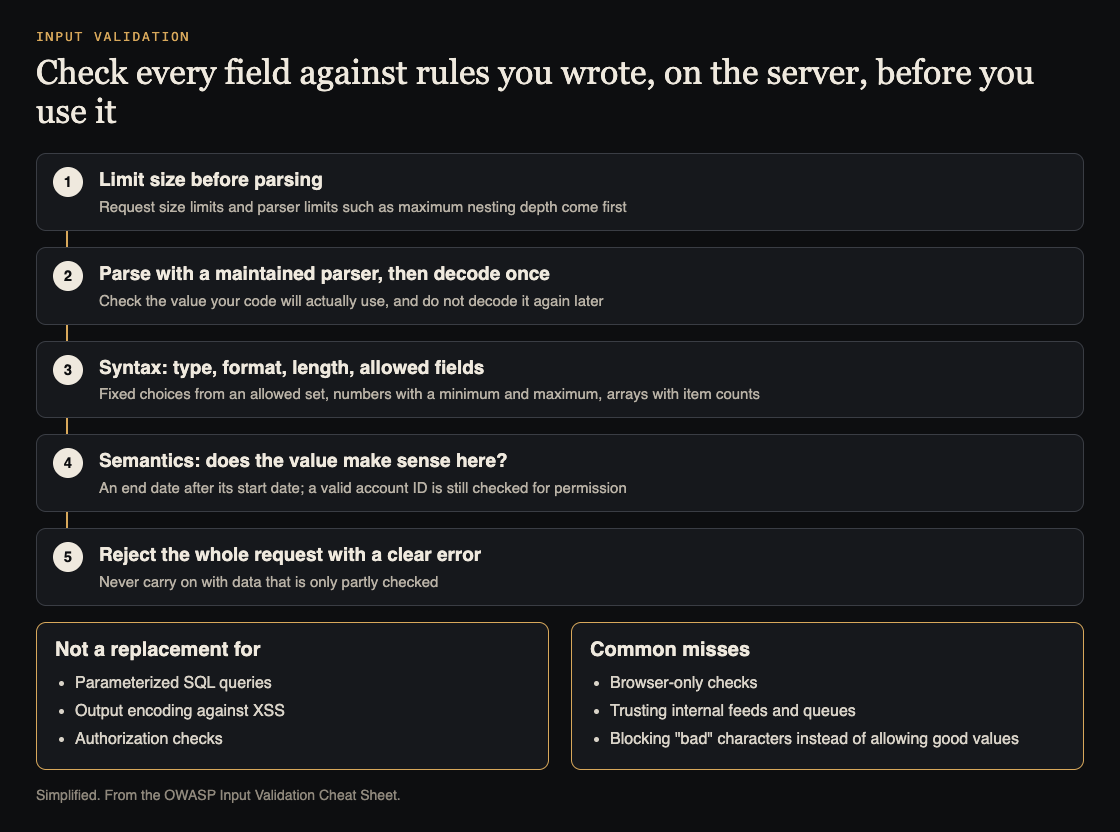
The order of the checks, and what validation does not replace. Simplified from the OWASP Input Validation Cheat Sheet.
- Limit size before parsing. Set a request size limit and parser limits such as maximum nesting depth. A schema check after parsing cannot protect a parser that has already run out of memory.
- Parse with a maintained parser, and decode once. Check the value your code will actually use. Decoding it again later can undo an earlier check.
- Check syntax. Type, format, length and allowed fields.
- Check meaning. OWASP calls this semantic validation: does the value make sense for this operation? A booking needs an end date after its start date.
- Reject the whole request with a clear error. Never carry on with data that is only partly checked.
Write allowlist rules, not blocklists
A blocklist tries to name the bad things. OWASP's example shows why that fails: blocking apostrophes rejects real names and still does not make a database query safe. An allowlist names what each field accepts and rejects the rest. For the profile example:
displayName: a string of 1 to 50 characters. Allow letters in any script and the punctuation real names use, such as apostrophes and hyphens.bio: a string of 0 to 500 characters, broad Unicode allowed. Free text is fine if its length is limited.locale: exactly one ofen,ptores.- Any other field in the body: reject the request.
OWASP's per-field rules give you a checklist. Fixed choices need exact membership in the allowed set, including values from drop-down menus. Numbers and dates need a type, a format and a minimum and maximum. Strings need length limits. Objects need allowed and required fields. Arrays need minimum and maximum item counts, with every item checked.
If you use regular expressions, match the whole value, limit the length before matching, and avoid patterns that backtrack heavily. Treat a timeout as a failed check.
Worked example: test the profile endpoint with malformed requests
Rules on paper prove nothing. Send requests your front end would never send, using a test account on a staging copy of your app. A basic test with curl looks like this:
curl -X PATCH https://staging.your-app.example/api/users/me -H "Content-Type: application/json" -H "Cookie: session=YOUR_TEST_SESSION" -d '{"displayName": 12345}'
Work through each field with these cases:
- Wrong type. A number where a string belongs, an array where an object belongs,
null,true. - Empty and missing. An empty string, then the field left out.
- Too long. 10,000 characters in a 50-character field, then a very large body.
- Out of range.
-1,0, a huge value, a decimal where a whole number belongs. - Bad format. An email with no
@, a date like2026-13-45. - Wrong meaning. An end date before its start date.
- Deep and wide. Nested objects many levels deep, and arrays with thousands of items.
A good API answers each with a clean 400 and a short message, such as displayName must be 1 to 50 characters. Watch for a 500, a stack trace, a slow response or a 200 that saved the junk. Each one points to a check that is missing or in the wrong place.
Reject unknown fields in JSON payloads
Many frameworks make it easy to save the whole request body to the database record. Send the profile endpoint fields the form never shows:
{"displayName": "Ana", "role": "admin", "emailVerified": true}
Then fetch the profile again. If an extra value stuck, you have mass assignment; the mass assignment testing guide covers it in depth. OWASP's advice is to bind only the fields you intend.
Schemas need care here. OWASP notes that in JSON Schema, listing a property neither makes it required nor rejects unknown fields. Set the required fields and turn off additional properties on purpose, and apply the schema to nested objects and arrays too. Test with a nested body like {"settings": {"billing": {"discount": 100}}}.
Where valid data still causes harm
All of this runs on the server. Browser checks help honest users fix typos; OWASP calls client-only checks bypassable. Then follow each value that passes to the place it is used:
- Text shown in a page needs output encoding. See how to test where user input runs as code.
- Text fed into a server-side template, like an email, can break out into template code. See template injection testing.
- Values that reach a database still need parameterized queries.
- Rejected input written to logs needs escaping. OWASP warns against logging it verbatim; see stopping fake entries in your logs.
Frequently asked questions
Is client-side validation enough to protect an API?
No. Anyone can call your API directly and skip the browser, so client-side checks only give users quick feedback. Every rule that matters must also run on the server.
What is the difference between input validation and output encoding?
Input validation decides whether data is allowed in at all. Output encoding makes allowed data safe for the place it ends up, such as an HTML page. You need both, because valid free text can still be dangerous when it is shown.
Should I strip dangerous characters from input?
No. OWASP lists cleaning input as a common mistake: removing characters can change the meaning and still does not give you parameterized queries or output encoding. Reject values that break the field's rules instead.
Does a valid ID mean the user may access that record?
No. Validation only says the ID has the right shape. Whether this caller may read or change that record is a separate authorization check.
Get started
Pick one endpoint today. List its inputs, write an allowlist rule for each, then send the seven kinds of malformed request and the unknown-field test. Write down every 500, every leaked detail and every extra field that saved. That list is your first fix plan.
If you want a second pair of eyes, whitehatstoic's security testing covers web app and API review, with a written report, fixes and a retest after fixes. It is scoped after a short call, and no test can promise to find every weakness.

Building something that has to be safe? Book a meeting with whitehatstoic: tell us the product, the deadline and your biggest worry, and we reply with a plan and a price.
Comments
No comments yet.
Sign in or make an account to comment.