Is a browser screen recorder private? What leaves your computer
Is a browser screen recorder private? It depends on what the recorder sends, and where. For Cheap Recorder, the privacy page spells it out: the recording itself stays on your own computer, and a few other things leave it, each for a stated reason. This post lists every one, what you can switch off, and a worked example of keeping a sensitive recording to yourself.
The short answer for this browser screen recorder
The video does not leave your computer unless you ask it to. Cheap Recorder writes each recording to a folder you choose, and the privacy page says it does not keep copies. Four other things can leave:
- an activity log, sent to Cheap Recorder while you use the recorder;
- your microphone audio, sent to Google by Chrome while the live transcript is on;
- the file itself, sent to Cheap Recorder's server when you press Convert or Download MP3;
- the transcript, sent to Anthropic when you press an AI button.
The page also carries visit counting. Each of these is covered below, in the privacy page's own terms.
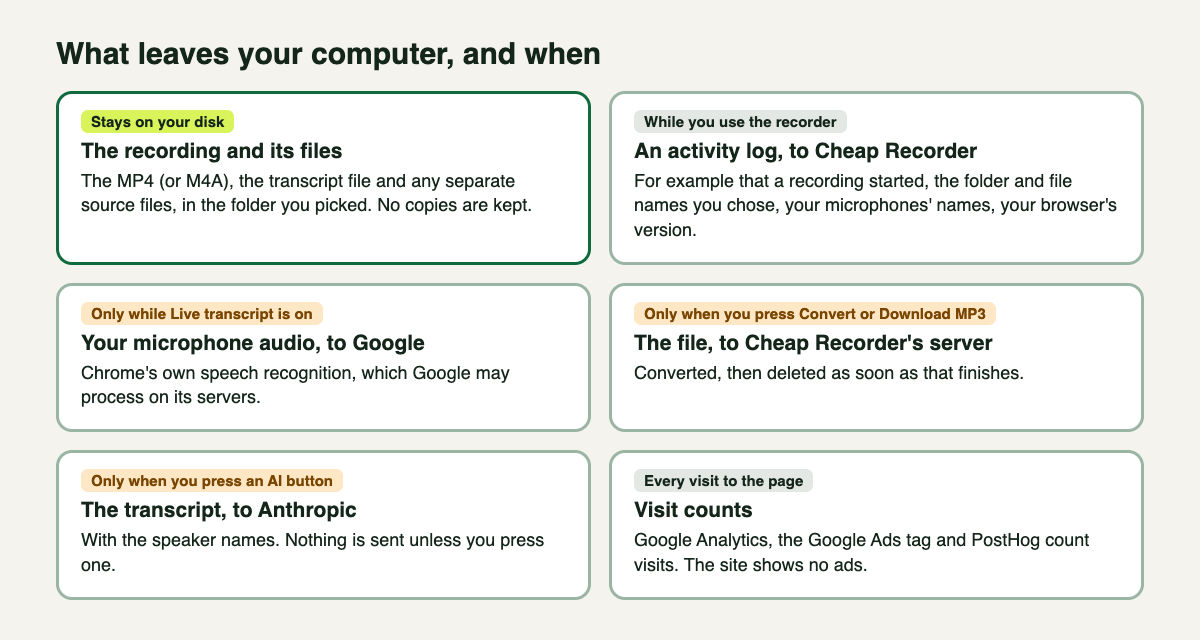
What a Cheap Recorder session sends, and when, from its privacy page.
What stays on your computer
The recording, its transcript file and any separate source files are written to the folder you picked under Where to save. The where recordings are saved guide says the same as the privacy page: no copy is kept. Deleting your account does not touch the recordings on your computer.
What ends up in the file is your choice too. Chrome opens its own sharing box, and you pick a whole screen, one window or one browser tab there. Sharing one window or one tab keeps your other tabs and apps out of the recording. Anything on the shared screen goes into the file, so close what you do not need and silence notifications first.
What Cheap Recorder itself receives
The privacy page lists what the service keeps about you:
- Your account: name, email address, plan, trial and billing status, and when you joined.
- Usage: how many minutes you record and how many AI credits you use each month, so your plan's limits work.
- An activity log of what happens in the recorder, for example that a recording started, the folder and file names you chose and the names of your microphones, with your browser's version. It is kept while your account exists, to help you and to fix problems.
That third item is the one people miss. The video stays home, but the name you type in Name this recording and the name of the folder you save into are in the log. If a recording's name would itself be sensitive, choose a plain one.
When you delete your account, the privacy page says your account, usage, support messages and activity log are deleted straight away; payment records are kept for the company's accounts.
What goes to Google and to Anthropic
The live transcript
Transcripts are made by Chrome's own speech recognition. While the live transcript is on, Chrome sends your microphone audio to Google to turn it into text, and the privacy page says Google may process it on its servers under Google's privacy policy. Live transcript is a tick box under Options. Untick it and that audio is not sent, though you then get no transcript or captions for that recording. The live transcript guide covers the rest.
The AI button
When you press an AI button, your transcript, with the speaker names, is sent to Anthropic to produce the result. Nothing is sent unless you press one.
What goes to the server when you convert
The convert guide says the only time a recording leaves your computer is when you press Convert or Download MP3. The file is sent to Cheap Recorder's server, converted, and deleted as soon as that finishes. The original in your folder is never changed.
If a recording must not leave your computer at all, skip Convert. The MP4 already plays almost anywhere. With every source saved separately, bash finalise.sh makes a finished demo.mp4 on your own computer, using ffmpeg installed there.
Visit counting on the page
Every page for visitors, the recorder included, carries Google Analytics and the Google Ads tag, and visits are counted with PostHog. In the EEA, the UK and Switzerland, the Google tags set no cookies, and PostHog uses no cookies anywhere. The site shows no ads and sets no tracking cookies of its own. This counts visits to the page; it is not the recording.
Worked example: recording a sensitive client walkthrough
Say you are walking a client through their own account in a web app, and the recording should stay with you until you choose to send it.
- Tell the client you are recording. Recording a call may need everyone's agreement, depending on where you and they are.
- Name it plainly. Type something like
Walkthrough 03in Name this recording, not the client's name or account number, since file and folder names are in the activity log. - Share one tab. Under What to capture, choose A browser tab and pick the app's tab in Chrome's sharing box. Close other tabs and silence notifications.
- Decide on the transcript. Leave Live transcript ticked if you want captions and accept that Chrome sends the audio to Google; untick it if not.
- Record, then stop. Press Stop and finish. The MP4 is in your folder.
- Keep it local. Do not press an AI button or Convert. Send the MP4 yourself, by whatever route the client trusts.
For a client demo page, see how to zip a screen recording folder so the demo page opens; and if you are leaving, cancelling a plan keeps every recording.
Frequently asked questions
Does Cheap Recorder upload my screen recordings?
No. Recordings are saved to your own folder and no copies are kept. A file only goes to the server when you press Convert or Download MP3, and it is deleted as soon as the conversion finishes.
Does the live transcript send my voice anywhere?
Yes. Chrome's speech recognition sends your microphone audio to Google to turn it into text while the live transcript is on. Untick Live transcript under Options to stop that.
What does the AI button send?
Your transcript, with the speaker names, to Anthropic, and only when you press it.
Can Cheap Recorder see my file names?
Yes. The activity log includes the folder and file names you chose and your microphones' names. It is kept while your account exists and deleted with it.
Get started
Recording, the live transcript and captions are on the Free plan. Open the recorder in Chrome, pick a folder, and read the privacy page once before you record anything sensitive.
The free plan needs no card. Try Cheap Recorder in Chrome, and your recordings stay on your own disk.
Comments
No comments yet.
Sign in or make an account to comment.