JWT security: test how your app checks tokens
JWT security comes down to one question: does your code actually verify a token before it trusts what the token claims? A JSON Web Token is just three base64 parts joined by dots. The header and payload are readable by anyone. The only thing that makes a token trustworthy is the signature, and the only thing that makes the signature mean anything is a strict server side check. When that check is loose or missing, an attacker can forge a token that says "I am the admin" and your app will believe it.
This post walks through what to test, in the order a real verifier runs, using the OWASP JSON Web Token Cheat Sheet. You get a step by step validation flow, four concrete test cases with example tokens and expected outcomes, and a way to put those checks in CI so a future change cannot quietly weaken them.
What JWT security testing checks and why validation fails
JWT security testing checks that your app rejects every token it should reject, not just that it accepts the good ones. Most teams only test the happy path: log in, get a token, call an endpoint, see a 200. That tells you nothing about the dangerous paths. The failures live in the tokens you never tried: a token with the signature stripped, a token signed with a key you did not issue, a token that expired an hour ago, a token minted for a different app.
Validation fails for predictable reasons. A library is called with "verify" settings that do not actually enforce the algorithm. The signing secret is short enough to brute force offline. The code reads the user id from the payload before confirming the signature. Expiry is present in the token but never compared to the clock. Each of these is a single missing line, and each one lets a forged token through.
How your app should verify a token, step by step
Before you write tests, pin down what correct looks like. On every protected request your server should do all of these, in order, and stop at the first failure:
- Split the token and read the header, but do not trust it yet.
- Confirm the
algis one you expect, from a fixed allow list, not whatever the token asks for. - Verify the signature with your key for that algorithm. If this fails, reject.
- Only now read the payload claims.
- Check
exp(expiry) against the current time, with a small clock skew allowance. - Check
nbf(not before) andiat(issued at) if you use them. - Check
iss(issuer) andaud(audience) match your app exactly. - Check the token is not revoked, if you keep a revocation list or session record.
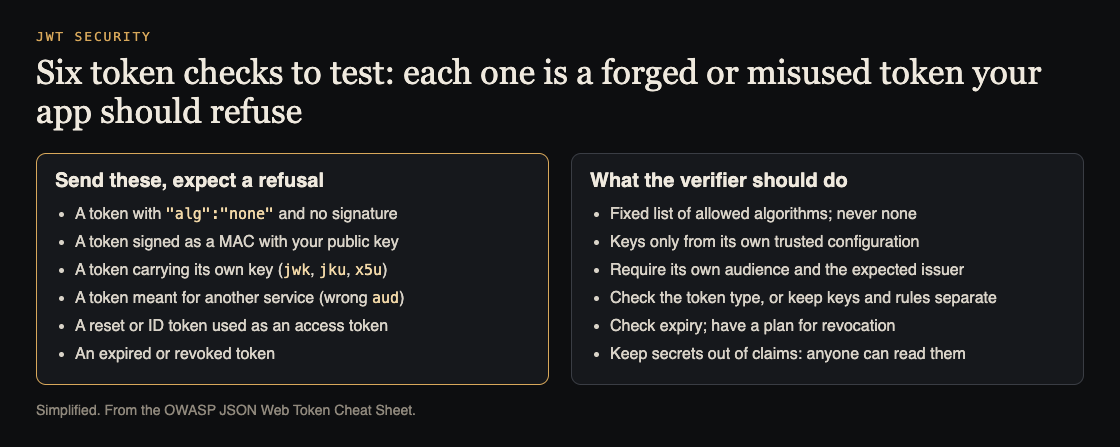
Six tokens your app should refuse, and the checks that refuse them. Simplified from the OWASP JSON Web Token Cheat Sheet.
The tests below each attack one of these steps. If a test passes when it should fail, you have found a real gap.
Test 1: Signature checks, alg none and algorithm confusion
Start with the signature, because it is the whole point of a JWT. Take a valid token your app issued. Now change the header so alg reads none, remove the signature part, and keep the trailing dot. Send it. A correct app returns 401. A broken one treats an unsigned token as valid. OWASP notes some libraries used to accept "alg":"none" by default.
Next, test what OWASP calls key type or algorithm confusion. If your app verifies tokens signed with RS256 (a private key signs, a public key verifies), try re signing the token with HS256 using the public key as the HMAC secret. The public key is not secret, so if your verifier accepts HS256 here, an attacker who knows your public key can forge any token. The fix is a fixed algorithm allow list: if you issue RS256, verify only RS256 and reject everything else before checking the signature.
A quick manual check: edit just the payload (flip a role from user to admin) without re signing, and send it. The signature no longer matches the body, so a correct verifier rejects it. If it works, your app is not verifying the signature at all.
Test 2: Weak secrets and keys named in the token
For HS256 tokens, the whole system rests on the secret. If that secret is a dictionary word or a short string, an attacker who captures one token can brute force the secret offline and then mint unlimited valid tokens. Test this by checking the secret itself: it should be long and random, treated like any other credential, and never committed to your repo. Rotate it if it has ever been in source control.
A token header can also carry a key, or point to one: jwk embeds a key, and jku or x5u point to a URL. OWASP's warning is plain: an attacker can sign a token with their own key and put that key, or a link to it, in the header. Test by doing exactly that. The verifier must only use keys from its own trusted configuration; kid should only pick among keys you already set up, through a fixed lookup. A verifier that fetches a key from a URL in the token has also built an SSRF path into sign-in.
Test 3: Expiry, audience, issuer and token type
A signature that is valid forever is still a problem. Take a known good token and wait past its expiry, or craft one with an exp in the past, and send it. Your app must reject it. Many apps verify the signature correctly and then never look at exp, so an old leaked token works for months.
Test nbf by sending a token whose "not before" time is in the future. It should be rejected until that time arrives. Test iss and aud by taking a token that is perfectly valid for a different service or environment and sending it to this one. If your staging token works in production, your audience check is missing. OWASP calls this audience confusion: a token minted for a low-privilege service replayed against an internal API. Finally, test token type confusion: send a password-reset or ID token where an access token belongs. OWASP's fix is an explicit typ checked by the verifier, or separate keys and claims per token kind.
Test 4: Revocation, logout and token storage in the browser
A stateless JWT is valid until it expires, even after the user logs out, unless you add revocation. Test logout: sign in, grab the token, log out, then reuse the old token. If it still works, your logout only cleared the browser and the token is still a live key. For real revocation you need a server side check, such as a short lived access token plus a refresh token you can invalidate, or a deny list keyed on a token id.
Then test storage. If your token lives in localStorage, any cross site scripting bug on your page can read it and send it to an attacker. If it lives in a cookie, the cookie needs HttpOnly, Secure and SameSite, and you need CSRF defenses because cookies ride along automatically. See CSRF protection for that side. Also confirm tokens never land in server logs: OWASP notes claims are exposed in logs, browser storage and referrer headers.
Automate JWT checks in CI so regressions get blocked
Finding these gaps once is good. Keeping them closed is the real work. Turn each test above into an automated case that hits a protected endpoint with a crafted token and asserts the status code. Keep a small fixtures file: a valid token, an alg: none token, a wrong key token, a token carrying its own key, a payload tampered token, an expired token, a wrong audience token and a reset token. Each should expect 401 except the valid one.
Wire that suite into your pipeline so a pull request that weakens verification fails before merge. A "verify" flag flipped off, a library upgrade that changes a default, a new endpoint that forgot the middleware: all of these show up as a red build instead of a breach. For a pattern on gating releases this way, see agent security tests for CI.
Frequently asked questions
Is a JWT encrypted or just signed?
A standard signed JWT is not encrypted. Anyone who holds the token can base64 decode the header and payload and read every claim, so never put secrets or sensitive personal data in it. The signature proves the token was not changed, not that its contents are hidden.
How can I tell if my app accepts alg none?
Take a valid token, set the header alg to none, delete the signature, keep the trailing dot, and send it to a protected endpoint. If you get anything other than a rejection, your app accepts unsigned tokens and must be fixed with a fixed algorithm allow list.
Should I store JWTs in localStorage or cookies?
localStorage is readable by any script on your page, so an XSS bug exposes the token. An HttpOnly, Secure, SameSite cookie is not readable by script, but it brings CSRF risk you must defend against. Pick based on your threat model and add the matching protections either way.
Get started
Start with the alg: none token and the tampered payload against one protected endpoint on staging today; both take minutes.
whitehatstoic runs security tests on web apps and AI systems, including web app and API review, with a written report, fixes and a retest after fixes. Testing finds weak spots; it cannot promise to find every one. Testing is scoped after a short call: book a meeting about security testing.
Building something that has to be safe? Book a meeting with whitehatstoic: tell us the product, the deadline and your biggest worry, and we reply with a plan and a price.
Comments
No comments yet.
Sign in or make an account to comment.