Key management: protect and rotate encryption keys
Key management is everything you do with an encryption key besides the encryption itself: making it, storing it, deciding who can use it, changing it, and finally getting rid of it. It is where most real-world encryption fails. A strong algorithm does not help if the key sits in a config file anyone on the team can read. This guide follows the OWASP Key Management Cheat Sheet and turns its lifecycle into a plan.
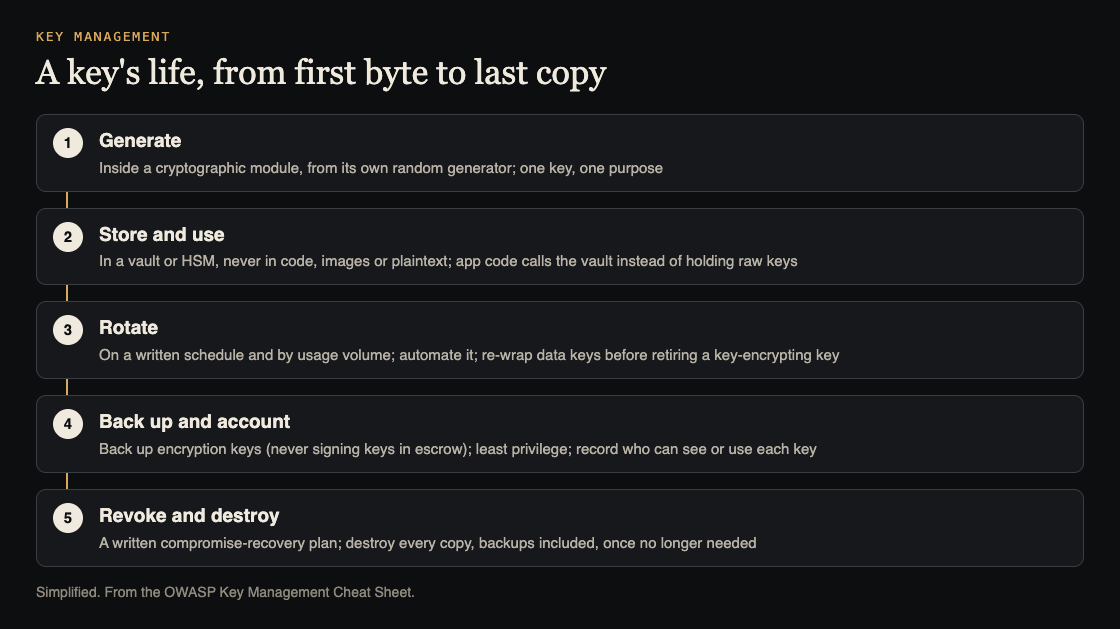
One key's life. Simplified from the OWASP Key Management Cheat Sheet.
Key management starts with an inventory
OWASP's first general rule is to know what you have. Identify your app's cryptographic needs, and map every component that processes or stores key material. That includes the services that encrypt data, the ones that sign tokens, the TLS certificates on your servers, and the backups that hold any of these.
The cheat sheet also asks for written rules for the whole lifecycle: how keys are generated, shared and destroyed, what happens when one is compromised or lost, and where keys are stored. For a company with more than one app, it suggests a shared cryptographic strategy so every team meets the same minimum.
One key, one purpose
Citing NIST, OWASP says a single key should generally be used for only one purpose: encryption, or authentication, or wrapping other keys, or signing. Not two of them.
The reasons it gives:
- Using one key for two different processes can weaken one or both.
- Limiting a key's use limits the damage if it leaks.
- Different uses can clash, for example over how long the key must be kept.
One more rule on strength: when you encrypt a key for storage or transport, use a key of equal or greater strength than the one you are protecting.
Where keys live, and how they are backed up
The cheat sheet's storage rules are strict, and each is easy to check:
- Never commit keys, secrets or API keys to a source repository, and never bake them into build artifacts such as binaries, container images or config files.
- Keep them in a dedicated secrets manager or key vault, never in plaintext.
- Ideally, your application code never reads a raw key at all. It asks the vault or a key management library to encrypt, decrypt or sign, and the key stays inside.
- For higher assurance, OWASP points to hardware-backed modules such as a hardware security module (HSM) or a Trusted Platform Module (TPM).
- If keys must be exported to offline storage, encrypt them first with a key encryption key at least as strong.
Backups matter as much as storage. OWASP is plain about it: data encrypted with a lost key will never be recovered. Back up encryption keys securely. But never place signing keys in escrow, the arrangement where a copy is held by a third party or a separate system for recovery. Our post on secrets management covers the tools side of storing them.
Rotation: by calendar and by volume
A cryptoperiod is how long a key is allowed to be used. Shorter periods limit how much data one key protects and how long a leaked key stays useful. OWASP says to set them by risk assessment and write down a rotation schedule.
Some examples the cheat sheet gives from NIST guidance:
- A symmetric data encryption key in a low-volume app: up to 2 years of encrypting new data. In a high-volume system: on the order of a day or a week.
- TLS certificates: plan renewal around certificate validity limits, and note that renewing a certificate does not necessarily replace its key pair.
Volume matters too, not just time. For AES-GCM with random 96-bit IVs, OWASP says to limit each key to at most 2^32 encryptions across every device that shares it.
If you wrap data keys with a key encryption key, retiring that outer key means re-wrapping the data keys under the new one first. That does not change the data keys themselves; replacing a data key means re-encrypting the data. Our guide to cryptographic storage explains the data key and key encryption key setup.
OWASP prefers automated rotation through a key management service or automated certificate management. When someone must rotate by hand, log the time, who did it, and who approved it.
Who can touch the keys
Apply least privilege to every key and secret. Only roles, services and workloads with a real need should reach keys or the interfaces that manage them.
OWASP prefers that no human can view keys at all. At the very least, your system should know everyone who can. That accountability does three things: it helps you work out when a compromise could have happened and who could have been involved, it discourages misuse, and it helps recovery by showing where each key was used.
The cheat sheet also asks for regular audits of the key management plan and its protections, plus more frequent reviews of what people actually do, since strong cryptography can be undone by careless handling.
When a key leaks, and when it retires
If an encryption key is disclosed, OWASP says, all the information it encrypted could be exposed. You need a compromise-recovery plan written before that day, kept where people can find it. It should list:
- Who to notify, and who performs the recovery
- How to re-key
- An inventory of every key and where it is used
- Training for the people involved
- How to check that re-keying finished for every affected key
Revoke a compromised key promptly and stop using it for new data. When any key is no longer needed, destroy every copy, including backups, archives, escrow copies and copies in memory. OWASP notes that overwriting keys in memory is only best effort in languages with garbage collection, so use the platform's secure memory tools where they exist.
Worked example: key management for a small team
Here is a plan for a team running one web app with an encrypted database field, signed session tokens and HTTPS.
- Inventory (1 hour). List each key: the field encryption key, the token signing key, the TLS key. Note where each is stored and which services use it.
- Separate purposes. If one secret both signs tokens and encrypts data, split it into two keys.
- Move to a vault. Take keys out of config files and environment files and into your cloud provider's key management service, so the app calls it to encrypt and decrypt.
- Scan. Search the repository and container images for key material. Any hit gets rotated, not just deleted.
- Schedule. Write the rotation period for each key and turn on automatic rotation where the service supports it.
- Access. List who and what can use each key. Remove anyone without a current need.
- Recovery plan. One page: who to call, how to re-key each key, and how to confirm it is done. Practise it once.
Frequently asked questions
How often should I rotate encryption keys?
OWASP says to set the period by risk assessment and write it down. NIST's example for a low-volume app is up to 2 years for a data encryption key, and much shorter for high-volume systems.
Can I keep keys in environment variables?
OWASP's Cryptographic Storage Cheat Sheet advises against it, because environment variables can leak through debug output. Keep keys in a dedicated secrets manager or key vault, and ideally never let the app read the raw key at all.
Should I back up my keys?
Yes, for encryption keys: data encrypted with a lost key cannot be recovered. OWASP says never to escrow signing keys.
Get started
Write today's key inventory: every key, where it lives and who can read it. That one page shows you the first key to move.
whitehatstoic's cybersecurity and AI safety testing includes a web app and API review, a written report with fixes, and a retest after you apply them, scoped after a short call. No test finds every weakness, but a review shows where keys actually sit and who can reach them.

Building something that has to be safe? Book a meeting with whitehatstoic: tell us the product, the deadline and your biggest worry, and we reply with a plan and a price.
Comments
No comments yet.
Sign in or make an account to comment.