Kubernetes security: check your cluster settings
Kubernetes security depends far more on cluster settings than on any single image. Who can call the API, who can reach etcd and the kubelets, what each pod may do and whether secrets are encrypted are all choices someone made, often by keeping a default. This guide follows the OWASP Kubernetes Security Cheat Sheet through those settings, and ends with a review you can run on one namespace.
Kubernetes security: check your cluster settings, not only your images
OWASP calls Kubernetes' flexibility a weakness when it comes to security: it runs on bare metal, in data centers and in managed clouds, and each setup has its own gaps. Its first and best defense is simple. Run the latest stable version, since the Kubernetes project keeps release branches only for the three most recent minor releases and backports security fixes to those. When an image has a flaw, fix the source image and redeploy, rather than patching a running container.
The rest of this guide goes from the control plane, the part that runs the cluster, out to the pods that run your app.
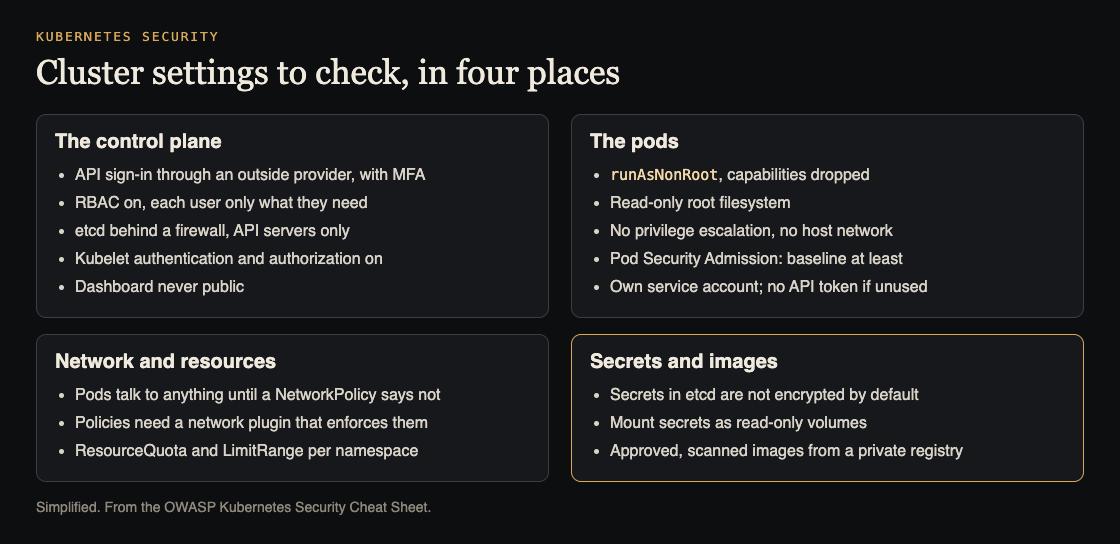
Four places to check. Simplified from the OWASP Kubernetes Security Cheat Sheet.
Lock down the API server, etcd and the kubelets
Kubernetes listens on well-known ports, which makes clusters easy to find. The cheat sheet's table includes 6443 for the API server, 2379 to 2380 for etcd, 10250 for the kubelet API and 30000 to 32767 for NodePort services. Block them at the network, and seriously consider limiting the API server to trusted networks. Then check three components:
- etcd, the cluster's database. OWASP marks it important: write access to it equals root on the whole cluster, and even read access can be used to escalate. Use mutual TLS between the API servers and etcd, and firewall etcd so only the API servers reach it.
- Kubelets, the agents on each node. By default they allow unauthenticated access to their API, which gives powerful control over the node and its containers. Production clusters should turn on kubelet authentication and authorization.
- The dashboard. Many install guides give its service account very high privileges. Never expose it to the public without extra authentication, keep its service account weak, check that no
cluster-adminbinding is left over, and put it behind an authenticating proxy with multi-factor sign-in.
Sign-in and RBAC: least privilege for people and workloads
Every API request must be authenticated and then authorized, and Kubernetes denies by default. For sign-in, OWASP strongly recommends that larger or production clusters use an external method: OpenID Connect with short-lived tokens, the cloud provider's identity system on a managed cluster, or impersonation. It calls the built-in options unsuitable for production; static token files are plain text, and client certificates cannot be revoked. All user access to the API should use multi-factor sign-in.
For permissions, use role-based access control (RBAC). Each role combines verbs such as get, create and delete with resources such as pods and services, scoped to a namespace or the whole cluster. Give each person and each workload the smallest role that does its job. Workloads count: OWASP says to give each application its own service account, and not to mount the service account token at all in a pod that never calls the API.
Safe pod settings and Pod Security Admission
A pod's security context sets what its containers may do. OWASP's conditions for every workload are:
- processes do not run as root (
runAsNonRoot); - privilege escalation is not allowed;
- the root filesystem is read-only (
readOnlyRootFilesystem: true); - unused Linux capabilities are dropped;
- the pod does not share the host's network or process namespace.
The container side of these settings is the same as in Docker security. To enforce them across a cluster, Kubernetes has three Pod Security Standards: privileged, which allows almost anything; baseline, which blocks the most dangerous settings such as privileged containers and host paths; and restricted, which adds hardening such as dropping all capabilities. The built-in Pod Security Admission controller can enforce a level per namespace, or only audit or warn. OWASP recommends baseline as the minimum everywhere and restricted as the goal, with privileged only where cluster services truly need host access. The older Pod Security Policies were removed in Kubernetes 1.25.
Network policies and resource limits
By default, pods are not isolated: any pod can talk to any other, inbound and outbound. A compromised app can then attack its neighbors. Network policies fix that, with two catches from the cheat sheet. Your cluster needs a network plugin that enforces them, or creating a policy does nothing. And inbound and outbound rules are separate, so allowing inbound traffic sets no outbound limit.
Resources are the other shared space. A ResourceQuota caps the total CPU, memory and object counts in a namespace, so one team or tenant cannot starve the rest; a LimitRange sets defaults and bounds for each pod or container. The same thinking appears in limiting what one client can use.
Protect secrets and the images you run
The cheat sheet's most surprising default: the API server stores Secrets in etcd without encryption at rest unless you configure an encryption provider, and existing Secrets must then be rewritten to be encrypted. Mount secrets into containers as read-only volumes rather than environment variables, keep them out of images, encrypt etcd backups, and consider an external secrets manager. Open-source scanners such as Trivy and Gitleaks can find keys left in container filesystems; the wider habits are in secrets management.
For images, OWASP asks for approved base images, a private registry that only receives images that passed a vulnerability scan in your build pipeline, and minimal images without shells or package managers, such as distroless images. At run time, watch for signs of trouble: a shell started inside a container, a sensitive host path mounted, a file such as /etc/shadow read, or an unexpected outbound connection.
Worked example: reviewing one namespace
Say your app runs in a namespace called shop on a managed cluster. Here is a review you can do in an afternoon with kubectl access.
- Version. Check the cluster's Kubernetes version against the three supported minor releases. If it is older, plan the upgrade first.
- Pod security level. Read the namespace's labels. If no Pod Security Admission level is set, add
warnandauditfor restricted, deploy as usual, and read the warnings before you switch toenforce. - Each workload. Read each deployment's security context for
runAsNonRoot,readOnlyRootFilesystem, dropped capabilities and no privilege escalation. Note any that share the host network. - Service accounts. Check that each app has its own service account, list what its role binding allows, and turn off the token mount for apps that never call the API.
- Network. List the namespace's network policies. If there are none, every pod can reach every other; start with a policy that lets the frontend reach the backend on its one port, and confirm your plugin enforces it.
- Secrets and quotas. Ask your provider or admin whether Secrets are encrypted at rest in etcd, check that apps read secrets from volumes, and confirm the namespace has a ResourceQuota.
Fix one item at a time and redeploy after each, since a stricter setting can break an app that relied on a default.
Frequently asked questions
Is a managed Kubernetes cluster secure by default?
Not fully. Defaults the cheat sheet warns about, such as pods that can reach every other pod and Secrets stored unencrypted in etcd unless configured, are yours to change, along with RBAC and pod settings.
Which Pod Security Standard should I use?
OWASP recommends baseline as the minimum for all pods and restricted as the goal, with privileged only for cluster services that truly need host access.
Do network policies work on every cluster?
Only if the cluster's network plugin enforces them. Without one, creating a NetworkPolicy has no effect.
Should apps read secrets from environment variables?
OWASP prefers mounting secrets into read-only volumes rather than exposing them as environment variables.
Get started
Pick one namespace and run the six steps above. If you want an outside review of the app running on your cluster, whitehatstoic's cybersecurity and AI safety testing covers web app and API review, with a written report, fixes and a retest after fixes. whitehatstoic's full-stack development builds apps from database to deploy. No test can promise to find every weakness; the work is scoped after a short call.

Building something that has to be safe? Book a meeting with whitehatstoic: tell us the product, the deadline and your biggest worry, and we reply with a plan and a price.
Comments
No comments yet.
Sign in or make an account to comment.