Laser blaster sounds for an arcade trailer: pick, layer, sync
A good arcade trailer runs on small, sharp sounds. If you are hunting for laser blaster sounds for an arcade trailer, the shot sound you pick, how you stack it, and where it lands against the cut will decide whether your footage feels punchy or flat. This guide walks through picking a blaster, layering it with hits and whooshes, syncing it to picture, and licensing it for the places you plan to publish.
Wavecrate licenses royalty-free sound effects and music, including retro arcade sounds, and every download comes with a license certificate and a code anyone can check on its verify page.

Why laser blaster sounds for an arcade trailer matter
Arcade trailers are short. You have maybe 30 to 60 seconds to show that your game is fast and fun. Most of that energy comes from sound, because a viewer feels a shot before they read it on screen.
A weak blaster makes great gameplay look sluggish. A blaster that is too loud or too long makes the trailer feel tiring by the 15 second mark. The goal is a sound that is short, clear, and easy to repeat without becoming noise.
Retro chiptune zaps vs modern sci-fi blasters: choosing a style
Pick a style before you pick a file. Two broad directions work for arcade games:
- Retro chiptune zaps. Thin, bright, stepped in pitch. They match pixel art, 8-bit music and coin-op nostalgia.
- Modern sci-fi blasters. Fuller, with low end and a tail. They match 3D shooters and neon visuals with a cinematic edge.
Match the sound to the music first. If your trailer track is chiptune or synthwave, a clean zap sits inside the mix. If your track is orchestral and huge, a tiny zap will vanish, and you need weight under it.
On Wavecrate, the place to start is the sound effects browse page. Its Game category lists Laser Blaster, a one second Premium effect, next to retro sounds such as 8-Bit Power-Up, Medium, Bright and Damage and Game Over, Medium, Deep. The Retro arcade collection, found on the collections page, groups Laser Blaster with Coin Pickup, chiptune and synthwave tracks such as Level Select, Boss Rush, Neon Freeway and Save Point.
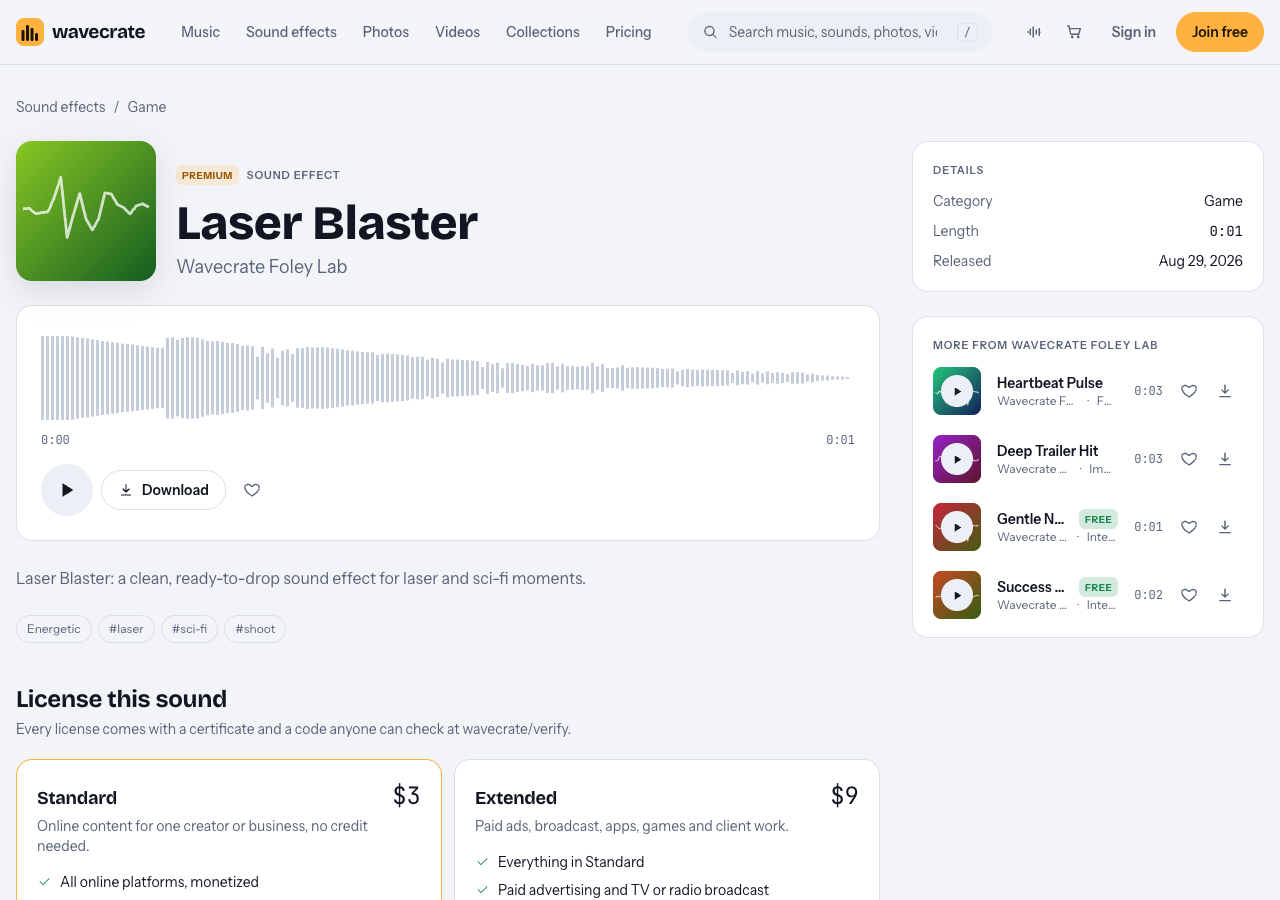
Laser Blaster, read on 11 October 2026.
What to listen for in a great laser blaster sound effect
Preview fast and judge on a few points. Wavecrate's keyboard shortcuts help: Space plays or pauses, and Shift with Left or Right jumps to the previous or next item, so you can audition a row of sounds without touching the mouse.
Listen for these things:
- Attack. The start should be instant. Any soft fade in at the front will feel late against a muzzle flash.
- Length. For rapid fire, shorter is better. A one second file like Laser Blaster leaves room to fire again before the tail piles up.
- Pitch. A shot that ends on a falling pitch reads as "fired away." A rising pitch reads as "charging."
- Repeat fatigue. Play it ten times in a row. If it grates by the fifth play, it will grate in your trailer.
- Space for other sounds. A blaster that fills every frequency leaves nothing for the impact or the music.
Layering blasts, impacts and whooshes for bigger shots
One file rarely carries a hero moment. Layering lets you keep a light shot for normal fire and build a bigger one for the money shots.
Here is a worked example for a boss kill at the end of a trailer:
- Shot layer. Laser Blaster on the frame the beam leaves the ship.
- Air layer. A short whoosh underneath to add movement. Air Cut Whoosh, a Transitions sound marked Free, fits here.
- Impact layer. A hit on the frame the boss reacts. In the impacts category, Deep Trailer Hit is "for boom and trailer moments," and Glitch Impact, Medium, Deep is a one second option that suits a digital look.
- Payoff layer. A tail for the explosion. Metallic Boom, Long, Deep, a 5 second impact, gives the explosion size.
Keep each layer doing one job. The shot gives the start, the whoosh gives motion, the impact gives the hit, and the boom gives size. If two layers fight in the low end, cut the bass from the one that matters less.
For normal gameplay shots, drop back to the shot layer alone. The contrast is what makes the boss kill feel big.
Syncing laser sounds to cuts, beats and on-screen action
Sync is where trailers feel tight or sloppy. Use three rules.
Lock shots to the muzzle flash, not the hit. Place the blaster on the exact frame the projectile appears. At 30 fps, a shot one or two frames late already feels off.
Put big shots on the beat. Work out the beat length from the tempo: 60 divided by BPM gives seconds per beat. Last Train Out, a Free Rock track in the Trailer and tension collection, runs at 140 BPM, so one beat is about 0.43 seconds. Rise of the Ember, a Cinematic track in the same collection, runs at 90 BPM, so a beat is about 0.67 seconds. Line up your hero shots and cuts on those marks. The music browse page's tempo filter (Slow under 90, Mid 90 to 120, Fast over 120) helps you pick a track whose pace matches your gameplay.
Use the track's versions. Many Wavecrate tracks come as a full track, a 30 second edit and an 8 bar loop. Rise of the Ember's 30 second edit runs 0:29, which fits a short social cut. A loop is handy when you need to stretch a gameplay section to match footage.
Not every shot belongs on a beat. Rapid fire should follow the picture. Save beat sync for the moments you want the viewer to remember.
Mixing blasters with music and voiceover without clutter
A trailer mix has three main voices: music, effects and voiceover. Give each one a lane.
- Duck the music under hero shots. Pull the music down a few decibels for the length of a big layered shot, then bring it back.
- Thin your blasters under voiceover. While someone is talking, use the shot layer alone, keep it lower, and cut some of its midrange so the words stay clear.
- Cut the low end from small sounds. A high pass filter on the blaster stops dozens of shots from muddying the bass.
- Leave a breath before the payoff. A half second of near silence before the final hit makes the hit land harder.
Check your mix on phone speakers. Many viewers watch trailers on a phone, and a blaster that sounds fine on headphones can disappear or turn harsh on a small speaker.
Licensing laser sound effects for trailers you publish
Where your trailer goes decides which license you need. Wavecrate's pricing table for music and sound effects sets it out:
- Free license (only on items marked Free): YouTube, TikTok, Instagram, Twitch, podcasts and monetized channels, with credit text required in the description. A free account gets 3 free downloads a month.
- Standard: the same platforms, no credit line needed, plus your own business and brand content. Registered channels are printed on the certificate.
- Extended: adds paid advertising, TV, radio and cinema, apps, games and software, and client work.
Laser Blaster has no Free card, so take it through three uses: a trailer for your own game on your own channel is "your own business and brand content", which Standard covers (listed at $3 on its page); running that trailer as a paid ad, or cutting it for a client studio, needs Extended (listed at $9 on its page); and the same sound inside the game is "apps, games and software", Extended only. Prices differ by item, so read each page. The pricing page says that, once purchases open, Standard can be upgraded to Extended for the difference.
If you need a lot of items, Pro is listed at $8.25 a month billed yearly ($99 a year) or $12 month to month, and it covers Standard licenses on the whole catalog. It does not include Extended. Content you publish while subscribed stays covered after Pro ends. Pro and the paid licenses are not on sale yet (Wavecrate says purchases open soon), so the prices here are the listed prices for when sales open, while items marked Free can already be downloaded with a free account.
Every download comes with a license certificate and a code. Paste the code in your video description. Anyone can enter it on the verify page to see the licensee, the item and the license type. You get a license to use the sound; Wavecrate keeps the copyright. See the full breakdown on the pricing page.
Frequently asked questions
Where can I find royalty-free laser blaster sounds?
Wavecrate's sound effects page has a Game category that lists Laser Blaster, a one second Premium effect, alongside chiptune pickups and power-ups. The Retro arcade collection groups it with matching chiptune and synthwave tracks.
How do I make a laser sound feel more retro and 8-bit?
Shorten it, cut the low end, and try a bitcrusher or a lower sample rate to add grit. Pairing it with chiptune sounds like 8-Bit Power-Up and a chiptune track pushes the whole trailer toward a coin-op feel.
Can I use the same laser sounds in the game and the trailer?
Wavecrate's pricing table puts apps, games and software under the Extended license only, so using a sound inside your game needs Extended. A trailer on your own channels fits the Standard license.
Get started
Open the Game category, play Laser Blaster a few times, then pull a whoosh and an impact to build your hero shot. If you only need a few items to test a cut, items marked Free are listed under free downloads, with a credit line in your description.
Browse Wavecrate: you can join free and download items marked Free now, paid licenses are not on sale yet (purchases open soon), and every download comes with a license certificate and a code anyone can check on its verify page.


Comments
No comments yet.
Sign in or make an account to comment.