LDAP Injection Prevention: Check How Your App Builds Queries
LDAP injection prevention starts with one question: how does your app build the query it sends to the directory? If the answer is "we paste the username into a string," that code needs a change. This post gives you the checks from the OWASP LDAP Injection Prevention Cheat Sheet, in the order a small team can run them on its own sign-in and search code. The family of bug is the same one behind NoSQL injection, and the fix follows the same idea: keep data and query structure apart.
What LDAP injection is
The Lightweight Directory Access Protocol (LDAP) lets an application search and change records in a directory over the network. Companies use directories for people, groups and devices, and apps use them to check who is signing in.
LDAP injection comes from inadequate input sanitization and validation. An app that builds an LDAP statement from user input can have that statement altered, in much the same way as in SQL injection. A malicious user can then pull out restricted information from the directory.
OWASP gives two reasons it is common. There are few safer, parameterized LDAP query interfaces, and LDAP is widely used to authenticate users. The results can be permissions granted to unauthorized queries, and content changed inside the LDAP tree. If your app trusts a directory to decide who gets in, read how your app trusts single sign-on too.
Two places user input lands: filters and distinguished names
Before you fix anything, find where input enters. A directory entry has a distinguished name (DN), a unique identifier like uid=inewton, ou=Mathematics Department, dc=Cambridge, dc=com. Apps use DNs to reach a resource, often as a username.
Each entry has attributes, a bit like columns in a database row. To find entries by attribute, the app writes a search filter. Filters use prefix notation, with the operator first and the conditions after it, like (&(ou=Physics)(manager=...)).
So a value can land in two places: a search filter, or a DN. OWASP says untrusted data added to any LDAP query must be escaped, and that the right escaping depends on which place it lands. That is the heart of the topic.
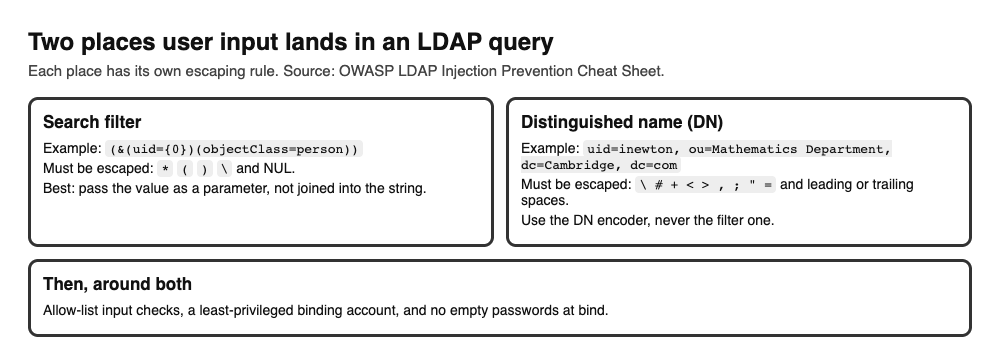
A filter and a DN have different special characters. Pick the escape that matches the place.
LDAP injection prevention: escape for the right place
This is the first of OWASP's two primary defenses: escape every variable using the right LDAP encoding function.
In a search filter, these characters must be escaped: *, (, ), \ and NUL. The filter encoding turns an unsafe character into \XX, where XX is its hex value.
In a DN, the characters to exclude or escape are \, #, +, <, >, ,, ;, " and =, plus leading or trailing spaces.
Do not write these rules by hand. Use a maintained encoder. The sheet points to the OWASP ESAPI Encoder, with encodeForLDAP for filter values and encodeForDN for DN values. In .NET it names the Encoder class, with LdapFilterEncode and LdapDistinguishedNameEncode.
The common mistake is mixing them up. A filter encoder on a DN value, or the reverse, leaves gaps, because the two lists differ. The same habit applies to encoding output for each place it lands.
Pass values as parameters, not joined strings
The second primary defense is a framework or API that protects you automatically. The sheet shows the same Java lookup written two ways.
The insecure version joins the user's input straight into the filter: "(&(uid=" + userInput + ")(objectClass=person))". Any special character in the input is now part of the query.
The secure version writes the filter once, with a placeholder, and passes the value separately: "(&(uid={0})(objectClass=person))", with the value handed over in an object array. The library treats the value as data, not as filter syntax.
For .NET, the sheet recommends LINQ to LDAP, which encodes automatically when it builds queries. It adds a note: the version it names is for .NET Framework 4.5 or lower, until it is updated. Check that your library version still fits before you rely on it.
Add the extra layers
OWASP asks for defense in depth on top of either primary defense. Three layers are listed.
- Allow-list input validation. Check input against a list of characters you accept before it gets near a query. The sheet's Java example accepts word characters and whitespace with
[\w\s]*, and says plainly that this is an illustration, not a rule for personal names. Pick an allow-list that fits your own fields. Normalize input before you validate it, so a trick encoding does not slip past the check. - Least privilege. Give the account your app uses to connect to the directory only the rights it needs. If an injection does get through, the damage is limited to what that account can reach.
- A careful bind. A bind is the step where the app signs in to the directory. The sheet warns that binding with valid credentials does not stop user input from changing a filter, so keep escaping. It also says to reject empty passwords before binding. A non-empty name with an empty password can perform an unauthenticated bind that gives anonymous access, and a success result then proves nothing about who the user is.
Also require authenticated access to protected directory data, so anonymous access cannot read what it should not.
A one-afternoon review you can run
You do not need special tools. Set aside an afternoon and walk through this list on your own code.
- List every directory call. Search your code for each place it searches, binds or compares against an LDAP server. Write each one down.
- Trace each value back. For every filter or DN, follow each piece to where it came from. Mark any piece that came from a form, a header, a cookie or a stored value a user can edit.
- Mark joined strings. Circle every filter built by joining strings. These come first in the fix list.
- Check the place. For each value you escape, confirm the encoder matches where it lands: a filter encoder for filters, a DN encoder for DNs.
- Switch to parameters. Where your library supports a filter with placeholders, move the query to it.
- Check the sign-in. Find the code that binds with a user's password. Confirm an empty password is rejected before the bind.
- Check the account. Look at the rights of the connecting account. Cut anything the app does not use.
Fix the joined strings first, then the account, since those two change the most risk. Keep a short note of what you found for the next review. A checklist like this lowers the chance of the common mistakes, and it cannot prove an app is free of injection.
Frequently asked questions
What is LDAP injection?
It is a flaw where user input changes an LDAP query because the app built the query from raw input. It can expose restricted directory data or allow changes inside the directory.
Is escaping enough for LDAP injection prevention?
Escaping the right characters for the right place is one of OWASP's two primary defenses, and a framework that escapes for you is the other. Add allow-list input validation and a least-privileged account as extra layers.
What is the difference between a filter and a DN?
A filter is the search condition, like which uid to look for. A DN is the unique name of one entry. Each has its own list of characters to escape, so use the encoder made for the place.
Why reject empty passwords at sign-in?
A non-empty name with an empty password can perform an unauthenticated bind. The bind may report success, and that success does not prove who the user is.
Get started
Start today with the list: find every place your code talks to a directory and trace each filter and DN back to its input. Fix the joined strings first, then check the sign-in code for empty passwords.
If you want a second pair of eyes, whitehatstoic runs security tests on web apps and APIs, with a written report and fixes. You can book a security testing call, and the work is scoped after a short call. No test can promise to find every weakness, so treat a report as a clear list to work from.
Building something that has to be safe? Book a meeting with whitehatstoic: tell us the product, the deadline and your biggest worry, and we reply with a plan.
Comments
No comments yet.
Sign in or make an account to comment.