Legacy application security: manage old apps you cannot retire
Legacy application security is the work of protecting an old app that your team still depends on but cannot replace yet. The OWASP Legacy Application Management Cheat Sheet says there is no one-size-fits-all fix, so it offers practical steps instead: know what you run, limit who can reach it, scan and patch, watch it closely and plan the way out. This guide turns those steps into a plan a small team can follow, then walks through one old internal tool.
Why legacy application security is hard
OWASP defines a legacy application as one that is recognized as outdated but still in active use. Teams keep them because no good replacement exists, replacing them costs too much right now, or the app is so custom that it serves one narrow job nobody else covers. OWASP gives three reasons they add risk:
- The app may be at end of life, so it no longer gets patches or vendor support, and known flaws stay open.
- It may use technology that is no longer common or taught, so the people who could fix a flaw are hard to find.
- It may produce data in custom formats or use old interfaces and network protocols, which makes it hard to feed into vulnerability management or security logging.
The right approach depends on what data the app holds, whether it has known flaws, and how far you can restrict access to it. OWASP adds that you may need advice from a security expert, inside or outside your company, who can look at your exact setup.
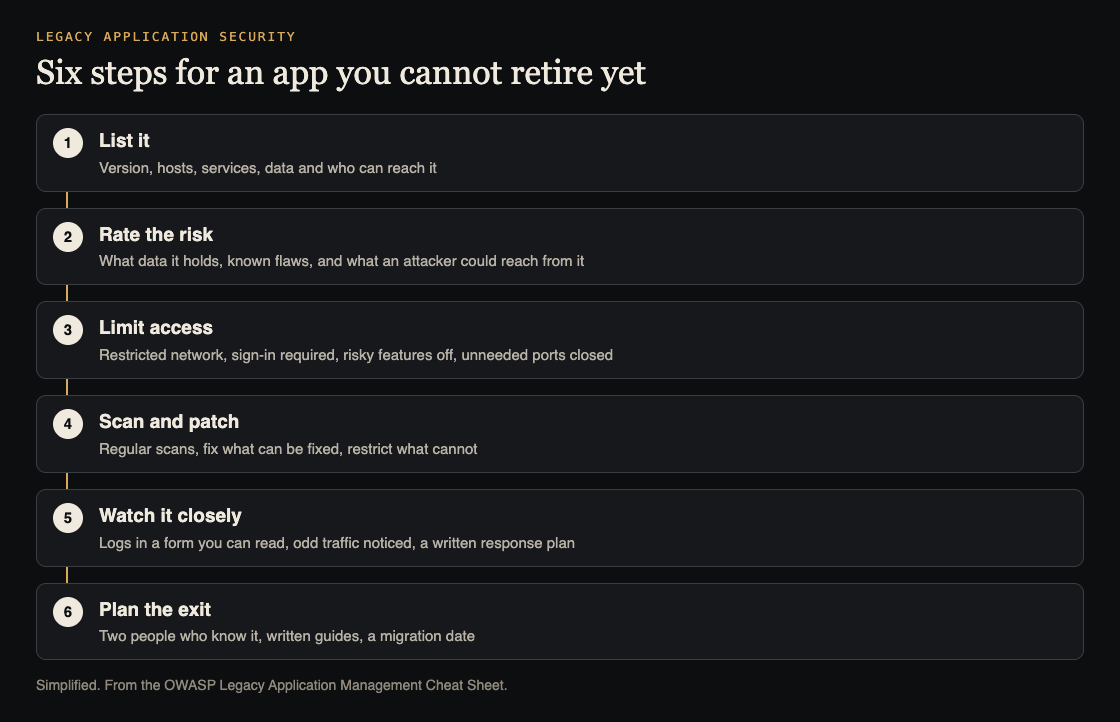
Six steps for an app you cannot retire yet. Simplified from the OWASP Legacy Application Management Cheat Sheet.
List every old app and rate its risk
You cannot protect what you have not written down. OWASP's baseline is an inventory of each legacy app with its version number, the date it went into production and its configuration settings. Add which network hosts a person must be on to reach it, the services running on its servers and data stores, and sometimes where the servers physically sit and who may enter. If the app depends on third-party parts, a Software Bill of Materials, a list of every component inside it, helps.
Then rate the risk, for the whole app and for parts of it such as one API route or one open port. A one-afternoon threat model is enough to start. OWASP also offers four plain questions:
- What information does the app handle, and what would a leak do to your business?
- Does the app, a part it depends on or its servers have known flaws, how easy are they to use, and can you patch them with the right people?
- How badly does your business need the app to stay up?
- If an attacker got in, could they steal other critical data or reach a privileged network from it?
The more the answers worry you, the more conservative the protections should be.
Limit who and what can reach it
OWASP says to treat every legacy app as high risk and to apply least privilege, which means giving each person and system only the access its job needs. Its list of controls, from the outside in:
- Network controls: host the app in a restricted subnet, allow only listed IP addresses, or in some cases run it air-gapped, cut off from other networks.
- Fewer features: switch off high-risk functions, especially administrative ones, for most users.
- Sign-in: only authenticated users may reach it, either through the app itself or an identity provider. If the app sits on a restricted network, require sign-in to that network too, for example through a VPN. OWASP notes this slows an attacker down and helps an investigation afterwards.
- Closed ports: close every port on the app's servers that is not strictly needed, and use firewall rules to restrict the rest.
- A go-between: in some cases you can build a separate service, such as a small set of APIs, that moves data in and out of the old app so users never touch it directly.
The same idea runs through network segmentation and zero trust architecture: assume the old app will be attacked and make sure a breach stays small.
Scan and patch what you can
Scan the app on a regular schedule, ideally automatically, with a standard vulnerability scanner. Where you have the code, a static code scanner can catch obvious flaws and a dependency scanner can find vulnerable parts. OWASP admits that none of these may work on a very old app. Then the only choice is a person checking the host's configuration and reading the code by hand.
Patch confirmed flaws where you can. OWASP says to rank the work by how exposed and important the app is, the impact and ease of using the flaw, and any evidence that attackers are using it already. It also says a CVE number, the public ID for a known flaw, does not by itself settle the priority. Our guide to dependency updates covers the routine side.
When a patch is not possible, OWASP's answer is to restrict the affected part further with the access controls above. A related option is virtual patching, which shields a flaw until a fix exists.
Protect the data and watch the app closely
Where you can, encrypt the app's data both when it is stored and when it travels. Some legacy apps can only speak older protocols that send data as plain text. OWASP says to apply the tightest network limits you can in that case, up to temporary or permanent air-gapping.
OWASP asks for an especially high level of monitoring and quick follow-up on anything odd. The trouble is that old apps often write logs that your monitoring tools cannot read. Its two workarounds are a custom interface that converts the app's information into a form your tools accept, or scripts that produce reports looking for signs of compromise. Either way, watch for strange traffic into and out of the app's environment and for sudden surges.
Write the response plan before you need it: what to do if the app goes down or is compromised, who to call, and who leads. Tell whoever handles incidents that this app is a priority. OWASP says to plan this inside your wider business continuity plan.
Keep the know-how and plan the exit
An app nobody understands cannot be fixed. OWASP's advice is to train more than one person to troubleshoot and reconfigure it, so one departure does not end your ability to maintain it. Write down how it works and keep troubleshooting guides for the common failures. If nobody knows the language the app is written in, you may need to teach a core group enough of it to write basic programs.
Most legacy apps should end up replaced by something maintainable and built to resist today's threats. OWASP lists what a plan should weigh: how much money is available and when, whether you have or can find the people to do the move, and how urgent it is given the app's risk and how much risk you accept. The plan, formal or informal, should list small steps, give a real completion date and state the business and security case. Ask the people who run and use the app how critical it is and what stands in the way.
Worked example: an old invoicing tool
Imagine a small company that still runs an invoicing tool built years ago by a contractor, with no vendor support. Here is how the steps above could look for it.
- List it. Write down the version, the server it runs on, the database behind it, its open ports and the three people who use it.
- Rate it. It holds customer names and billing details, a leak would hurt, and a scan finds two known flaws in an old library. Rating: high.
- Limit access. Move it to a restricted subnet, require the VPN and sign-in, switch off the admin screen except for one account, and close every port but one.
- Scan and patch. Schedule a weekly scan. Update the library if the tool still runs; if it breaks, keep the restriction and write down why.
- Watch it. The tool writes plain text logs, so a small script turns them into a daily report of failed sign-ins and odd requests.
- Plan the exit. Train a second person, write a guide for the two failures that happen most, and set a date to move to a maintained invoicing product.
None of this makes the tool safe, and the cheat sheet never claims it does. It lowers the odds and the damage while the replacement is built.
Frequently asked questions
What counts as a legacy application?
OWASP calls it an application that is recognized as outdated but still in active use, often because replacement is too costly or no good alternative exists.
What if the app no longer gets security patches?
Restrict it harder. OWASP's answer is to apply extra access controls to the affected parts, such as a restricted network, required sign-in, fewer features and closed ports.
Is a scan enough?
No. A scan finds known flaws, but some old apps cannot be scanned at all, and then OWASP says manual review of the host's setup and the code may be the only option.
When should we replace it?
As soon as budget, skills and the app's risk allow. OWASP says to set an explicit completion date and write down the business and security case.
Get started
If you run an old app and want a second pair of eyes on it, book a call with whitehatstoic. The security testing service covers web app and API review, with a written report, fixes and a retest after fixes, scoped after a short call. We cannot promise a test finds every weakness, but we can show you where to start.

Comments
No comments yet.
Sign in or make an account to comment.