Lessons learned log: how to record what worked and what failed
A lessons learned log is a running record of the problems your team hit, what you tried, and what actually happened. Done well, it stops the next person from repeating a mistake you already paid for. Done badly, it is a document written once at the end of a project and never opened again. This guide shows you a simple shape that keeps a log useful, with a worked team example.
What a lessons learned log is for
The Lean Enterprise Institute describes a practice called hansei, Japanese for "self-reflection". In the Toyota Production System, it says, reflection meetings "typically are held at key milestones and at the end of a project to identify problems, develop countermeasures, and communicate the improvements to the rest of the organization so mistakes aren't repeated" (Lean Enterprise Institute, Hansei).
That sentence holds the whole job of a lessons learned log:
- Identify problems. Name what went wrong, plainly.
- Develop countermeasures. Record what you tried in response.
- Communicate. Put it where the people who need it will see it.
Most logs do the first part and skip the other two. They list what went wrong, but not what was tried, whether it worked, or who should read it.
The four things every entry needs
Keep each entry to one problem. A page titled "Q3 lessons" with twenty bullets is hard to search and harder to act on. Give every entry these four parts:
- The problem, in one line. What happened, how often, with no blame in it. "The newsletter goes out late every month", not "Jo keeps missing deadlines".
- What you tried. Every attempt, not only the one that worked.
- The outcome of each attempt. One word: worked, partly or failed, plus one line of evidence.
- What the working fix needs. The condition that has to stay true for the fix to keep working, such as a deadline, an owner or a tool.
The fourth part is the one most logs miss. A fix that worked last spring can quietly stop working when the thing it depended on changes. Writing the requirement down tells the next person what to protect.
Record the failures as plainly as the wins
Teams are tempted to tidy a lessons learned log so it reads well. That removes the most useful part. A failed attempt tells the next team which idea not to try again, and saves them the weeks it cost you.
Problem Graph's home page puts it well: "The graph is honest. A solution that failed three times stays on the map as a failed solution, and that is exactly what the next person needs to know."
Two habits help:
- Use the same three outcome words every time. Worked, partly, failed. It makes entries easy to compare and hard to spin.
- Add, never erase. If an outcome changes, add a dated line. The history is part of the lesson.
When to write in the log
Hansei points to milestones and the end of a project. Those are good moments for a team review, but if you wait until then, people forget the details. Write an entry at three moments:
- When the problem first shows up. One line is enough.
- When you try something. Add the attempt, even before you know the outcome.
- At each milestone review. Mark each open attempt worked, partly or failed.
The Lean Enterprise Institute compares hansei to the "check" step of the plan, do, check, act cycle, where you evaluate the results and then keep the change or begin the cycle again (Lean Enterprise Institute, PDCA). Your milestone review is that check, with the log as its record.
A worked example: one entry in a team's lessons learned log
Here is one entry from a made up team that sends a monthly newsletter. It shows all four parts.
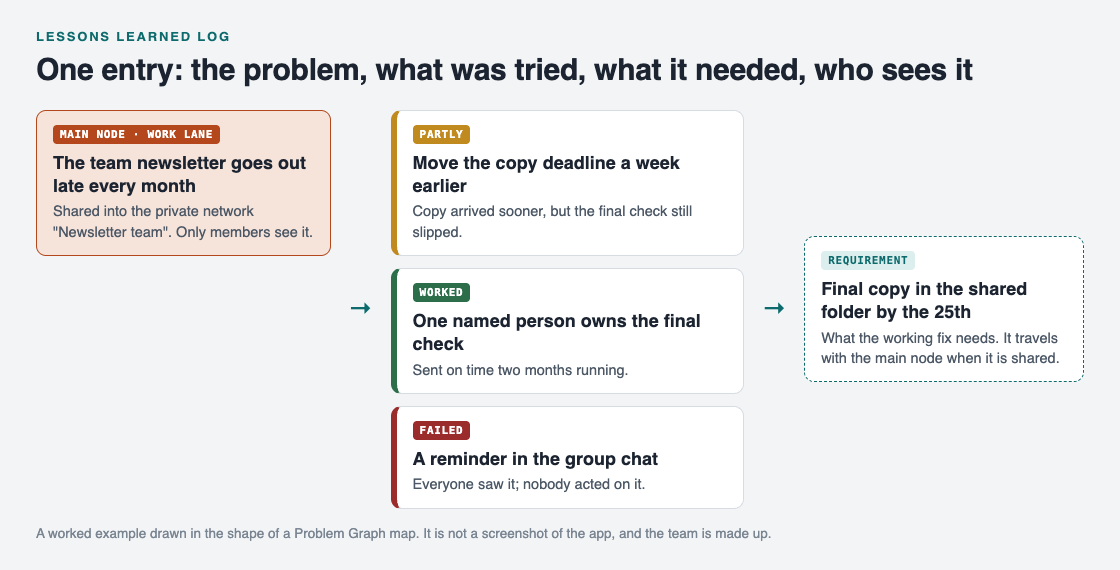
One problem, three attempts with outcomes, and the requirement the working fix depends on.
- Problem: the team newsletter goes out late every month.
- Attempt 1, partly: move the copy deadline a week earlier. Copy arrived sooner, but the final check still slipped.
- Attempt 2, failed: a reminder in the group chat. Everyone saw it; nobody acted on it.
- Attempt 3, worked: one named person owns the final check. Sent on time two months running.
- Requirement: final copy in the shared folder by the 25th, so the owner has time to check it.
If the team later changes who owns the check, or lets the 25th slide, the entry tells them exactly which fix they are weakening and what happened before it existed.
Share the log with the people who need it
A lessons learned log only prevents repeat mistakes if the next person can find it. That usually means a small group, not the whole company and not just you.
Problem Graph handles this with a main node. Here is the newsletter entry as a map:
- Write the problem in one line and put it in the work lane.
- Attach the three attempts as solutions and record each outcome as worked, partly or failed.
- Add the requirement. The map key in the app names three kinds of node: problem, solution and requirement.
- Mark the problem as a main node. Only a main node can be shared, and when it is, its solutions, their outcomes and the requirements they need go along with it.
- Create a private network for the team and give them the invite code. Share the main node into it. Members see it; nobody else does.

The three ways to share on Problem Graph: only you, people you choose, or everyone.
Two things to know. Everything is private by default, so nothing reaches the team until you share it. And the app says anyone with the invite code can join a network, so share the code only with the people you mean to. Problems you merely link to the main node stay home, like the rest of your graph. If a lesson would help people outside the team, you can put a main node out publicly instead, where others can link their own problems to it.
The same shape works for one person. If you want to try it on your own problems first, see this guide to keeping a problem solving journal.
Frequently asked questions
What should a lessons learned log include?
One problem per entry, every attempt you made, the outcome of each as worked, partly or failed, and what the working fix depends on. Add who should see it.
How is a lessons learned log different from a project retrospective?
A retrospective is a meeting. The log is the record that outlives it, so the next team can read what was tried and what happened.
Should a lessons learned log name who made a mistake?
No. Describe what happened and what was tried. Blame makes people hide problems, which empties the log.
How often should a team review its lessons learned log?
The Lean Enterprise Institute describes reflection at key milestones and at the end of a project. Add entries as problems happen, and mark outcomes at each review.
Get started
Pick one problem your team has hit more than once. Write it in one line, list every attempt with worked, partly or failed, and add what the working fix needs. Then share it with the people who will face it next.
Try Problem Graph: it is free, and you can look around the public network without an account. Write one problem down in a line and attach the first thing you will try.
Comments
No comments yet.
Sign in or make an account to comment.