Level up and coin sounds for a mobile game: a practical guide
Good level up and coin sounds for a mobile game do quiet work. They tell the player they did something right, they make a small action worth repeating, and they do it in under a second through a tiny phone speaker, hundreds of times a session. This guide covers how to pick and shape them so they stay satisfying, and which license a sound needs before it goes into your build.
Wavecrate licenses royalty-free music, sound effects, photos and videos, and every download comes with a license certificate and a code anyone can check on its verify page.

A coin pickup is often the most repeated sound in a game; a level up is the rarest and the most important. One says "keep going", the other says "you made it". Keep that contrast clear. If the coin is too grand, the level up has nowhere to go. If the level up is too small, the big moment falls flat.
What makes a coin sound feel right
- Pitch. Bright, high tones read as gain, and a jump up between two notes feels like a reward. A falling shape feels like a loss, which is why game over jingles fall.
- Attack. The sound should start at once. The player touches the coin and hears it on the same frame; a soft start feels laggy.
- Length. Keep it short, or five quick pickups pile into a smear.
A quick test: tap the sound ten times as fast as you can. If it turns to mush, it is too long. If you dislike it by the tenth tap, it is too harsh; take a little off the top and try again.
A level up that lands
A level up has more room: a couple of seconds and more than one layer. A common shape is a short rise that builds, a hit that lands when the new level appears, and a tail that fades while the player reads the screen. Time the hit to the moment the banner settles, not the moment it starts to move.
Keep the level up in the same family as the coin. If your coins are bright and chiptune, an orchestral swell will sound like another game. Pick one palette and stay in it.
Finding level up and coin sounds for a mobile game
On Wavecrate, the sound effects page has a Game category, with filters for length and for access (All, Free or Premium). On 10 October 2026 it held ten sounds, all in one chiptune and arcade family:
- Coin Pickup, one second, marked Free.
- 8-Bit Power-Up, Medium, Bright: "a rising chiptune arpeggio as a player powers up".
- Level Complete, Medium, Warm: "a short chiptune fanfare for finishing a level", two seconds; there is a longer version too.
- Damage and Game Over, Medium, Deep: "a crunchy 8-bit damage hit or a falling game-over jingle", marked Free.
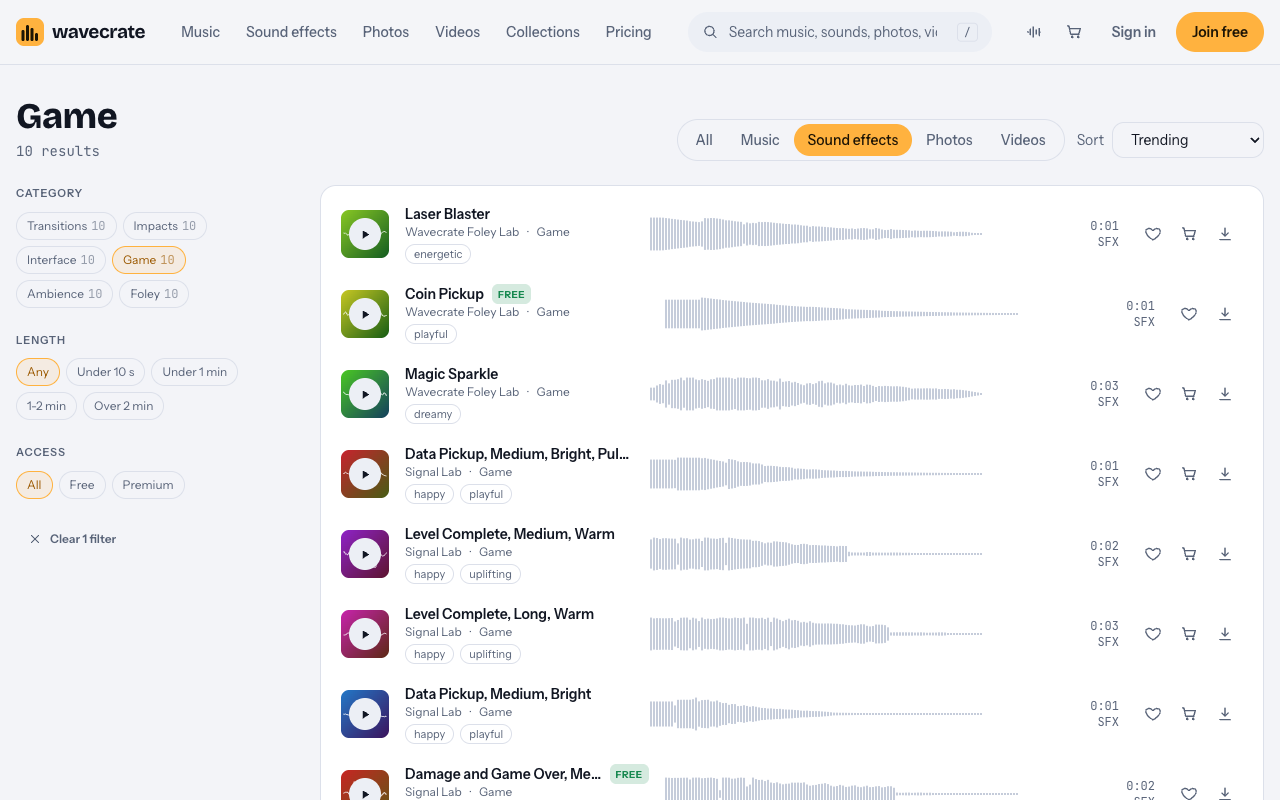
The Signal Lab sounds above come as a 24-bit WAV master and a 320 kbps MP3, so you can keep the WAV as your source and export what your engine needs. To audition fast, press Space to play, Shift with Right for the next sound, and / to search.
Keeping repetition from wearing players out
Playing the exact same coin a thousand times is the quickest way to get your game muted. A few cheap tricks fix most of it.
- Small random changes. Shift each pickup's pitch a little up or down, and vary the volume slightly, so the ear stops hearing a loop.
- Combo chains. Count coins picked up within half a second of each other as
chain, and set the pitch tobasePitch * 2^(chain / 12), so each coin in a run plays one semitone higher. Capchainat 7 or 12, reset it after half a second with no coin, and play a short bonus sound once at the cap. A row of coins becomes a little tune players chase. - A voice limit. Let only three or four coin sounds play at once; when another starts, stop the oldest. A coin shower then never swamps the mix.
Checking on phone speakers
Most players hear your game through a small speaker with little bass, so a coin that relies on a low thump vanishes. Keep the important part of the sound in the middle and high range. Then check on earbuds, where the same sound can feel sharp. Trim any silence before the attack, because even a sliver adds felt delay, and keep music low enough that a coin shower on top does not distort.
Which license a game sound needs
This is where games trip. The license cards on Wavecrate's sound pages say:
- Free, only on sounds marked Free: online videos and podcasts (YouTube, TikTok, Instagram, Twitch, podcasts, monetized channels), with credit text in the description.
- Standard: no credit, and your own business and brand videos.
- Extended: paid ads, broadcast, client work, and "Apps, games and software".
So a sound inside a game you release needs Extended, whatever else it is marked. Pro (listed at $99 a year, or $12 month to month, and not on sale yet) gives Standard only, so Pro alone does not cover sounds in your build. The pricing page says that once purchases open, someone who holds Standard will pay only the difference for Extended. Paid licenses are not on sale yet (Wavecrate says purchases open soon), so the prices below are the listed prices for when sales open; items marked Free, like Coin Pickup, can already be downloaded with a free account.
Worked example: one coin, three places
Say you are making a small endless runner. You pick Coin Pickup for coins and Level Complete, Medium, Warm for the end of each stage. Coin Pickup was marked Free on the day this was written; read the page on the day you download, because items change. Follow the coin through three places:
- A devlog video on your channel, showing an early build, with the credit line in the description: the Free license covers online videos with credit.
- The game's trailer on your studio's site and channel: your own business video, so Standard ($3 listed on the Coin Pickup page) or Pro once it is on sale.
- Inside the game you ship: apps and games are Extended only, listed at $9 on the Coin Pickup page. Level Complete's page lists Extended at $19, so prices differ by sound; read each page.
Every download comes with a certificate and a code. Anyone can enter the code on the verify page to see who holds the license, for which sound and what it covers. You get a license to use the sound; Wavecrate keeps the copyright. Keep each code in your project's credits file.
Frequently asked questions
How long should a coin sound be?
Short enough that ten fast pickups do not blur together: well under a second, with an instant start and a quick tail.
Should coin sounds rise in pitch during a combo?
Often, yes. One semitone per coin in a chain turns repetition into a tune. Cap the rise and reset it after a short pause.
Is a sound marked Free enough for my game?
No. The Free license covers online videos and podcasts with credit; apps and games are Extended only, and Pro does not include Extended.
Should I keep the WAV or the MP3?
Keep the WAV as your master where a page offers one, and export the format your engine prefers from it.
Get started
Open the Game category, play the coin and level up candidates back to back, test your favorites on a real phone, and plan to license each sound in your build as Extended once purchases open.
Browse Wavecrate: you can join free and download items marked Free now, paid licenses are not on sale yet (purchases open soon), and every download comes with a license certificate and a code anyone can check on its verify page.


Comments
No comments yet.
Sign in or make an account to comment.