LLM rate limiting: cap usage and cost in your AI app
LLM rate limiting is what stands between your AI feature and a bill you did not plan for. Every model call costs money, takes time and uses capacity you share with every other user. A login form with no limit lets an attacker guess passwords. An AI feature with no limit lets anyone spend your budget.
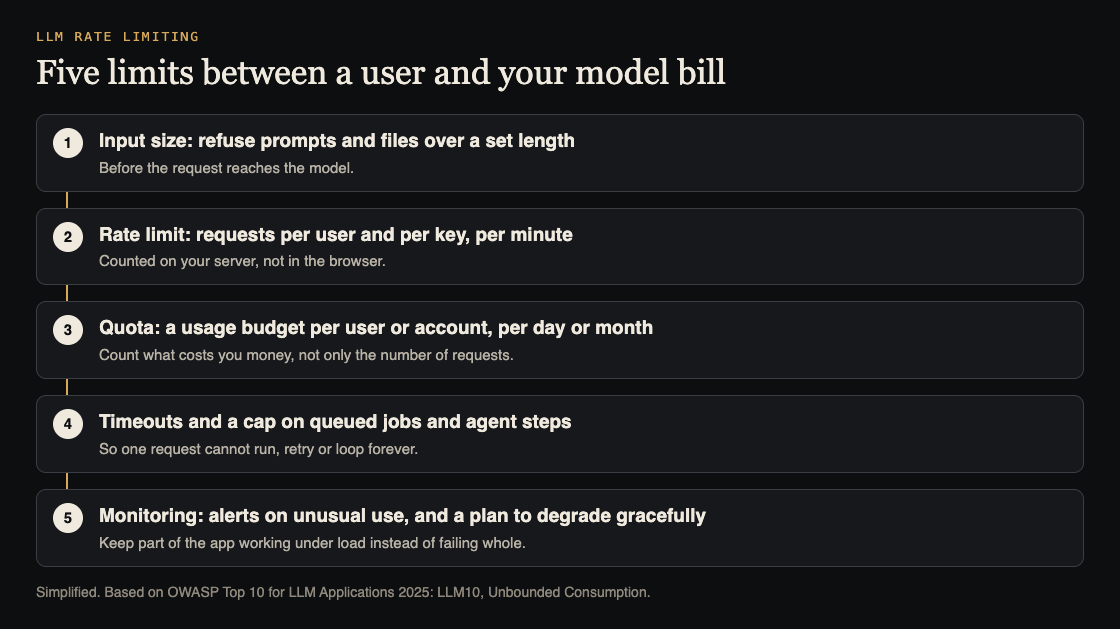
OWASP names this risk LLM10:2025, Unbounded Consumption: an app that lets users run excessive and uncontrolled model calls, leading to denial of service, financial loss, model theft and slower service for everyone. This guide turns its advice into five limits and a test you can run.
Why LLM rate limiting is different from API rate limiting
A normal API limit counts requests: 60 per minute per user, say. That works when every request costs about the same. Model calls do not. One request with a short question and a short answer is cheap. One request with a huge pasted document, a long answer and five tool calls can cost many times more.
OWASP's API Security Top 10 shows the same gap outside AI. In its API4:2023 Unrestricted Resource Consumption entry, an API has a traditional request limit, but an attacker packs hundreds of heavy operations into a single request and gets around it. AI features invite the same trick, because one message can trigger a lot of work.
So count what costs you something: input size, output size, tool calls and time. Request counts are only the first line.
What unbounded consumption looks like
OWASP lists several patterns. These are the ones a product team is most likely to meet:
- Input floods. Many inputs of varying lengths, or inputs that keep exceeding the model's context window, use up resources and slow or stop the service.
- Denial of wallet. A high volume of calls that exploits the pay-per-use pricing of cloud AI services, so the cost lands on you.
- Resource-heavy queries. Inputs crafted to trigger the most expensive processing.
- Model extraction. Enough queries to copy a model's behavior, or to use its outputs as training data for another model. This matters most if your model or prompts are part of what you sell.
None of these need a bug in your code. They only need a feature that says yes to every request.
Limit 1: input size
OWASP's first mitigation is strict input validation, so inputs do not exceed reasonable size limits. Set a maximum length for typed prompts and a maximum size for uploaded files, and check both on your server before anything reaches the model. Tell the user plainly when they hit it. API4:2023 lists maximum upload file size among the limits whose absence makes an API vulnerable.
Limit 2 and 3: rate limits and quotas per user
OWASP calls for rate limiting and user quotas, to restrict how many requests one source can make in a period. Use both, because they catch different things:
- A rate limit stops bursts: a few requests per user per minute, counted on your server, keyed to the signed-in account and also to the API key or address for anyone not signed in.
- A quota stops slow drains: a budget per user or account per day or month, counted in what costs you money, such as tokens or model calls, not only requests.
The counting ideas carry over from login forms. Our guide to login rate limiting covers where to count and how to avoid locking out real users.
Limit 4: timeouts, queues and agent steps
OWASP recommends timeouts and throttling for heavy operations, and limits on the number of queued actions and total actions. For AI features that means:
- A timeout on every model call, so a slow one does not hold resources forever.
- A cap on retries, so a failing call does not repeat itself into a large bill.
- A cap on steps for agents. An agent that can call tools and then call the model again needs a maximum number of rounds per task. See how to limit what your AI agent can do.
- A cap on how many jobs one user can have waiting.
OWASP also advises limiting the model's own access to network resources, internal services and APIs, which keeps any single runaway task smaller.
Limit 5: spending alerts and graceful degradation
API4:2023 lists a missing spending limit at third-party providers as a weakness, and its third scenario shows why: a service with no cost alerts and no maximum cost allowance saw its monthly bill rise from about US$13 to US$8k. If your model provider offers a spending limit or usage alerts, set them. Then add your own: OWASP recommends logging, monitoring and anomaly detection on resource use.
Plan what happens when a limit is hit. OWASP suggests designing for graceful degradation, keeping part of the app working under heavy load instead of failing completely. A clear "AI answers are paused, try again in an hour" beats a feature that breaks for everyone.
Worked example: test LLM rate limiting on staging
Run this against a staging copy of your AI feature, with a test account and a low test budget. Keep the volume small: you are checking that limits exist, not trying to overload anything.
- Oversized input. Paste a prompt well above your intended limit. The server should refuse it before any model call; check your provider's usage log to confirm no call was made.
- Burst. Send requests a little faster than your per-minute limit allows. Requests past the limit should get a clear error, and the count should be per account, not per browser tab.
- Quota. Set the test account's daily quota very low, use it up, and confirm the next request is refused until the reset.
- Batching. If one request can hold several questions, files or operations, send one with many. It should count as many, not one.
- Agent loop. Give the agent a task that cannot finish, such as searching for something that does not exist. It should stop at your step cap.
- Alert. Check that your spending or usage alert fired, or would fire at its set threshold.
Write down which limit stopped each test. A test that only stopped because of the provider's own limits means yours are missing.
Frequently asked questions
What is denial of wallet?
OWASP's name for an attack that sends many operations to a pay-per-use AI service so the provider of the app bears unsustainable costs.
Should I limit requests or tokens?
Both. A request limit stops bursts; a quota counted in tokens or model calls stops the expensive requests a request count misses.
Is a rate limit in the browser enough?
No. Anything in the browser can be skipped. Count and enforce limits on your server.
Do limits make an AI feature secure?
They cut cost and outage risk from overuse. They do not cover other risks such as prompt injection or data leaks, which need their own checks.
Get started
whitehatstoic builds the product and tests it to protect it. Our cybersecurity and AI safety testing runs security tests on web apps and AI systems, including web app and API review, with a written report, fixes and a retest after fixes. Every engagement is scoped after a short call.
Book a meeting with whitehatstoic: tell us the product, the deadline and your biggest worry, and we reply with a plan and a price.
Comments
No comments yet.
Sign in or make an account to comment.