LLM Regression Testing: Catch Quality Drops Before Users Do
LLM regression testing means rerunning a fixed set of test inputs through your AI feature after every change and comparing the scores with the last version you trusted. If the scores drop, the change does not ship. It is the simplest way to find out that a prompt tweak broke something before a customer finds out for you.
Regression testing builds on the eval set you make in Evals: Shipping AI That Works, an Advanced course on Age of AI Entrepreneur whose three lessons cover why your AI product needs evals, building an eval set and judging outputs, and running AI in production; sign in with your email and an emailed code to open it.
What LLM regression testing is and why prompt changes break things silently
In normal software, the same input gives the same output, and a bug shows up as a red failure. A language model's output changes from run to run, and a change that fixes one case can quietly break another. Nothing crashes, and no error appears in your logs.
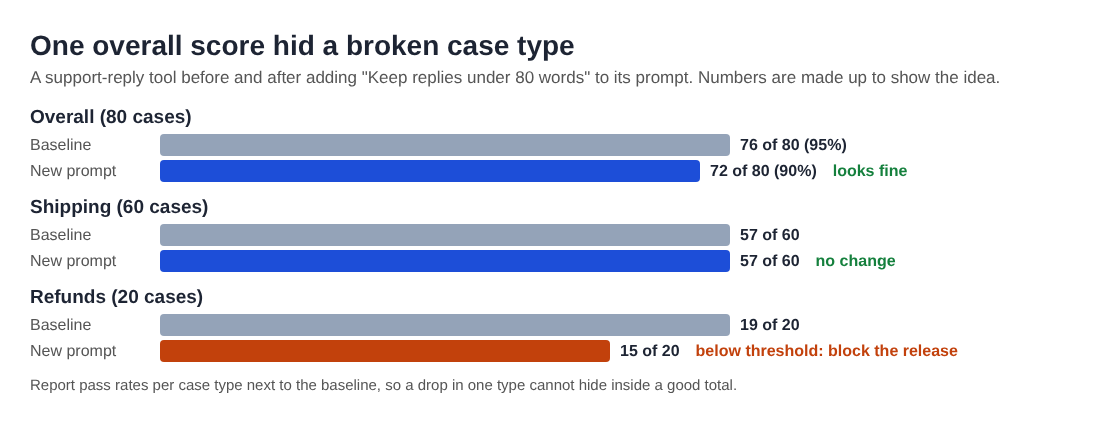
Here is the running example. You built a tool that drafts replies to customer support emails. Users complain the replies are too long, so you add one line to the prompt: "Keep replies under 80 words." Replies get shorter. You ship. A week later you notice refund replies no longer ask for the order number, because the model cut that step to save words. Every individual reply looked fine. The drop only shows when you check the same cases you checked before.
That is the whole idea of a regression test: same inputs, same checks, before and after. A checklist for testing LLM prompts before release covers the first test of a new prompt; regression testing is what keeps every later change honest.
The changes that cause regressions: prompts, model upgrades, retrieval and temperature
Most quality drops trace back to one of four kinds of change. Treat each one as a reason to rerun your suite.
- Prompt edits. New wording, a reordered instruction, a removed example. Small edits shift behavior in places you did not touch.
- Model changes. Moving to a newer model, or to a smaller one to save money, changes how the model reads your prompt. The AI Product Stack course has a lesson on choosing between big, small, open and closed models, and the tradeoffs it describes are exactly what your tests should measure.
- Retrieval changes. If your tool pulls in help articles before answering, a new chunk size, a reindex or a deleted document changes what the model sees. The answer can get worse even though the prompt never moved.
- Sampling settings. Raising temperature or top-p makes output more varied, which can mean more mistakes on cases that used to pass. If you want to know what those settings do, read how top-p sampling picks the next word.
Anything else that shapes what goes into or comes out of the model, such as tool definitions or output parsers, counts too.
Turning your eval set into a regression suite you can rerun on every change
An eval set is a list of inputs with a way to judge the outputs. A regression suite is that same list, frozen, versioned and run automatically. The step from one to the other is mostly discipline.
Store your cases in a file in your code repository, one case per line. Each case gets an id, an input, a case type and the checks it must pass. For the support tool, one case might look like this in plain words:
- id:
refund-03 - input: "I ordered a jacket last week and I want my money back."
- type:
refund - checks: asks for the order number; does not promise a refund amount; under 80 words
Build the set from four sources:
- Common cases. The requests you see most often.
- Edge cases. Angry customers, two questions in one email, a language you did not plan for.
- Past failures. Every bug a user reports becomes a new case. This is how the suite gets stronger over time.
- Attacks. Inputs that try to make the tool ignore its instructions or leak data. The OWASP AI testing guide walkthrough gives you a list of attack types to turn into cases.
Then write one script that runs every case, applies every check and saves the results to a file with the date and the version of the prompt and model. That file is what you compare against later.
What to score: exact checks, rubric grades and pass rates per case type
Use the cheapest check that can catch the problem.
Exact checks
These are plain code: valid JSON, under 80 words, contains "order number", avoids a banned phrase. They are fast, cost nothing to run and give the same answer every time, so put as much as you can here.
Rubric grades
Some qualities need judgment: is the tone polite, is the answer correct for this policy. For these, write a short rubric with yes or no questions, such as "Does the reply state the 30 day return window from the policy?" A person or a second model can grade against it. If you use a model as the judge, grade a sample yourself and check that you and the judge agree before you trust it.
Pass rates per case type
Report results per case type, not only as one overall number. The chart shows why: the total barely moved, while refunds fell well below their baseline.
Setting a baseline and a pass threshold that blocks a bad release
Run the suite on the version currently live. Because outputs vary, run it a few times and note how much the pass rate per type moves between runs. That spread is your noise. The averages are your baseline.
Now write the rule that blocks a release. A workable shape has two parts:
- Must-pass cases. A short list that has to pass on every run, such as safety cases and anything involving money or legal policy.
- Per-type thresholds. No case type may fall below its baseline by more than the normal run-to-run spread you measured.
Choose the numbers based on what a mistake costs you: a wrong tone is annoying, a wrong refund promise costs money. When a change genuinely improves results, update the baseline on purpose and record why.
Running regression tests in CI so no prompt ships untested
The suite only protects you if it runs every time. Put it in your continuous integration pipeline so it runs on its own.
- Keep prompts in the repo. Treat prompts, model names and retrieval settings as code, so no change skips the tests.
- Compare and fail. When those files change, the job runs the suite, compares each case type with the baseline and fails the build if a threshold breaks.
- Post a summary. Show pass rates per type next to the baseline, with links to the failing outputs.
- Pin the model version. Use a fixed model version where your provider offers one, so a change on their side does not slip in unnoticed.
Every run costs tokens. A common split is a small set of fast cases on every commit and the full suite before a release.
Reading a failed run: fixing the cause without overfitting to the test cases
When the build fails, read each failing output next to its baseline output and name the cause: the prompt, retrieval, or the judge itself. Judges make mistakes too, so check the grade before you change the product.
In the support example, refund-03 fails because the 80 word limit squeezed out the order number request. The fix is to tell the model which steps are required and which can be cut, not to raise the limit until the test passes.
Watch for overfitting. If you add "When a customer mentions a jacket, ask for the order number" to make refund-03 pass, the test turns green and real users with shoes get the old bug. Two habits help:
- Fix the general behavior, then check that the fix holds on cases you did not look at.
- Keep a small held-out set you never read while debugging, and run it before release.
The lesson "What AI Gets Wrong" in the How Modern AI Actually Works course explains why models fail in the ways they do, which makes failed runs easier to read.
Frequently asked questions
How many test cases does an LLM regression suite need?
Start with enough to cover each case type you care about, plus every bug users have reported. A small suite you run on every change beats a large one you skip, and it grows each time a new failure becomes a case.
How do you regression test outputs that are never word-for-word the same?
Do not compare text exactly. Check properties instead: required facts, format, length and banned phrases with code, and quality with a yes or no rubric graded by a person or a model judge.
Should you rerun every test when the model provider updates the model?
Yes. A new model version changes how your prompt is read, so run the full suite against it before you switch, and pin the version you tested so updates do not reach users untested.
Is LLM regression testing the same as monitoring in production?
No. Regression testing checks known cases before a release, while monitoring watches real traffic after it. They feed each other: failures you find in production become new cases in your suite.
Get started
The Evals: Shipping AI That Works course on Age of AI Entrepreneur is the next step after this post. Its three lessons cover why your AI product needs evals, how to build an eval set and judge outputs, and how to run AI in production. Each lesson takes about 9 minutes and lists its sources, every attempt is graded, and you can retake a lesson any time. Sign in with your email and an emailed code to open the course.
Start Age of AI Entrepreneur: short hands-on lessons on how to build a business in the age of AI, with every side of the debate and the sources to read next.
Building a business in the age of AI, from a first project to a company.
Visit aientrepreneur.vlvd.net↗


Comments
No comments yet.