llms.txt example: a blog's file, line by line
This llms.txt example comes from a working blog: the file Electrified serves. Below you will see what each line does, how it compares with the llms.txt proposal, where the live file is looser than the proposal asks, and how to check your own file before you publish it.
What an llms.txt file is for
An llms.txt file is a short Markdown file that tells AI tools what a site is and which pages hold the detail. The proposal, written by Jeremy Howard and last updated as v2 in August 2026, puts the problem plainly: web pages are built for people, wrapped in menus and scripts, and an agent has limited room to read. The file gives it a small, clean map instead.
The proposal also says how it is used. An agent reads the file on demand, when it needs information while helping someone, then follows the links that matter. That is different from robots.txt, which says what access is acceptable, and from a sitemap, which lists every page.
One honest expectation before you start: the proposal makes no promise that any tool will read your file, rank your site or cite it. Writing one makes your site easier to read for the tools that choose to fetch it.
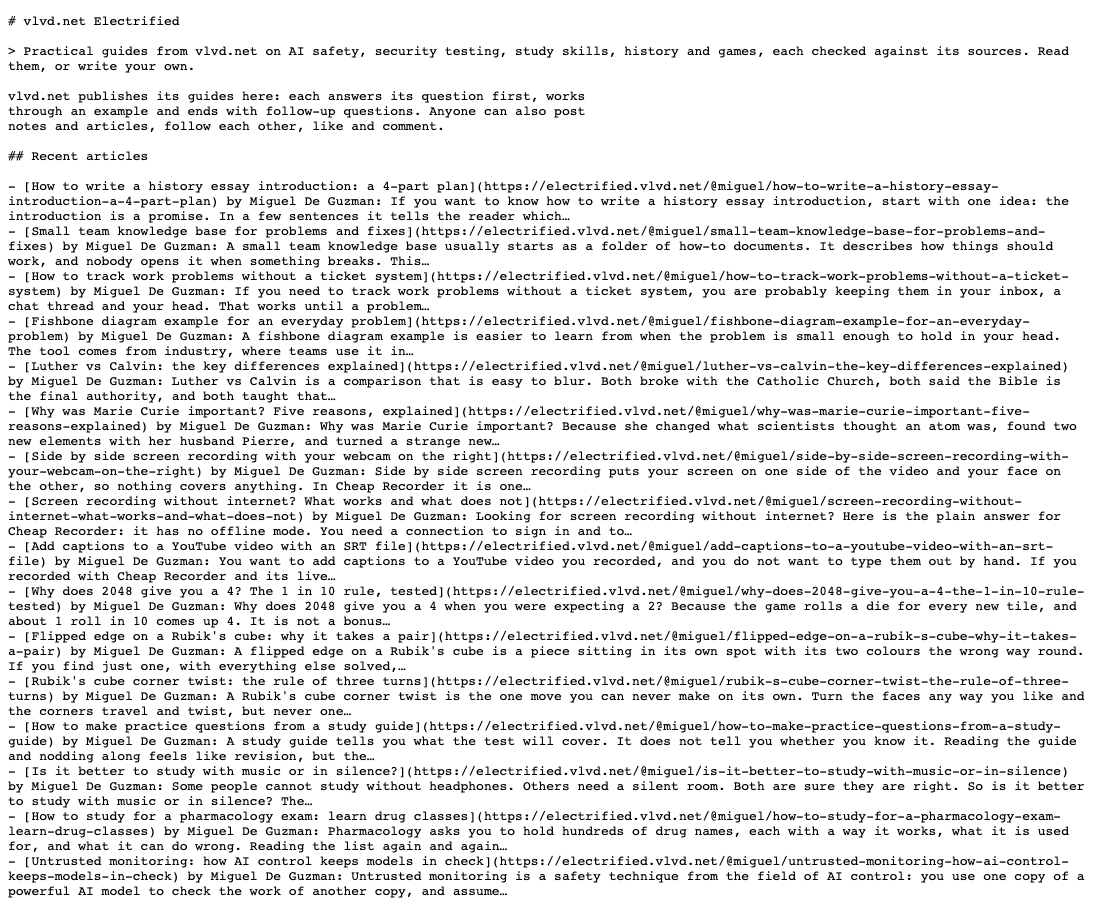
The llms.txt example: Electrified's file, part by part
Here is a trimmed copy of the live file, in the same order. The real one lists 20 recent articles and 30 topics; this shows one of each.
# vlvd.net Electrified> Practical guides from vlvd.net on AI safety, security testing, study skills, history and games, each checked against its sources. Read them, or write your own.vlvd.net publishes its guides here: each answers its question first, works through an example and ends with follow-up questions. Anyone can also post notes and articles, follow each other, like and comment.## Recent articles- [How to write a history essay introduction: a 4-part plan](https://electrified.vlvd.net/@miguel/how-to-write-a-history-essay-introduction-a-4-part-plan) by Miguel De Guzman: If you want to know how to write a history essay introduction, start with one idea...## Topics- [Exam prep](https://electrified.vlvd.net/topics/exam-prep): 14 postsAll topics: https://electrified.vlvd.net/topics## Data- Feed of every post (Atom): https://electrified.vlvd.net/feed.xml- One person's posts: https://electrified.vlvd.net/@{handle}/feed.xml- Sitemap: https://electrified.vlvd.net/sitemap.xml- Every post in full: https://electrified.vlvd.net/llms-full.txt
Three kinds of line make up the whole file: a heading, a sentence of plain text, and a list line. The next sections take them in order.
Lines 1 and 2: the name and the summary
Line 1: the H1
The file opens with one # heading that names the site. In the proposal, this is the only required part. Electrified's reads # vlvd.net Electrified: the name a reader would search for, with nothing added.
Line 2: the quote
Next comes a line that starts with >, a Markdown quote. The proposal calls it a short summary holding the key information needed to understand the rest of the file. Electrified's names its five subjects, says how its guides are made, and says what a visitor can do. An agent that reads only this line still knows what the site covers.
A good test: could a stranger explain your site after reading only lines 1 and 2? If not, cut the summary down to what the site covers and who it is for. Leave out claims about quality; they take room and tell a tool nothing it can use.
Line 3: the paragraph under the summary
The proposal allows any number of plain sections after the quote, as long as they are not headings: paragraphs, lists, notes on how to read the file. Electrified uses one short paragraph. It describes the pattern its guides follow (the answer first, an example, follow-up questions) and adds that anyone can post there too.
That second sentence matters on a site with many writers. It tells a tool that not every post comes from one author, so it should read the author on each line before it attributes a post.
The sections: Recent articles, Topics and Data
Everything after the paragraph sits under ## headings. The proposal calls each one a file list: a Markdown list where every item is a link written as [name](url), then, if you like, a colon and a note about the page.
Recent articles
For a blog, the post list is the main section. Electrified lists its 20 newest articles, newest first, each with its author. Two details are worth copying with care:
- The author sits between the link and the colon (
) by Miguel De Guzman:). That helps a reader, but the proposal's pattern puts the link first and the notes after the colon. If you want the strictest form, move the author after the colon:[Title](url): by Miguel De Guzman. What the post answers. - The note is the post's opening words, cut off with "...". That is quick to generate, but a cut-off sentence is a weak description. The proposal asks for brief, informative notes. A written line such as "a four-part plan for a history essay's first paragraph" tells an agent more in fewer words.
Topics
Electrified lists its 30 biggest topics, each a link with its post count, then ends the section with a plain line pointing to the full topics page. A topics list gives an agent a second way in: someone asking about exam preparation needs every post on that subject, not only the newest ones.
Data
The last section points to machine-friendly copies of the content: the Atom feed, one person's feed, the sitemap and llms-full.txt. Here the live file departs from the proposal. Each line is a label and a bare address, not a [name](url) link. A person reads it fine. A program that follows the proposal strictly looks for links in file lists and would skip these four lines. On your own blog, write them as links:
- [Feed of every post (Atom)](https://example.com/feed.xml)- [Every post in full](https://example.com/llms-full.txt)
The Optional section and what to leave out
The proposal gives one heading a special meaning: ## Optional. By convention, links under it are secondary, and an agent can skip them when it needs a shorter read. Electrified's file has no Optional section. On a blog it is a natural home for older posts, archive pages or a long topics list.
Leave these out of the file altogether:
- Pages behind a sign-in. A tool cannot read them. Electrified's robots.txt disallows
/write,/dashboard,/settings,/signinand/api/, and none of them appear in its llms.txt. - Drafts. On Electrified a draft is seen only by its author and never by a search engine, so it has no place in a public map.
- Every post you ever wrote. The short file is a map that should fit in an agent's reading room. Electrified keeps the full text in llms-full.txt, which held 336 published posts on 10 October 2026.
- Pages that do not help explain the site. Page 2, 3 and 4 of an archive add length without adding meaning.
Where to put llms.txt and how to check it
The usual place is the root of your site, at /llms.txt, which is where Electrified serves its file. The v2 proposal also allows a file at any path, such as /docs/llms.txt, covering the pages under that path. Where more than one file applies, an agent should use the most specific one. That helps if your blog lives in a folder of a bigger site.
Then check it with this short routine:
- Open the file in a private browser window. You should see plain Markdown, not a sign-in page or an error.
- Confirm the first line starts with a single
#and the summary starts with>. - Check that every list line under a
##heading starts with a[name](url)link. - Open each link. Every one should load a public page.
- Read your robots.txt and make sure it does not disallow the pages you listed. Electrified's names crawlers such as GPTBot, ClaudeBot and PerplexityBot, allows the site, and points to its sitemap.
- Do what the proposal suggests: give an AI assistant only your llms.txt and ask it questions about your site. If it picks the wrong page, your summary or notes need work.
Frequently asked questions
Is llms.txt the same as robots.txt or a sitemap?
No. The proposal designs it to sit alongside both. robots.txt says what access to a site is acceptable, a sitemap lists every page, and llms.txt is a short, chosen overview an agent reads when it needs to answer something.
Does an llms.txt make AI tools cite my blog?
Nothing in the proposal promises that. It describes a file an agent can read on demand. The v2 page notes that Chrome's Lighthouse now checks sites for one, but having the file is not a promise of readers, rankings or citations.
Can llms.txt go in a subfolder?
Yes, under v2. A file at /blog/llms.txt covers the pages under /blog/, and an agent uses the most specific file that applies.
Is llms-full.txt part of the proposal?
The llms.txt proposal page does not define it. Some sites, Electrified among them, publish one beside the short file: Electrified's holds every post in full, newest first, each with its address, author and date.
Get started: a blog that already has one
If you would rather not keep these files by hand, write on Electrified. Its llms.txt lists the newest articles as they are published, its llms-full.txt holds every post in full, and every writer has an Atom feed at /@handle/feed.xml. Give each post up to 5 topics so it is filed beside related posts, and keep it as a private draft until you press Publish.
Make an account on Electrified: write about your product, topic or idea on your own page, one article at a time, and let readers follow along.
Comments
No comments yet.
Sign in or make an account to comment.