Lo-fi music for study videos and streams: a creator's guide
If you make study-with-me videos or long focus streams, the music under your camera does most of the work. This guide covers how to pick lo-fi music for study videos and streams, how to stretch a short track list over a two hour session, and which license each kind of upload needs. The examples use Wavecrate's lo-fi tracks as read on 10 October 2026.
Wavecrate licenses royalty-free music, including calm lo-fi tracks for study sessions, and every download comes with a license certificate and a code anyone can check on its verify page.

Why lo-fi music for study videos and streams works
Study content asks viewers to look away from you and at their own notes. The music has to fill the quiet without pulling attention back. Lo-fi does that because it is built from soft, repeating parts: swung drums, mellow keys, a little tape or vinyl texture. Nothing jumps out, so nothing interrupts.
It also tells viewers what kind of session this is within seconds, and that sameness is part of why people come back to the same channel every day.
What makes a track good for focus
- Slow tempo. Wavecrate's tempo filter has three bands: Slow under 90 BPM, Mid 90 to 120, and Fast over 120. Start in Slow.
- No lyrics. Words compete with reading. Every track page has a Vocals line; look for Instrumental.
- Steady texture. A focus track should not build to a big drop or change mood halfway. Set mood to calm and listen through once.
To audition fast, Space plays or pauses, Left and Right skip 5 seconds, and Shift with Left or Right moves to the previous or next track.
A ready-made starting set
Wavecrate's Study and focus collection is "Low-key beats and pads that stay out of the way of your thinking." On 10 October 2026 it held six tracks, about seven minutes in all:
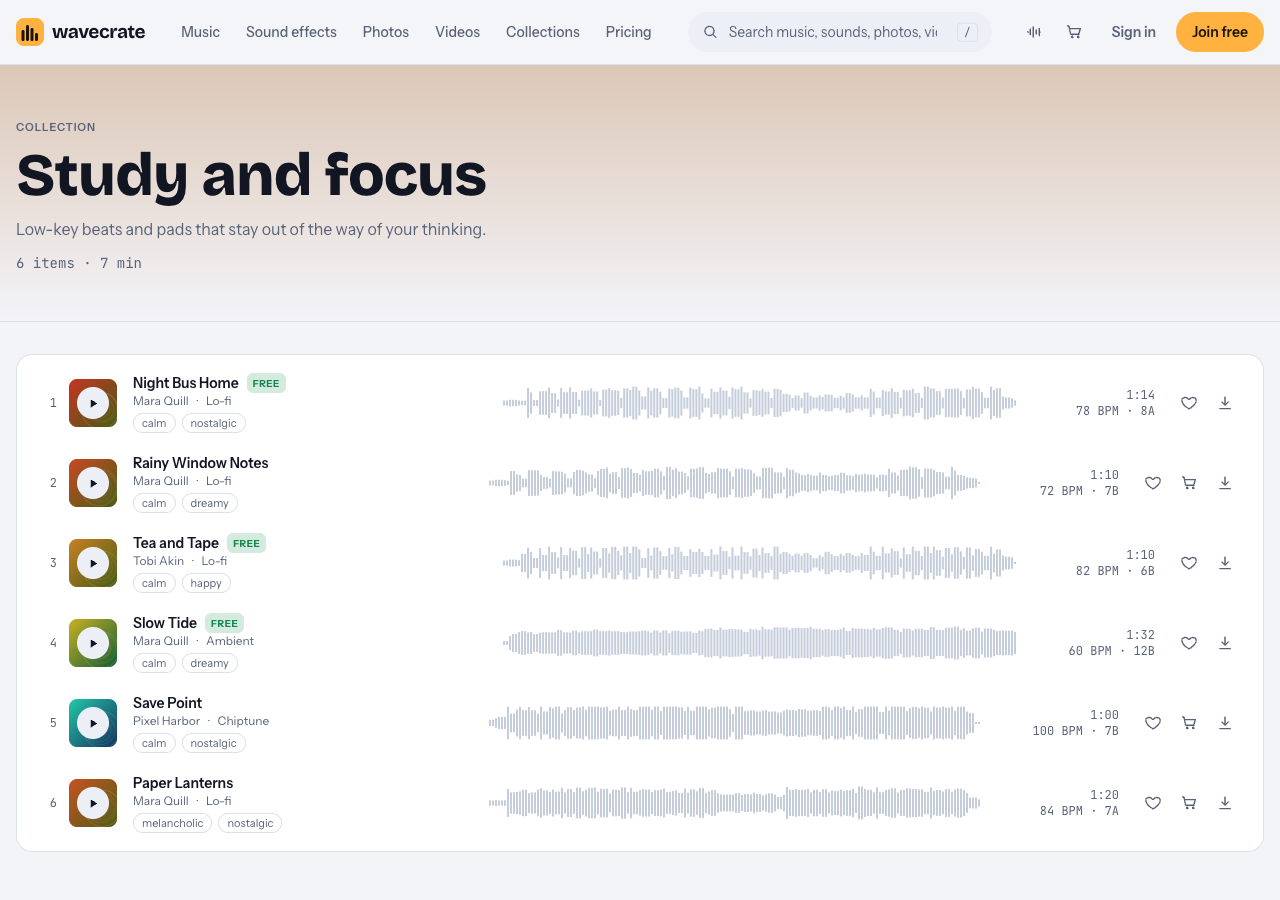
The Study and focus collection: three of its six tracks are marked Free.
- Night Bus Home (marked Free), 78 BPM
- Rainy Window Notes, 72 BPM
- Tea and Tape (marked Free), 82 BPM
- Slow Tide (marked Free), an Ambient track at 60 BPM
- Save Point, a Chiptune track at 100 BPM
- Paper Lanterns, 84 BPM
Tea and Tape shows what to look for on a page: "Dusty swung drums under soft electric piano chords and a little vinyl crackle. Calm and Happy, good for study and cooking." It is Instrumental, 82 BPM, energy Relaxed, and comes in three versions: a full track (1:10), a 30 second edit (0:29) and an 8 bar loop (0:23).
Stretching a short list over a long session
Seven minutes of music will not fill a two hour stream on its own, so plan for repeats.
- Pick the session shape first. A common setup is 25 minutes of focus and 5 minutes of break. Decide whether music plays during breaks.
- Use the loops. The 8 bar loop lets you repeat a section you like in your editor or stream software. Listen back to check the repeat sounds right.
- Build blocks, then rotate. Make two or three 25 minute blocks and rotate them across sessions, instead of shuffling at random.
- Widen the pool. Calm tracks from other genres, like Slow Tide, pass the same tempo and vocals test.
- Keep a log. List each track with its license code and, for Free tracks, the credit text you need.
Mixing lo-fi under your voice, timer and room sound
Most study streams have more than music: a few words at each break, a timer chime, sometimes rain or room sound. A few habits keep it calm.
- Music well below your voice. When you talk at a break, viewers should hear you without reaching for the volume. If your software can duck music while your mic is live, turn that on.
- A soft timer. A gentle chime works better than an alarm. Success Chime is a short Interface sound marked Free.
- Ambience under the music, not over it. Rain on Window, also marked Free, should read as a room, not a weather report.
- Test on cheap earbuds. Many viewers listen on basic headphones. If the drums swamp your voice there, cut some low end from the music.
Sounds carry their own licenses, the same three levels as music, so log them with your tracks.
Which license covers a study video or stream
A license lets you use a track; it does not make it yours. Wavecrate says: "You get a license to use it. We keep the copyright." For music, the pricing page splits it like this:
- Free, only on items marked Free: YouTube, TikTok, Instagram, Twitch, podcasts and monetized channels, with credit text in the description. A free account gets 3 free downloads a month.
- Standard: all online platforms, monetized, with no credit line, plus your own business and brand content. Tea and Tape's page lists it at $15.
- Extended: adds paid advertising, TV, radio and cinema, apps, games and client work. Tea and Tape's page lists it at $49.
Pro (listed at $99 a year, or $12 month to month, and not on sale yet) gives Standard on the whole catalog, never Extended. The pricing page says videos you published while subscribed stay covered forever.
Paid licenses are not on sale yet (Wavecrate says purchases open soon), so these are the listed prices for when sales open, while items marked Free, like Tea and Tape, can already be downloaded with a free account.
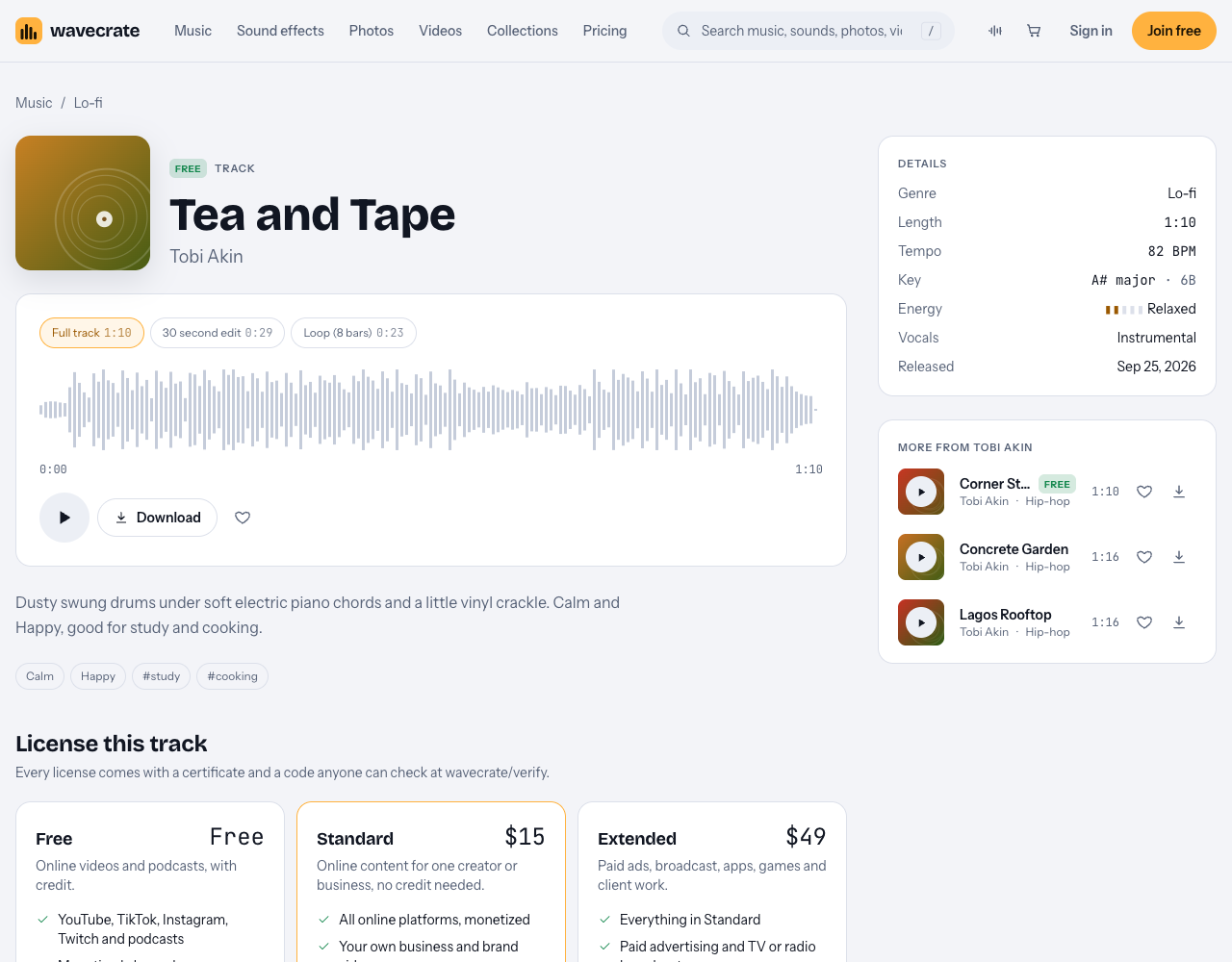
Tea and Tape: marked Free, with Standard and Extended above it.
A worked example: one track, three channels
Say you play Tea and Tape on a loop under a study session.
- A study-with-me video on your own YouTube channel, with credit text in the description: the Free license covers it, monetized or not.
- The same session for a tutoring company you run, as part of its own marketing: that is your own business content, which starts at Standard (listed at $15, or through Pro once it is on sale), even though the track is marked Free.
- A focus video you make for a client, or one you pay to promote: Extended only (listed at $49).
Live streams add one more check. Credit text belongs in the description, and Wavecrate's pages do not say where it goes on a live stream, so a channel that relies on Free tracks should put the credit in its stream description and saved video, or plan on Standard once paid licenses are on sale, since it needs no credit. Streaming platforms also have their own music rules on top of any license; Twitch, for one, publishes Music Guidelines. Read them before you plan a music-only stream.
If a claim ever arrives, the pricing page says to send the platform your license code or certificate link. The verify page shows the licensee, the item, the license type and your registered channels. What the platform decides is up to the platform.
Frequently asked questions
Can I play any lo-fi mix I find on my stream?
Only music you hold a license for. Hearing a track online does not mean you may broadcast it, so use tracks that come with a license you can show.
Do I need a license to monetize study videos with lo-fi?
Yes. On Wavecrate all three music licenses cover monetized channels; the Free license, on items marked Free, needs credit text in your description, and Standard does not.
How long should a study playlist be?
Aim for at least one full 25 minute focus block, then rotate two or three blocks across a longer session, using the 8 bar loops to stretch tracks you like.
Get started
Open the Study and focus collection, check each track says Instrumental, build one 25 minute block, and keep each license code in a note next to your stream setup.
Browse Wavecrate: you can join free and download items marked Free now, paid licenses are not on sale yet (purchases open soon), and every download comes with a license certificate and a code anyone can check on its verify page.


Comments
No comments yet.
Sign in or make an account to comment.