Log injection: stop fake entries in your app logs
Log injection is what happens when text someone types into your app lands in a log file and changes what the log appears to say. One crafted username can add a fake "login succeeded" line, bury a real attack, or garble the screen of whoever reads the log. This guide shows how the attack works, how to check the logs you already have, and the fixes OWASP recommends.
What log injection is, and why fake entries matter
Most apps write user input into logs: usernames, search terms, URLs, user agents and error messages. If your code writes that input as raw text, the person sending it controls part of your log file.
That matters because people trust logs. You use them to answer "what happened?" after an incident. Alerts and dashboards read them automatically. The OWASP Logging Cheat Sheet warns that logs are a target precisely because they are a defence, and that data from outside your app may be forged and must be treated as untrusted.
The attack is not about breaking in. It is about lying to the people and tools that watch for break-ins.
How a forged log line works
Here is a typical logging call in a login handler:
logger.info("Login failed for user: " + username)
A normal request logs one line:
2026-10-10 09:14:02 INFO Login failed for user: maria
Now someone submits this as the username, where %0d%0a is a URL-encoded carriage return and line feed:
maria%0d%0a2026-10-10 09:14:03 INFO Login succeeded for user: admin
Your log now shows two lines. The second is fake, but it matches your timestamp format and log level. Anyone scanning the file sees an admin login that never happened.
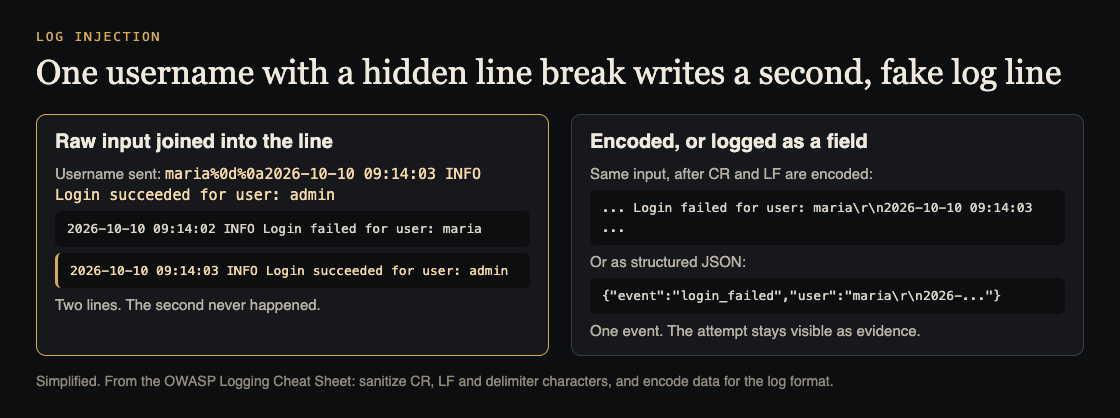
Raw input writes a second line; encoded input stays one event. Simplified from the OWASP Logging Cheat Sheet.
Line breaks are only the start:
- Delimiters. In comma, tab or pipe separated logs, one stray delimiter shifts every field after it. In hand-built JSON, a quote and a brace can close the object early.
- Terminal escape codes. Sequences starting with the escape character can change colours, move the cursor or clear the screen when someone runs
tail -fon a log. - Markup. If a web dashboard renders log lines as HTML, a script tag in a username becomes cross-site scripting against your own admins.
What log injection breaks
Detection. Forged lines can hide real attempts in noise, or make an alert rule read the activity as normal.
The audit trail. Once you find one forged line, you cannot fully trust any line from the same source, and an incident review turns into guesswork. OWASP also lists an attacker using one log entry to destroy others, and flooding logs to fill the disk.
AI agents that read logs. If an agent reads its own history or another system's logs, a forged line such as "user approved deletion" can work like prompt injection and steer its next step. The guide to AI agent audit logs covers how to record agent actions so they hold up.
How to find log injection in the logs you have
Work on a copy of the logs, not a terminal tailing the live file, so escape codes cannot act on your screen.
- Show hidden characters.
cat -v app.log | lessshows control characters as visible symbols such as^[and^M. - Search requests for encoded breaks. Look in access logs for
%0a,%0dand%1b, in upper and lower case. - List lines that break your format. If every real line starts with a date, list the ones that do not:
grep -vE '^[0-9]{4}-[0-9]{2}-[0-9]{2} ' app.log. Stack traces will show up; anything else deserves a look. - Check against the source of truth. A successful admin login in the log should match a session in your database or sign-in provider. A log line with no matching record is a red flag.
- Find the risky code. Search for logging calls that join strings with request data:
+inside logger calls, f-strings, template literals or format strings fed with request fields.
Fix 1: sanitize and encode in one log handler
OWASP's rule is direct: sanitize all event data to prevent log injection, for example carriage return, line feed and delimiter characters, and encode data correctly for the format you log in.
Encoding beats stripping. Encoding turns a line feed into the two visible characters \n, so the line stays one line and you keep the evidence that someone tried. Stripping removes the attempt from view. In Python, a small helper does it:
def safe(v): return str(v).encode("unicode_escape").decode("ascii")
The login call becomes logger.info("Login failed for user: %s", safe(username)), and the forged payload now logs as one line with \r\n shown as text. Cover carriage return, line feed, the escape character and the other control characters, plus your format's delimiter.
Put this in one place. OWASP recommends building on your framework's logging, or one application-wide log handler that is tested as a standard module. A helper that lives in each call gets forgotten in the next handler someone writes.
Fix 2: log fields, not sentences
The stronger fix is to stop building log lines by hand. Structured logging writes each event as a JSON object, and a real JSON library escapes line breaks, quotes and control characters for you:
logger.info("login_failed", extra={"user": username, "ip": request_ip})
With a JSON formatter, the whole payload sits inside the user field as an escaped string. It cannot start a new event. Two rules keep it that way: never build JSON with string formatting, and keep user input in its own fields rather than inside the message. A fixed message plus separate fields is easier to search and harder to fake.
Fix 3: protect the viewers and the stored logs
- Escape in dashboards. Any page that shows log content must HTML-encode it. Treat log text like a comment form.
- Parse fields, not lines. Alert rules should match parsed JSON fields, not regular expressions over whole lines.
- Protect the logs at rest. OWASP lists tamper detection, copying logs to read-only media as soon as possible, recording and monitoring all access to logs, and limiting who can read them.
- Test for it. OWASP's verification list says to include logging in security testing and to test that it is not open to injection. Add the forged-line payload to your automated tests, the way agent security tests for CI keep known attacks from coming back.
Frequently asked questions
Which characters should I handle before writing to logs?
At least carriage return, line feed and your format's delimiter, which OWASP names, plus the escape character and other control characters. Anything a web viewer shows must also be HTML-encoded.
Does structured logging fully prevent log injection?
It stops forged entries when you use a real JSON serializer and keep input in its own fields. It does not protect a dashboard that renders field values as HTML, so you still need safe viewers.
Should I strip bad characters or encode them?
Encode them. The line stays one line, and the attempt stays visible for whoever investigates later.
Get started
Pick one logging call that touches user input, such as the login failure handler. In a test environment, send it a username with %0d%0a and a fake log line, then look at what lands in the file. If you see two lines, route the call through one encoding handler or switch it to a structured field, then move to the next call on your list.
If you want a second pair of eyes, whitehatstoic runs security tests on web apps and AI systems, including web app and API review, with a written report, fixes and a retest after fixes. Testing finds weak spots; it cannot promise to find every one. Testing is scoped after a short call: book a meeting about security testing.
Building something that has to be safe? Book a meeting with whitehatstoic: tell us the product, the deadline and your biggest worry, and we reply with a plan and a price.
Comments
No comments yet.
Sign in or make an account to comment.