Logging vocabulary: name security events so you can search them
Logs only help if you can find the line you need. When every developer words a failed sign-in differently, a search at 2 a.m. misses half of them. A logging vocabulary fixes that: one agreed name for each security event, used the same way in every part of your app.
Logging vocabulary: one name for each security event
The OWASP Application Logging Vocabulary Cheat Sheet proposes a standard set of names for security events. Its idea is simple. If developers catch errors and log them with the same terms, then monitoring and alerting get better just by watching for those terms. You do not need a smart tool. You need names that never change.
The sheet also says what has to come first. Good error handling comes before logging, because if you are not catching an event, you have no event to log. Our error handling post covers that side.
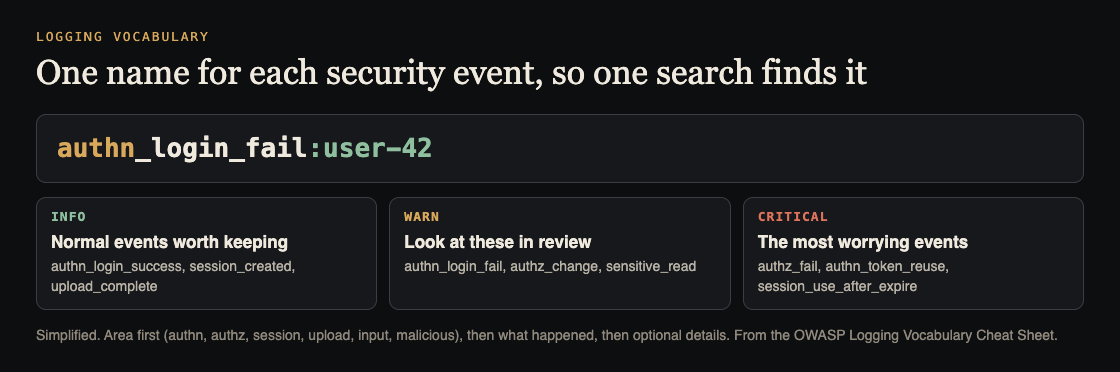
Start with what could go wrong
Before you name anything, the sheet suggests a plain version of threat modeling. Ask three questions for each part of your app:
- What could go wrong? Orders: could someone order on behalf of another person? Sign-in: could someone log in as someone else? Permissions: could someone see another person's account?
- What would happen if it did? Think about the order that ships to the wrong address, and who would find out first.
- Who might intend it? The sheet lists hackers, an employee "testing" how things work, and an API coded incorrectly that does something its author never meant.
Each answer to the first question is an event you want a name for. If you have never done this exercise, our one-afternoon threat modeling plan walks through it.
The shape of one log entry
The sheet gives every entry the same fields, written as structured data (JSON) rather than a sentence. The ones that matter most:
datetime: always ISO 8601 with the UTC offset, so entries from different servers line up.appid: which application wrote the line.event: the vocabulary name, with optional details after a colon, such asauthn_login_fail:joebob1.level: INFO, WARN or CRITICAL.description: a sentence for humans.- Request details:
useragent,source_ip,host_ip,hostname,protocol,port,request_uriandrequest_method, plusregionandgeo.
The name is for machines to match. The description is for people to read. Keep them apart, and never rely on the description to tell two events apart.
Name events by area
The names start with an area prefix, then say what happened. The sheet groups them like this, and each group matches a place attackers probe:
- AUTHN (authentication):
authn_login_success,authn_login_fail,authn_login_fail_max,authn_login_lock,authn_password_change,authn_impossible_travel, and token events such asauthn_token_created,authn_token_revokedandauthn_token_reuse. - AUTHZ (authorization):
authz_fail,authz_changeandauthz_admin, which records all activity by privileged users such as admins. - SESSION:
session_created,session_renewed,session_expired,session_logoutandsession_use_after_expire. - INPUT:
input_validation_failandinput_validation_discrete_fail. - UPLOAD:
upload_complete,upload_stored,upload_validationandupload_delete. - MALICIOUS:
malicious_excess_404,malicious_attack_tool,malicious_sqli,malicious_cors,malicious_direct_reference,malicious_csrfand more.
The sheet goes on with areas for failed encryption, excessive use (excess_rate_limit_exceeded), privilege changes, sensitive data, out-of-order steps (sequence_fail), the system itself (sys_startup, sys_crash), user management and MCP servers. You do not have to adopt all of it. Pick the events your app can actually produce.
Two entries are worth a closer look. input_validation_discrete_fail fires when a value that must come from a fixed list, such as a drop-down or radio button, arrives with something else in it. The sheet calls that a strong sign of malicious activity, because it means the client code has been tampered with. And malicious_excess_404 catches many requests for files that do not exist, which is often someone force-browsing for pages. Our input validation post shows how to build the checks that raise them.
Choose a level for each event
The sheet gives each event a level, so a search for the worst events is one filter. Treat its levels as a starting point and change them to fit your app:
- INFO for normal events worth keeping, such as
authn_login_success,authn_password_changeandsession_created. - WARN for events someone should review, such as
authn_login_fail,authn_login_lock,authz_change,input_validation_failandmalicious_csrf. - CRITICAL for the events most likely to be an attack, such as
authz_fail,authn_token_reuse,authn_impossible_travel,session_use_after_expire,sequence_failandmalicious_direct_reference.
Notice authz_fail: a signed-in user asking for something they have no right to is rated CRITICAL. That is the log line behind most broken access control tests. Our authorization checks post is the code side of it.
Keep personal data and payloads out of the log
The sheet warns that every field after the event name is optional. Weigh what a field is worth against your duty to look after the data you log. Its own example: a user's IP address helps detection and response, but combined with other data it can count as personal information, and it may be subject to deletion requests.
Payloads are the other risk. For malicious_sqli, the sheet says logging the payload is dangerous and may cause log injection. Record the detection rule ID and the parameter name instead. For malicious_csp_violation, it says to strip the query string and fragment from reported URLs, because they can carry session or reset tokens. For the MCP events, it says to avoid logging full prompts or tool input and output, and to log counts, rule IDs and request identifiers instead.
The sheet also says you do not need to log or alert on changes to every file. Keep that kind of logging (sensitive_read and friends) for data you have marked as highly sensitive. For the attack that turns a log into a forgery, read our log injection post.
Worked example: a small shop app
Imagine a small shop with sign-in, orders and a product image upload. This is an example, not a client. Start with ten events:
authn_login_success(INFO) andauthn_login_fail(WARN)authn_login_lock(WARN), written when too many failures lock an accountauthn_password_change(INFO)authz_fail(CRITICAL), written when someone asks for another customer's orderauthz_admin(WARN) for every admin actionsession_use_after_expire(CRITICAL)input_validation_discrete_fail(WARN), for the country drop-downupload_validation(INFO when it passes, CRITICAL when it fails)malicious_excess_404(WARN)
Now the searches become plain. For guessing attacks, filter event for authn_login_fail and count by source_ip. For the worst news of the day, filter level for CRITICAL. For permission probing, filter for names that start with authz_ and group by user.
Last, test it. On a test copy, do each wrong thing on purpose: fail a login, ask for someone else's order, upload a bad file, send a country that is not in the list. Confirm each one writes a line with the right name, level and fields. Any attempt that leaves no line is a gap in your vocabulary, and you want to find it before an attacker does.
Frequently asked questions
What is a logging vocabulary?
It is a fixed list of names for security events, such as authn_login_fail. Every part of your app uses the same names, so one search finds every case.
Do I have to use all the events in the OWASP sheet?
No. The sheet is a proposed standard, and it is long. Start with sign-in, permissions, sessions and input, then add areas your app really has.
Should I log the user's IP address?
It helps detection and response, but the sheet warns it can count as personal information when combined with other data. Log it only if the value is worth that responsibility.
Should I log the full bad input when an attack is detected?
Usually not. The sheet says to log a rule ID and the parameter name instead, because a full payload can cause log injection or store a secret.
Get started
Write down the ten events your app should name, add them to your sign-in and permission checks first, then trigger each one on a test copy. If you want a second pair of eyes, book a call with whitehatstoic. The security testing service covers web app and API review, with a written report, fixes and a retest after fixes, scoped after a short call. No test can promise to find every weakness, but you will see which attempts leave a trace and which leave none.

Comments
No comments yet.
Sign in or make an account to comment.