Long distance grandparenting ideas that fit into one evening
The most practical long distance grandparenting ideas are often small, recorded moments rather than long live calls. A small child can drift away from a live call after a minute, then want to watch Grandpa read the same book again the next night. Our guide to recording a bedtime story video for a grandchild far away covers one of these in detail: Webcam only in Chrome, the book held in the middle of the frame, a seven-minute plan, and one MP4 to send. This post adds more ideas you can do in a single evening, and shows how they fit into a routine.
Cheap Recorder helps with this. It runs in Google Chrome, records your webcam and your voice with nothing to install, and saves one MP4 on your own computer that you can send to the family however you already share files.
Long distance grandparenting ideas: why recorded moments can beat live calls with little ones
A live call needs a lot to line up. Both homes have to be awake. The child has to be in the mood. The connection has to hold. With a big time difference, that window can be ten minutes on a Sunday.
A recording waits for the child. Parents can play it at bath time, in the car, or on a hard day. The child can watch it again, and small children love repeats. You also get a second take, so a sneeze or a ringing phone does not ruin the moment.
Live calls still matter. Recorded moments fill the days in between, so you stay a familiar face and voice, not a stranger who appears on a screen once a month.
Record a bedtime story they can replay every night
The bedtime story is the classic. The other post walks you through it step by step, so here are two things to add.
First, keep yourself and the book in the middle. Cheap Recorder never stretches the camera picture. If the camera's shape does not match its box, it trims evenly from both sides, so whatever sits in the centre stays in the centre. A book held off to one side can lose its edge.
Then give every page the same rhythm, so the child knows what comes next and has time to look:
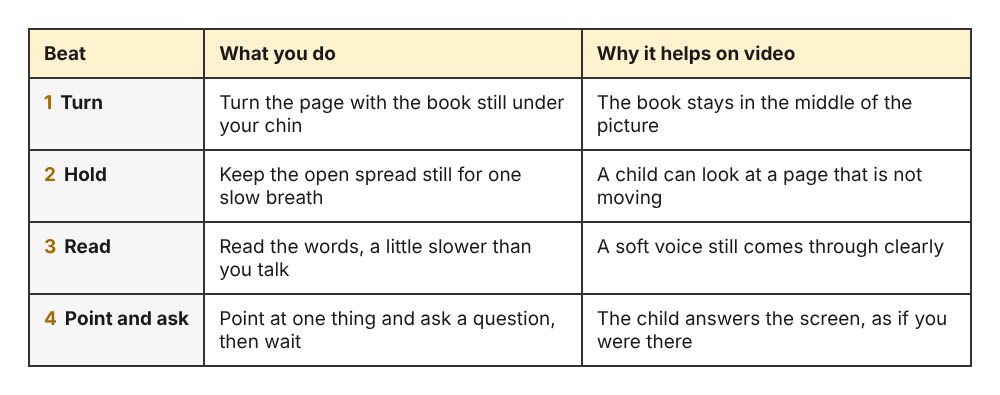
One page, four beats. Repeat them for every spread in the book.
Second, build a library, not a single video. The name you type in Name this recording becomes the file name and the folder name. If you number your stories, they stay in order:
Story 01 Three Little PigsStory 02 The Moon BoatStory 03 Counting Ducks
Each folder also gets the date and time the recording began, so you can always see when you made it. The recorder does not remember your folder between visits, so you choose it again each time. The guide to where recordings are saved explains the folder picker and what ends up inside each folder.
Send a short video letter about your day
Children are curious about ordinary things. Your cat, your kettle, the bird at your window. A video letter is a few minutes about your day, told to one child.
Here is a simple shape you can use every time:
- Hello by name. "Hi Mia, it's Nana. It's raining here."
- One thing you saw. Carry the laptop to the window, or hold up the first tomato from the garden.
- One question. "What did you have for lunch today?" This gives the child something to tell you on the next call.
- A goodbye ritual. The same wave or phrase every time, so they know it is ending.
If you want to show photos from your week, you can share a browser tab with the pictures and keep your camera on screen too. Which screen and camera layouts you have depends on your plan, and it is listed under What you can do on this plan in the menu under your name. The screen and webcam guide shows how to pick the tab and place the camera.
Teach a family recipe or skill on camera
Every family has something worth passing down. Grandma's flatbread. How to fold a paper boat. A card trick. A song in the family's language. A one-evening lesson on camera keeps that alive, and older grandchildren can follow along with a parent.
Set the laptop on the counter, choose Webcam only under What to capture, and do the task close to the camera so your hands are in view. Light your face and hands from the front. A bright window behind you makes everything dark.
Here is a useful extra for recipes. Live transcript is ticked by default under Options. If it hears speech, the recording's folder gets a plain-text transcript with times, for example Flatbread - transcript.txt. Open it, copy the steps you said out loud, and paste them into an email to the parents. Now they have the video and a written recipe from the same evening.
Two things to know. Chrome listens for one language per recording, and the language menu goes back to its default each time the page opens, so check it before you start. And while the live transcript is on, Chrome sends your microphone audio to Google to turn it into text. If you would rather it did not, untick Live transcript before you press Start recording.
Build small rituals across time zones
Rituals turn one-off videos into something a child expects and looks forward to. Time zones make this easier, not harder, because a recording can arrive while you sleep.
- A good-morning message. Record it in your evening so it is waiting when they wake up.
- Story Sunday. One new numbered story each week, so the library grows.
- A lullaby with no picture. Switch Record my webcam off and do not pick a screen. The recorder then saves an M4A audio file instead of an MP4. A parent can play it in a dark bedroom without a glowing screen.
Rituals can be on your side too. Take the same short walk each week and describe it in the next video, or write a few lines about the child and read them out at the end. Children like hearing that something was made just for them.
Pair a video with something in the mailbox
A parcel is exciting. A parcel that comes with a video from the person who sent it is even better.
- Post a book, then read it. Send a copy of the book and record yourself reading the same edition. The child can turn the pages along with you.
- Seeds and a garden tour. Mail a seed packet, then send a video planting the same seeds in your garden.
- A postcard with a story. Send a postcard of your town and a video explaining the place in the picture.
- A small treasure hunt. Hide clues in a parcel and record the instructions, one clue per video.
Write the recording's name on the parcel, such as "Watch Story 07", so the parents know which file goes with it.
Frequently asked questions
What can I do with a grandchild who is too young for phone calls?
Send short recorded videos the parents can play when the child is calm, such as a story, a song, or a look around your home. Recordings let them see your face and hear your voice often, without needing to sit still for a call.
How long should a video for a small child be?
Keep it short enough to hold their attention, usually a few minutes. The bedtime story post plans for about seven minutes, which suits a picture book. A video letter can be shorter.
Do I need special equipment to record a story for my grandchild?
No. You need Google Chrome on a Mac, Windows or Linux computer with a webcam and microphone, and the free Cheap Recorder plan gives you 12 hours of recording a month with no card. Avoid a Bluetooth headset as your microphone, because it drops to a low-quality mode when used that way; the laptop's own microphone in a quiet room is fine.
How do I send a video to family who live in another country?
Cheap Recorder saves the MP4 on your computer and does not host it, so you send it the way your family already shares files, such as email, a messaging app or a file-sharing service. The MP4 uses H.264 video and AAC sound, which plays almost anywhere. If someone needs a different format, the convert guide covers the options.
Get started: record your first bedtime story with Cheap Recorder
Pick one idea from this post and do it tonight. A bedtime story is the easiest first step:
- Open Google Chrome and go to Cheap Recorder. Create a free account if you have not yet.
- Press Choose folder... and pick a folder for your stories. Allow Chrome to edit files there.
- Under What to capture, choose Webcam only, and allow the camera and microphone when Chrome asks.
- Type a name such as
Story 01 Three Little Pigs. - Record a 30-second test and play it back to check your voice is clear.
- Record the story, then press Stop and finish. The MP4 is already in your folder, and the card offers Download MP4.
For the full walk-through, with where to hold the book and how to plan the seven minutes, read how to record a bedtime story video for a grandchild far away.
The free plan needs no card. Try Cheap Recorder in Chrome, and your recordings stay on your own disk.
Screen recording that is cheap and easy.
Visit cheaprecorder.com↗
Comments
No comments yet.