Motion background loops for videos and slides
Motion background loops are short clips that move gently and repeat, made to sit behind a title, a slide or a social post. Picking one by look alone is easy. The two things people miss are the specs, which decide whether it fits your screen, and the license, which changes the moment a loop moves from your own blog to a talk, an ad or a client's deck. This guide covers both, with one worked example.
What motion background loops are for
A loop gives a still screen some life without pulling attention from the words on top. Typical uses are a title card at the start of a video, the background of a slide while you talk, a header on a web page, or the backdrop for a short social clip.
On Wavecrate, videos have their own category called Motion backgrounds, next to Abstract, Nature, Technology, City, Vertical for social, and Transitions and overlays. The collections page also has a set called Backgrounds for designers: "Gradients, textures and motion loops to put behind titles, slides and social posts."

Check the specs before you fall for the look
Open any motion background page and read the details panel first. Here is Slow Gradient Flow, described on its page as "Blue and violet gradients drifting slowly, for titles and presentations."
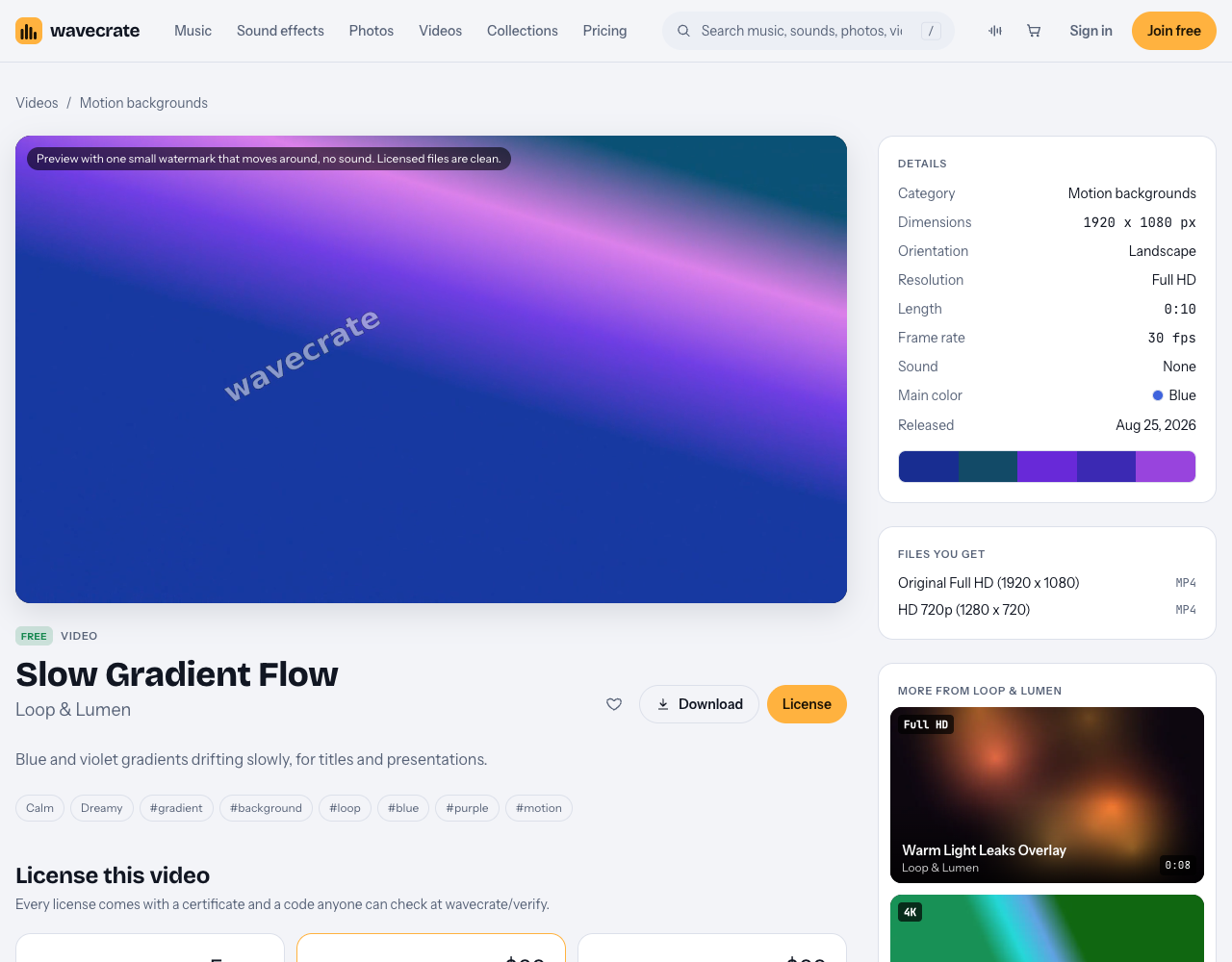
Four lines matter most:
- Orientation and dimensions. Slow Gradient Flow is 1920 x 1080, landscape. A slide or a widescreen video wants landscape; a story or a reel wants portrait.
- Resolution. Full HD here. Some videos are listed as 4K, which helps if you crop in or show it on a large screen.
- Length. 0:10 at 30 fps. Short loops are normal; you repeat them in your editor or slide app.
- Sound. None. Good for a background, since your voice or music goes on top.
The "Files you get" panel lists what you download: an Original Full HD mp4 and an HD 720p mp4. Previews carry "one small watermark that moves around, no sound", and the page says licensed files are clean.
Find motion background loops with the filters
The videos page lets you narrow the list before you preview anything:
- Set the category to Motion backgrounds, or Vertical for social if you need portrait.
- Set orientation (landscape, portrait or square) to match your screen.
- Pick a color close to your brand or slide theme.
- Set resolution to Full HD 1080p+ or 4K.
- Use length (under 10 seconds, 10 to 30, over 30) and mood to narrow it further.
- Set access to Free or Premium, depending on the license you plan to use.
Two choices make the words on top easier to read. First, pick a slow, low contrast loop for anything with text over it; the mood filter has options such as calm and dreamy, and Slow Gradient Flow is tagged with both. Save the busier loops, such as the neon grid in Retro Neon Grid, for short title moments with only a word or two. Second, match the shape of the screen from the start. If your post is a story or a reel, look in Vertical for social, or in the Backgrounds for designers collection, which includes Vertical Pink Gradient for Stories next to the two landscape loops. Cropping a landscape clip down to portrait throws away most of the frame.
The home page says you can hover a video to preview it, so you can compare a handful quickly. Once you have one, drop two copies back to back in your editor and watch the join, so you know how it repeats before you build around it.
Which license covers where the loop plays
This is the part that changes with the job. Photos and videos have their own table on the plans and licenses page, and the rows read like a list of places a loop might end up.
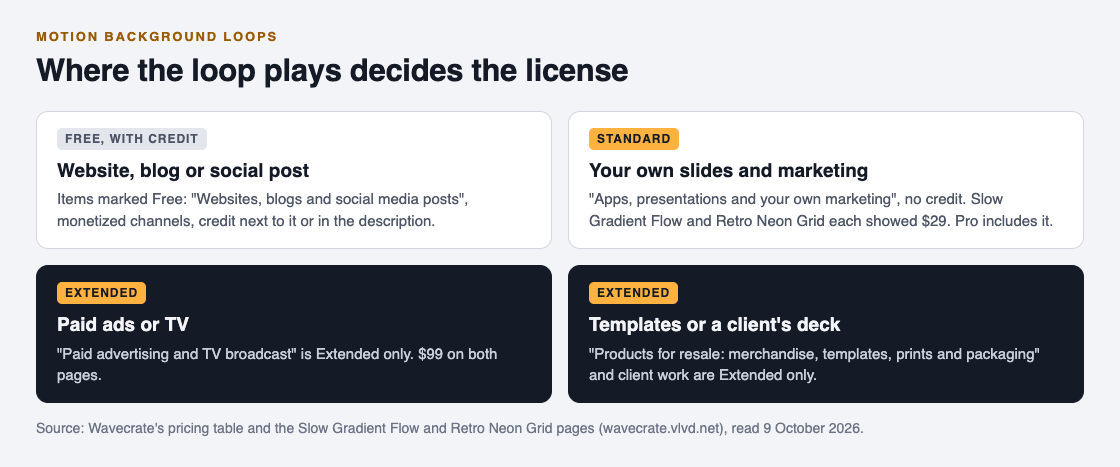
- Free, on items marked Free: websites, blogs and social media posts, and monetized channels, with credit text next to it or in the description. A free account gets 3 free downloads a month.
- Standard: adds no credit line, and "apps, presentations and your own marketing". Slow Gradient Flow and Retro Neon Grid each list Standard at $29. Pro is listed at $99 a year or $12 month to month and gives Standard on everything, but it is not on sale yet.
- Extended: adds paid advertising and TV broadcast, products for resale ("merchandise, templates, prints and packaging"), unlimited print runs and client work. Both pages list Extended at $99. Pro never includes it.
Note the presentations row. The Free license does not tick it, so a Free loop behind your own slides needs Standard, even though the same loop on your blog does not. Paid licenses are not on sale yet (Wavecrate says purchases open soon), so the prices above are the listed prices for when sales open; items marked Free can already be downloaded with a free account.
A worked example: one loop, four jobs
You like Slow Gradient Flow, which is marked Free, and you want it in four places this month.
- A header on your own blog. Websites and blogs are covered by the Free license. Download it with one of your free downloads and put the credit text next to it.
- The title slides of your company's own webinar. Presentations and your own marketing are Standard. Its page lists Standard at $29 for when sales open, and Pro will cover it too. No credit needed.
- A slide deck you design for a client. Client work is Extended only. Its page lists Extended at $99. The pricing page says that, once purchases open, someone holding Standard for it will be able to upgrade to Extended for the difference.
- A slide template you sell, with the loop built in. Templates fall under products for resale, which is Extended only.
Same clip, three different licenses. Decide which jobs you have before you download, and keep each certificate with the project it belongs to.
Keep the license with the file
Every Wavecrate license comes with a certificate and a code that anyone can check on the verify page, with no account needed. For a loop that sits inside a deck or a template, there is no video description to paste a code into, so save the certificate in the project folder next to the mp4. If a client or a colleague asks later where the background came from, you can hand them the code and they can check it themselves.
Frequently asked questions
Can I use a free motion background in a presentation?
Not under Wavecrate's Free license, which covers websites, blogs, social posts and monetized channels. Presentations are listed under Standard and Extended.
Do motion background loops come with sound?
The two motion background pages read for this guide list Sound as None, so you add your own voice or music on top.
What size should a background loop be for slides?
Match your slide shape: a widescreen deck wants a landscape clip such as 1920 x 1080. Use the orientation and resolution filters to find one.
Do I need Extended to sell a template that includes a loop?
Yes. Products for resale, including templates, are ticked only under Extended, and Pro does not include it.
Get started
Browse Wavecrate: you can join free and download items marked Free now, paid licenses are not on sale yet (purchases open soon), and every download comes with a license certificate and a code anyone can check on its verify page.
Open the videos page, filter by Motion backgrounds, orientation and color, then check the license cards against where the loop will play.


Comments
No comments yet.
Sign in or make an account to comment.