Multifactor authentication: choose and roll out MFA
Multifactor authentication asks for a second kind of proof after the password, so a stolen password alone no longer opens an account. The OWASP Multifactor Authentication Cheat Sheet says it plainly: any MFA is better than no MFA. How you roll it out decides how much it actually protects. This guide covers which factors to offer, how to handle codes, resets and changes, and the attacks aimed at MFA itself.
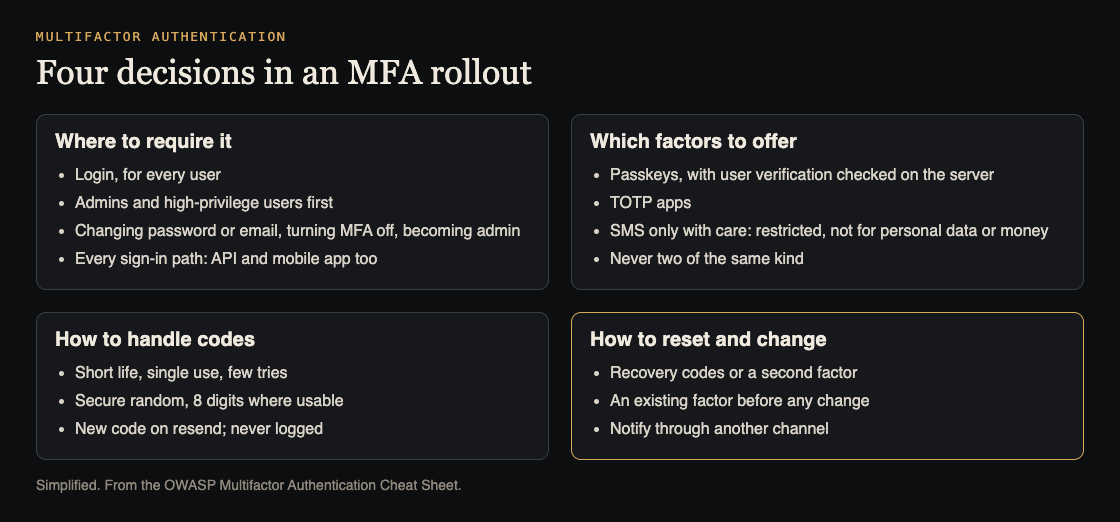
What to decide when you roll out MFA. Simplified from the OWASP Multifactor Authentication Cheat Sheet.
What counts as multifactor authentication
MFA needs proof from at least two different kinds of factor: something you know (a password or PIN), something you have (a code generator, a security key, a phone) or something you are (a fingerprint or face). OWASP adds two warnings.
- Two of the same kind is not MFA. A password plus a PIN adds little. The factors should be independent, so one attack cannot take both.
- Location is a signal, not a factor. An IP address or country can decide when to ask for more proof, but it never replaces a factor.
Why bother? OWASP says most accounts are taken over through weak, reused or stolen passwords, and that you should assume your users' passwords will leak at some point. MFA is by far the best defense against brute force, credential stuffing and password spraying.
OWASP's starting recommendations
The right setup depends on your threat model and your users, but OWASP gives a starting point that suits most apps:
- Require some form of MFA for all users.
- Let users turn on MFA with a time-based one-time password (TOTP) app.
- Require MFA for admins and other high-privilege users.
- Build a secure way for users to reset their MFA.
- Consider MFA as a service.
On the last point, OWASP is balanced: a service can save work, but if that service is compromised, an attacker could bypass MFA on every app that uses it. Be honest about the costs too. OWASP lists more support work, lockouts when users lose a factor, extra code and dependencies, and reset processes that attackers can abuse.
Where to require it
Login comes first. Then the sensitive actions OWASP names:
- Changing the password
- Changing the account's email address
- Turning MFA off
- Moving a session up to admin rights
The common miss is a second door. If your app has a separate API that can sign in, or a mobile app, each must require MFA too. Our attack surface analysis guide helps you find every door.
To keep prompts bearable, ask again only when risk is high, such as a new device or location. OWASP warns that the signals you use must not be easy to fake, and any fallback must not be weaker than the main method.
Choosing factors: passkeys, TOTP and SMS
- Passkeys can give phishing-resistant MFA, because they are tied to your real site. OWASP says to require user verification (a PIN or biometric on the device) and check the verification flag on your server; a simple touch to show presence is not a second factor. OWASP prefers phishing-resistant methods in general.
- TOTP apps are in OWASP's starting list and are a reasonable default to offer every user.
- SMS and phone calls are restricted. Codes can be intercepted or stolen through SIM swaps and number porting. OWASP says not to rely on them for apps that hold personal data or carry financial risk. If SMS is the only option, write down that you accept the risk, rate-limit sends per account, watch for SIM swap signs and plan a move to something stronger. Sending also costs money, so stop attackers from requesting thousands of codes.
Handle one-time codes like passwords
OWASP treats one-time codes as secrets. Your code should:
- Expire quickly, work once, and be invalidated as soon as it is used
- Allow only a few wrong tries
- Come from a secure random generator, and be 8 digits or longer where users can manage it
- Be replaced, not resent, when the user asks for another
- Never appear in logs, and never sit in the database as plain text for long
Hash stored codes, but know why. A 6-digit code has about a million possibilities, so a hash will not hold against someone with the database. It still keeps codes out of logs and debugging tools during their short life. Our password storage guide covers the stronger hashing passwords need.
Failures, resets and factor changes
When the password is right but the second factor fails, either the user lost their factor or their password is known. OWASP says to offer another method, allow a reset, and tell the user: the time, browser and location of the attempt, shown at their next login and optionally emailed.
Resets are where MFA is most often bypassed. OWASP says there is no single best way, and lists options to weigh: single-use recovery codes given at setup, several enrolled factors so losing one is not fatal, a code posted to the registered address, a support process with strict identity checks, or another trusted user vouching.
Changing a factor, such as a new phone, is just as risky. Ask for an existing factor first, not only an active session, which may be hijacked. Notify the user through another channel, and consider a delay for high-value accounts. This mirrors the advice in our password reset security guide.
Worked example: a rollout and the attacks to test
- Admins first. Require MFA for every admin, with passkeys or TOTP.
- Offer it to everyone. Add TOTP and passkeys to account settings, with recovery codes shown once at setup.
- Close the side doors. Require it on the API sign-in, the mobile app and the four sensitive actions above.
- Then require it for all users, with risk-based prompts so people are not asked on every visit.
Then test against OWASP's attack patterns:
- Push fatigue: attackers send prompt after prompt until the user taps approve. Use number matching, cap prompts, and alert on bursts.
- Real-time phishing: a fake login page relays everything to your real one and captures the session. Phishing-resistant methods such as passkeys stop this; watch for odd session activity too.
- SIM swap: watch for sudden phone number changes, and steer users to TOTP or passkeys.
The whitehatstoic home page lists "audit sign-in and payments" among what it does, and its cybersecurity and AI safety testing covers a web app and API review, a written report with fixes, and a retest after you apply them. It is scoped after a short call. No test finds every weakness, but reset and side-door paths are worth a second look.

Frequently asked questions
Is a password plus a PIN multifactor authentication?
No. Both are something you know. OWASP says the factors should be of different kinds and independent, so one attack cannot take both.
Is SMS good enough for MFA?
It is better than nothing, but OWASP calls it restricted because of interception and SIM swaps, and says not to use it for apps with personal data or financial risk. Offer TOTP or passkeys instead.
What if a user loses their phone?
Plan for it before launch. Recovery codes given at setup, a second enrolled factor, or a strict support process are among OWASP's options; whichever you choose must not become an easy way around MFA.
Get started
Turn on MFA for every admin account this week, then check whether your API and mobile app sign-ins ask for it too.
Building something that has to be safe? Book a meeting with whitehatstoic: tell us the product, the deadline and your biggest worry, and we reply with a plan and a price.
Comments
No comments yet.
Sign in or make an account to comment.