Music for a channel trailer: how to pick and license a track
Music for a channel trailer has a harder job than music for an ordinary video. The trailer is the first thing many new visitors see, it usually runs well under a minute, and it has to say what your channel feels like before you say a word. This guide shows how to pick a track for that job, which version of a track fits a short trailer, and which license covers it, including the two cases where the usual license is not enough.
What a channel trailer is for
YouTube's help page on customizing your channel layout describes the channel trailer as a video for people who haven't subscribed. It "offers a preview of your channel so viewers can learn more and subscribe." Two more details from that page shape the music choice:
- Each visitor sees it once. "Once a viewer watches your channel trailer, it won't be shown to them again." You get one first impression per person, so the music has to land fast.
- Ads stay off by default. YouTube says ads won't show on a channel trailer "unless your video contains third-party claimed content." A claim on music you did not license can change that, on the one video meant to win new subscribers.
So the trailer needs a track that sets the mood in seconds and a license you can show if anyone asks.
Wavecrate, the music library used as the example in this guide, gives each track a short edit and a loop, and every download comes with a license certificate and a code you can show.

How to choose music for a channel trailer
Start from the feeling, not the genre. Ask what a new visitor should feel after 30 seconds: curious, calm, pumped, amused. Then use that word to search.
On Wavecrate's music page you can filter by mood, tempo (BPM), key and energy. A few pairings that tend to work:
- A gaming, action or challenge channel: moods like epic or tense, and a high energy level. The Trailer and tension collection gathers "big hits, rising tension and epic builds."
- A tutorial, business or explainer channel: uplifting or confident. Forward Motion, a corporate track at 118 BPM, is described as "uplifting and confident" with "driving" energy.
- A cooking, craft or study channel: calm or happy, at a slower tempo, so the voice and the images carry the trailer.
Tempo matters more than people expect. If you cut your trailer to the beat, a track at around 90 BPM gives you a cut every two-thirds of a second on the beat, while 140 BPM pushes the edit much faster. Pick the tempo that matches how quickly you want the shots to change.
The 30 second edit and the loop
A full track rarely fits a trailer. Wavecrate's track pages list three versions of each track, which is where the trailer edit gets easier.
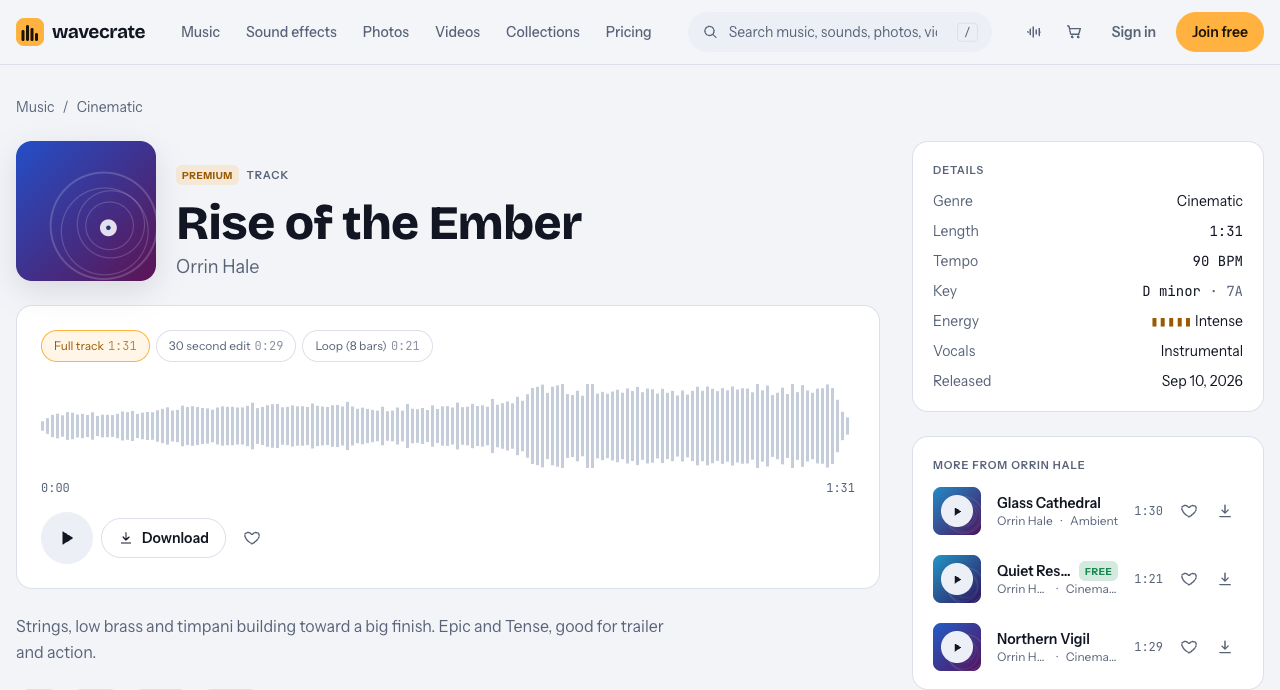
Take Rise of the Ember, a cinematic track at 90 BPM in D minor with "Intense" energy, described as "good for trailer and action." Its page lists:
- Full track, 1:31. Too long for most trailers, but useful if you want to pick your own section.
- 30 second edit, 0:29. Already shaped with a start and an end, so a 30 second trailer can use it as it is.
- Loop (8 bars), 0:21. Made to repeat, which suits a trailer that ends on a still end card while you speak.
The short edit saves you from the most common trailer mistake: music that stops dead because the video ended before the track did.
Which license your channel trailer needs
The plans and licenses page has a table for music and sound effects. For a trailer on your own channel, three options apply:
- Free, only on tracks marked Free (Last Train Out in the Trailer and tension collection is one). It covers YouTube and monetized channels, but "credit text required in the description." The trailer's description has to carry it.
- Standard, listed at $15 on the track pages read on 10 October 2026. It is "online content for one creator or business, no credit needed," and your registered channels are printed on the certificate.
- Pro, listed at $99 a year or $12 month to month and not on sale yet, gives Standard licenses on the whole catalog, in all versions: full, 30-second edit and loop.
Paid licenses are not on sale yet: Wavecrate says purchases open soon, so these are the listed prices for when sales open. A track marked Free can already be downloaded with a free account.
If your trailer promotes your own business, the table ticks "Your own business and brand content" only under Standard and Extended, not Free.
When a trailer needs Extended
Two common trailer situations move you past Standard, and Pro does not cover either, because Pro gives Standard only.
- You pay to promote the trailer. Running it as a paid ad is paid advertising, which the table ticks only under Extended, listed at $49 on the track pages read. Wavecrate's pages do not define paid advertising further, so treat any paid promotion as an ad.
- You make the trailer for someone else's channel. That is client work, also Extended only, even for a track marked Free.
The pricing page says that, once purchases open, Extended will cost only the difference if you hold Standard on the track.
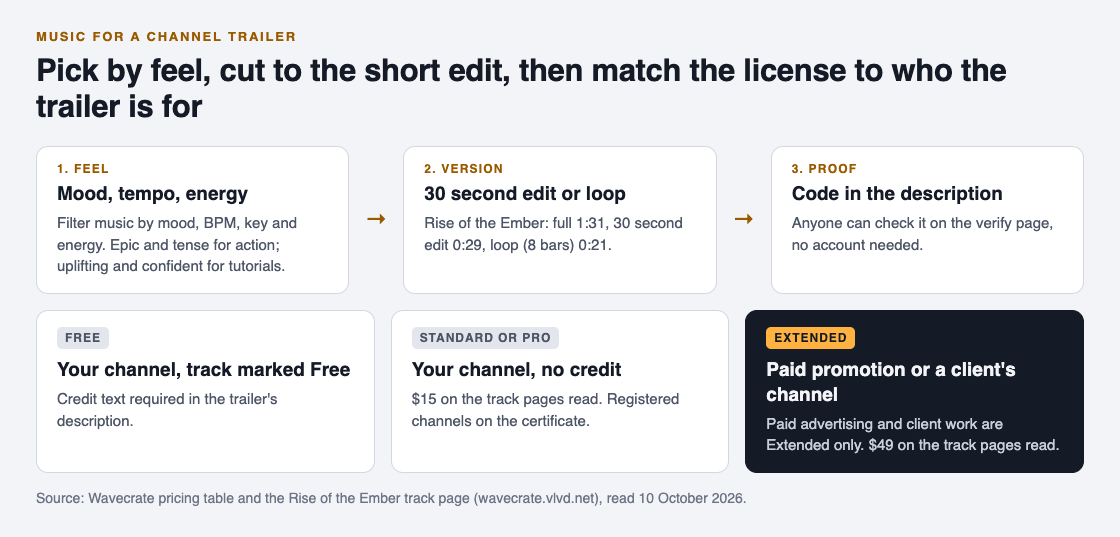
A worked example: a 30 second trailer for a woodworking channel
Say you run a woodworking channel and want a 30 second trailer: ten fast shots of finished pieces, then a still end card with "New build every Friday."
- Pick the mood. You want it to feel confident and a little epic, so you filter for epic, then sort by energy. Rise of the Ember comes up.
- Pick the version. You use the 30 second edit (0:29) and cut your ten shots on its beats, at 90 BPM.
- Pick the license. It is your own channel, the trailer runs no paid promotion, and you want a clean description, so Standard is the license that fits, listed at $15 on its page for when sales open. Your channel name goes on the certificate.
- Keep the proof. Paste the license code into the trailer's description, and save the certificate with your project files.
- Later, a boost. If you decide to pay for the trailer to reach more people, that track needs Extended first.
If a claim ever lands on the trailer, the pricing page says to send the platform your license code or certificate link. The verify page shows who holds the license, for which track and what it covers, so a reviewer can check it without an account. Whether the claim is released is up to the platform.
Frequently asked questions
How long should channel trailer music be?
As long as the trailer, with a real ending. A 30 second edit, such as Rise of the Ember's 0:29 version, fits a short trailer without a hard cut.
Can I use a free track in my channel trailer?
Yes, if the track is marked Free and you put the credit text in the trailer's description. Using it with no credit line needs Standard instead.
Does Pro cover a trailer I run as an ad?
No. Pro gives Standard licenses only, and paid advertising is ticked only under Extended.
I made a trailer for a client. Which license?
Extended. Client work is ticked only under Extended in Wavecrate's table, even for a track marked Free.
Get started
Browse Wavecrate: you can join free and download items marked Free now, paid licenses are not on sale yet (purchases open soon), and every download comes with a license certificate and a code anyone can check on its verify page. Filter the music by the mood you want new visitors to feel, and try the 30 second edit against your cut.


Comments
No comments yet.
Sign in or make an account to comment.