Music for a fitness class video: how to pick tracks that work
Picking music for a fitness class video is harder than picking music for a live class. In the room, the beat only has to carry people through the next interval. On video it also has to sit under your voice, match your edits, and come with a license that covers where the video ends up. This guide shows how to choose tracks by tempo and energy, shape a class from warm-up to cool-down, mix the music under your cues, and pick the right license.
Wavecrate licenses royalty-free music you can filter by tempo and energy, including fast tracks for workouts, and every download comes with a license certificate and a code anyone can check on its verify page.

Why the music matters more on video
A viewer at home cannot feel the energy of a room full of people. They have your cues and the beat, and nothing else. If the track is too slow for a sprint interval, the block feels flat. If it is too busy under a stretch, it fights your breathing cues.
Music also shapes the edit. A track with a clear tempo makes it easy to time intervals, count reps and place camera changes on a downbeat, so the video feels planned rather than stitched.
Choose tracks by tempo and energy
BPM means beats per minute, and it is the most useful single number when you pick class music. Treat these as starting points to test against your own class, not rules:
- Intervals and cardio: fast and driving, above 120 BPM.
- Strength: mid tempo with a firm pulse, so reps stay controlled, roughly 90 to 120 BPM.
- Stretching and mobility: slow and calm, under 90 BPM, or music with almost no beat.
On Wavecrate, the music browse page has a Tempo filter with Slow (under 90), Mid (90 to 120), Fast (over 120) and a custom range, and an Energy filter that runs Calm, Relaxed, Steady, Driving and Intense. You can also filter by mood, length and vocals, and sort by BPM from slow to fast. Set tempo first, then energy: tempo tells you whether people can move to it, energy tells you how hard it pushes.
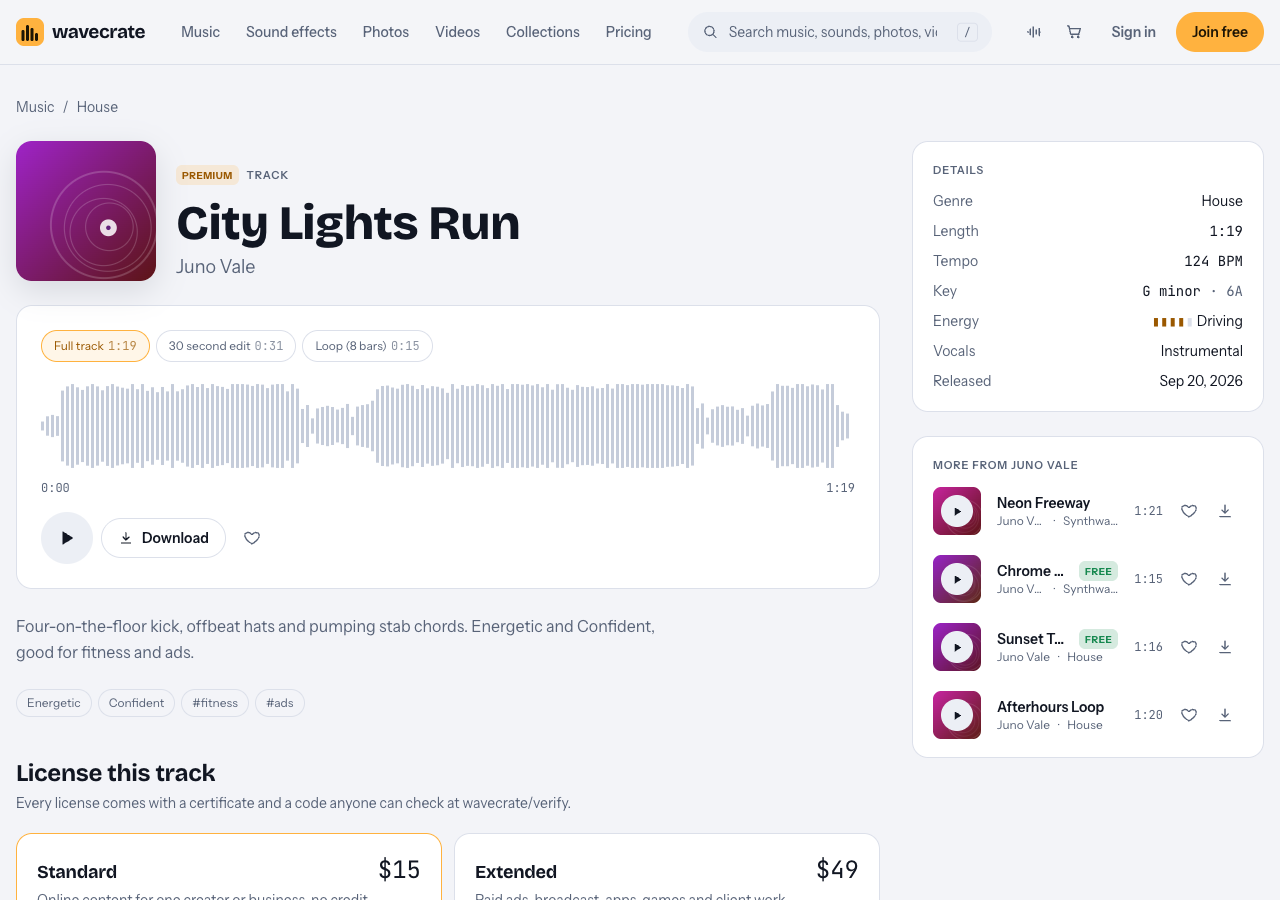
City Lights Run, read on 11 October 2026: 124 BPM, energy Driving, three versions.
Shape the class: warm-up, peak, cool-down
Here is a worked example. You film a 30 minute interval class for your channel and need a warm-up, three fast blocks and a cool-down.
- Peak first. Set Tempo to Fast and Energy to Driving. Two tracks read on 11 October 2026 fit: City Lights Run, a House track at 124 BPM described as "good for fitness and ads", and Digital Model, also House at 124 BPM, marked Free. Using the same tempo for every work block lets you count reps the same way all class.
- Audition fast. The site's keyboard shortcuts help: Space plays or pauses, Left and Right skip 5 seconds, and Shift with Left or Right moves to the previous or next item. Skip ahead to check a track keeps its drive to the end.
- Warm-up. Switch Tempo to Mid and Energy to Steady, and pick something that feels like movement, not a sprint.
- Cool-down. Drop to Slow and Calm or Relaxed. The Study and focus collection has Tea and Tape (Lo-fi, 82 BPM) and Slow Tide (Ambient, 60 BPM), both marked Free when read. The sudden drop in tempo tells viewers the hard part is over, even if they missed your cue.
- Fill long blocks. Track pages offer a full track, a 30 second edit and a loop. City Lights Run's full track is 1:19, so a five minute block needs the loop to extend it in your editor.
Mix the music under your cues
Your voice is the instruction; the music supports it. A few habits keep them from fighting:
- Lower the music while you talk, then bring it back up during work intervals with no cues.
- Prefer instrumentals. Track pages say whether a track is Instrumental or With vocals, and the browse page filters by it. Sung lyrics compete with your counting.
- Cut on the beat. With the BPM known, you can place interval starts on a downbeat.
- Use the 30 second edit for clips. When you cut a class into a short, the shorter version saves you a hard chop.
- Check on a phone speaker. Most viewers follow along on a phone. If a cue is hard to hear there, the music is too loud.
Music for a fitness class video: which license covers each use
A song you like is not automatically yours to publish. The U.S. Copyright Office explains that a recorded song can hold two works, the musical work and the sound recording, which are commonly licensed separately. A license covers the uses it names, and nothing more. On Wavecrate, you do not own the music: the pricing page says "You get a license to use it. We keep the copyright."
The trap for instructors is a track marked Free in a business video. Take Digital Model through three uses, using its page and the license table on the pricing page:
- Your own channel. The Free license covers YouTube, TikTok, Instagram, Twitch and podcasts, monetized channels included, with credit text required in the description. A free account gets 3 free downloads a month.
- Your studio's own channel or website. A class posted to promote your own studio is "your own business and brand content." The Free license does not tick that row, so it needs Standard (listed at $15 on this page), even though the track is marked Free. Standard needs no credit and prints your registered channels on the certificate.
- A gym client, an app or a paid ad. Filming a class for a gym that pays you is client work. Boosting the video as an ad, or putting it in a fitness app, is a paid ad or an app. All three need Extended (listed at $49 on this page).
If you post every week, Pro is listed at $8.25 a month billed yearly ($99 a year) or $12 month to month, and gives Standard licenses on the whole catalog. Content you publish while subscribed stays covered after it ends. Pro never includes Extended. Pro and the paid licenses are not on sale yet (Wavecrate says purchases open soon), so the prices here are the listed prices for when sales open, while tracks marked Free, like Digital Model, can already be downloaded with a free account.
The license table covers published content. It does not name playing a track out loud in a live class, so treat that as not covered by these licenses.
Every download comes with a certificate and a code. Paste the code in your description. On the verify page, a reviewer can see the licensee, the item, the license type and your registered channels without contacting Wavecrate.
Frequently asked questions
What tempo works for an interval workout video?
Fast tracks above 120 BPM suit work intervals. On Wavecrate, set Tempo to Fast and Energy to Driving to start your search.
Is a track marked Free enough for my studio's promo video?
No. On Wavecrate the Free license does not cover your own business and brand content, so a studio promo needs Standard, and a paid ad needs Extended.
Does Pro cover a class I film for a gym?
No. Work a client pays you for is client work, which is Extended only, and Pro gives Standard licenses only.
Can I use the music during my live class?
Wavecrate's license table names online, business, ad, broadcast, app and client uses, not live playback in a room, so treat it as not covered.
Get started
Write down the blocks of the next class you film, then open the music browse page, set tempo and energy for each block, and pick one track per block. Note whether each is marked Free or needs a license for your use, and keep the license codes with your video files.
Browse Wavecrate: you can join free and download items marked Free now, paid licenses are not on sale yet (purchases open soon), and every download comes with a license certificate and a code anyone can check on its verify page.


Comments
No comments yet.
Sign in or make an account to comment.