Music for paid social media ads: how to license a song
Music for paid social media ads is where a lot of small businesses get the license wrong without knowing it. You post a short video with a song under it, people like it, and you pay to show it to more people. The video did not change, but the use did, and Wavecrate's license table lists paid advertising as a use of its own. This guide explains why, which Wavecrate license covers an ad, and how to take one track from a normal post to a paid campaign.
Wavecrate licenses royalty-free music for videos, under licenses that say plainly which ones cover paid ads, and every download comes with a license certificate and a code anyone can check on its verify page.

Why a song in an ad needs a license at all
A recorded song is usually more than one thing. The U.S. Copyright Office's page for musicians says that recording a song can create two works: the musical work (the composition and any lyrics) and the sound recording. It says these are separate works that are "commonly owned and licensed separately".
The same page says that to use another artist's recordings or musical works, you must get permission from the copyright holder or license the work on the terms of a licensing contract. For a well-known song, that can mean two permissions from two different owners. A track from a music library is simpler: you take one license, for one item, from the place that offers it, and the license says which uses it covers.
Music for paid social media ads: the row that decides it
On Wavecrate's plans and licenses page, the table for music and sound effects has a row called "Paid advertising". It is ticked only under Extended.
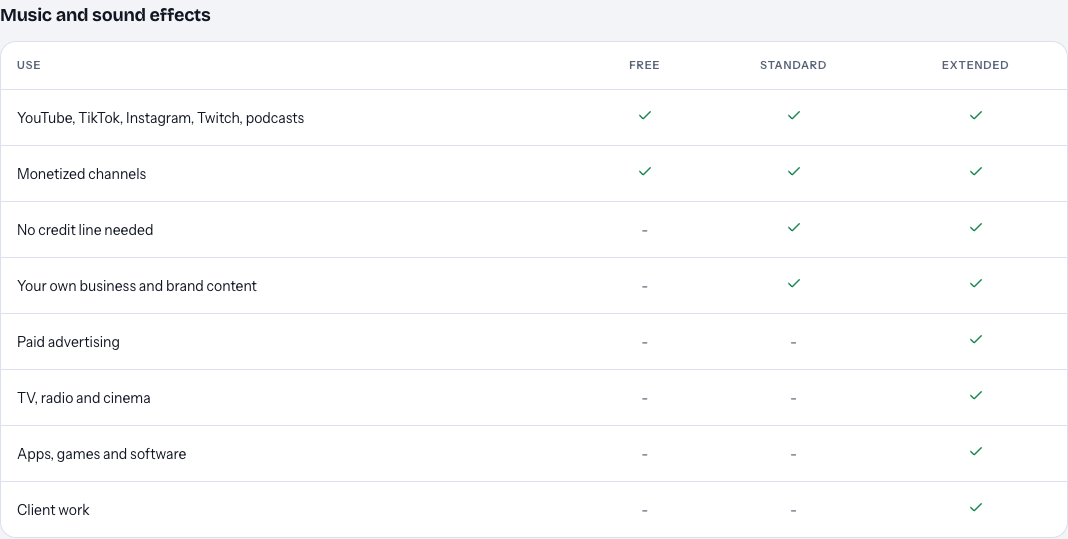
Here is how the three licenses line up for a business:
- Free is only on items marked Free. It covers YouTube, TikTok, Instagram, Twitch and podcasts, with credit text in the description. "Your own business and brand content" is not ticked, and neither is paid advertising.
- Standard covers online content for one creator or business with no credit, including your own business and brand videos. Paid advertising is not ticked.
- Extended adds paid advertising, TV, radio and cinema, apps and games, and client work. The track pages describe it as "Paid ads, broadcast, apps, games and client work" and list "Client work and unlimited impressions".
Paid licenses are not on sale yet (Wavecrate says purchases open soon), so the prices in this guide are the listed prices for when sales open, while items marked Free can already be downloaded with a free account.
A normal post or a paid ad?
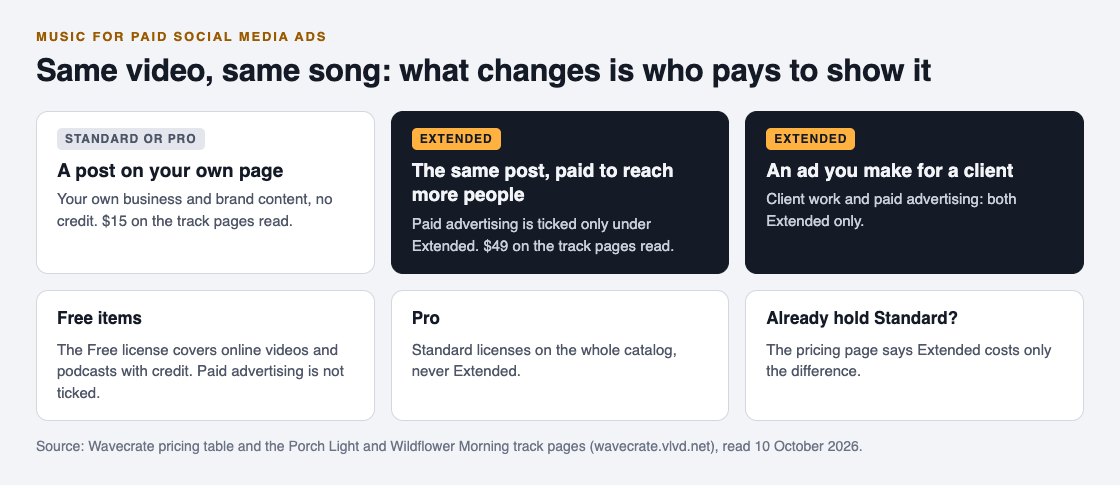
The line that trips people up is boosting. A video on your own page that promotes your shop is your own brand content, which Standard covers. The moment you pay a platform to show that same video to more people, you are paying for advertising.
Wavecrate's pages do not define "paid advertising" in more detail, and the site has no separate license agreement page today. So the safe reading is simple: if money goes to a platform to promote the post, treat it as a paid ad that needs Extended. If you are not sure whether you will boost a video later, decide before you publish it, so you do not have to swap the music on a post that is already doing well.
Why Pro and Free items do not cover ads
Pro is the subscription, listed at $99 a year or $12 month to month and not on sale yet, with a Standard license on everything and no credit needed. That is useful if you post a lot of your own videos. But Pro gives Standard licenses only, never Extended, so it does not cover paid ads.
A track marked Free does not help here either. Its Free license covers online videos and podcasts with credit, and paid advertising is not on it. For an ad, a Free track needs Extended like any other track.
If you hold a Standard license for a track and later decide to run it as an ad, the pricing page says that, once purchases open, Standard can be upgraded to Extended for the difference. You would not start again from zero.
A worked example: a bakery's 15-second ad
Say you run a small bakery and you are launching a new loaf. You film a 15-second video for Instagram and plan to run it as a paid ad for two weeks.
- Find the track. Open Wavecrate's music, pick the happy or uplifting mood, and set the tempo filter to Mid (90 to 120 BPM). You land on Porch Light, an acoustic track with plucked and strummed guitars at 96 BPM.
- Pick the version. Porch Light comes as a full track (1:20), a 30 second edit and an 8-bar loop. For a 15-second ad, the 30 second edit gives you a clean ending to cut toward.
- Check the cards. Porch Light is marked Free, but that Free license is for online videos and podcasts with credit, not for your shop's ads. Its page lists Standard at $15 and Extended at $49. Your ad is paid advertising, so it needs Extended.
- Keep the post and the ad the same. One Extended license includes everything in Standard, so the normal post on your page and the paid version are both covered by it.
- File the proof. Every download comes with a license certificate and a code. An ad may not give you a description to paste it into, so save the code and the certificate link in your campaign notes.
If you want a track with singing, Wildflower Morning is another acoustic track, uplifting and happy at 104 BPM, listed "With vocals", with the same $15 Standard and $49 Extended cards. Listen with your voiceover on top before you choose: vocals and a voiceover can fight for attention in a short ad.
When someone else makes the ad
If you are a freelancer or agency making the ad for a client, two Extended rows apply at once: paid advertising and client work. Neither is in Standard or Pro.
Decide early whose name is on the license. The verify page shows who holds the license, for which track, and what it covers, so either you license the track and give your client the certificate link, or the client licenses it under their own account and hands you the file.
What to keep on file
A license is permission, not ownership. Wavecrate's pricing page says you get a license to use the music and Wavecrate keeps the copyright. Keep three things with every campaign: the track name, the license type, and the code.
If a platform ever questions the music, the pricing page says to send them your license code or certificate link. The verify page shows the licensee, the item, the license type and your registered channels, so a reviewer can check it without contacting Wavecrate. And if your ad later moves to TV or radio, check the table again: TV, radio and cinema is its own Extended row.
Frequently asked questions
Can I use Standard music in a boosted post?
Not on Wavecrate. A boosted post is one you pay to promote, and paid advertising is ticked only under Extended.
Does Pro cover music in my ads?
No. Pro gives Standard licenses on the whole catalog, never Extended, and paid ads need Extended.
Can I use a free track in a paid ad?
Not with its Free license, which covers online videos and podcasts with credit. A track marked Free still needs Extended for a paid ad.
What if a video licensed for Standard later runs as an ad?
Your ad needs Extended. Wavecrate's pricing page says that, once purchases open, Standard can be upgraded to Extended for the difference.
Get started
Browse Wavecrate: you can join free and download items marked Free now, paid licenses are not on sale yet (purchases open soon), and every download comes with a license certificate and a code anyone can check on its verify page.


Filter the music by mood and tempo, and read each track's Standard and Extended cards against how you plan to use your video.
Comments
No comments yet.
Sign in or make an account to comment.