Neighbourhood problems: a shared list with neighbours
Every street has the same few problems that never quite go away: the broken streetlight, the overflowing bin by the bus stop, the car that blocks the dropped kerb every Tuesday. A shared list with neighbours is the simplest fix for neighbourhood problems because it keeps one record of what is wrong, what has been tried, and what happened. This post shows you how to set one up on Problem Graph, how to log calls and reports to the council, and how to keep it useful without another noisy group chat.
Why neighbourhood problems keep coming back
Often, neighbourhood problems come back not because nobody cares, but because nobody remembers what happened last time.
Someone reported the pothole in March. Someone else reported it again in May, not knowing about March. The council replied to one of them with a reference number, and that number now sits in one person's inbox. When the pothole gets worse in autumn, the street starts from zero.
Three things can go wrong:
- The history is scattered. It lives in texts, emails, and doorstep conversations.
- Failures are forgotten. Nobody writes down that the online form went nowhere, so the next person uses the same form.
- Related problems look unrelated. Fly tipping in the alley and the broken gate at its end might be one problem, but on separate messages nobody sees that.
A shared list fixes the first two. A list drawn as a map helps with the third.
What belongs on a shared list with neighbours
Keep it to problems that affect more than one household and that someone could act on. Good candidates:
- Broken or missing things: streetlights, signs, drains, railings.
- Recurring nuisances: bins left out, blocked pavements, noise at a known time.
- Safety worries: a dangerous crossing, a dark path, a loose wall.
Leave out personal disputes between two households. A shared list works when everyone can read every entry without feeling accused. Write each problem as a fact, not a complaint. "Streetlight outside number 14 has been out since early September" works. "Number 14's landlord ignores everything" does not.
How to set up one shared neighbourhood problem list
Problem Graph is a problem and solution journal drawn as a knowledge graph. You write a problem in one line, attach the solutions you try, mark how each one went, and link problems that belong together. It runs in the web browser and works on your phone, so neighbours do not need to install anything.
The setup below has one keeper: one neighbour who writes the problems and shares them. Everyone else joins the network to read the list and tells the keeper what they tried. The pages say members of a private network see what is shared into it; they do not describe members adding to someone else's problem, so plan on one person doing the writing.
Here is the setup, start to finish.
- The keeper creates an account. You can look around the public network without one, but adding a problem needs a username and a password. Open the app.
- Create a private network. Call it something obvious, like "Elm Road neighbours". You get an invite code.
- Write the first problem. One line is enough. Put it in the personal lane. It appears on the graph as soon as you press Enter.
- Mark it as a main node and share it into the network. This matters. Only a main node can be shared. When you share it, its solutions, their outcomes, and the requirements they need go with it.
- Hand out the invite code. Anyone with the code can join, so give it to neighbours directly: on a note through the door, or in person. Do not post it on a public noticeboard.
One detail to understand early. If you link a second problem to a shared main node without making it a main node itself, that second problem stays home on your own graph. Only a main node can be shared, so each problem you want the street to see needs to be marked as one and shared into the network.
If you have done something similar for a club or charity, the same pattern is in our post on keeping one shared list for a volunteer group.
Recording what was tried: calls, reports and replies from the council
This is where a street list earns its keep. Every action a neighbour reports becomes a solution the keeper attaches to the problem. Each solution gets an outcome: worked, partly, or failed.
Write each solution so the next person can repeat it or avoid it. Include who did it, when, how, and any reference number. For example, under the problem "Streetlight outside number 14 out since early September":
- "Reported on council website, 12 Sept, ref noted in my email. No reply after 3 weeks." Marked failed.
- "Phoned council street lighting line, 6 Oct. Told it was logged and a crew would visit." Marked partly.
- "Asked our local councillor by email to chase it." Added as an idea, not yet tried.
Keep the failed entries. The home page puts it well: "A solution that failed three times stays on the map as a failed solution, and that is exactly what the next person needs to know." On a street, the next person might be a new neighbour who moves in next year.
If a fix needs something first, like a photo of the damage or a second resident to report it, add that as a requirement. When the problem is shared, the requirement goes along with the solution, so nobody discovers it halfway through a phone call.
If you are stepping back from the street group, the same record works as a handover. Our post on handover notes that pass on open problems and what was tried covers how to write entries someone else can pick up.
Keeping neighbours involved without endless group chats
Be clear with your neighbours about what this is. The pages describe sharing, linking and borrowing, not chat, comments or notifications. It is a shared record, not a conversation. That is the point.
A few habits keep people involved:
- Ask for one message, not ongoing effort. "When you call the council, tell the keeper what they said." One line per call is enough.
- Put names in the solution line. "Priya phoned on 6 Oct" makes it clear who to ask, without a formal owner system.
- Review once a month. The keeper opens the List view, filters to Network, and reads out what is still open at the next doorstep chat or residents' meeting.
- Link related problems. If the keeper sees fly tipping and a broken alley gate keep appearing together, they link them. Patterns show up on the map that never show up in a list.
Households sharing a single building can use the same approach on a smaller scale. See how to solve roommate problems with a shared list.
Example: one street's shared list for a month
This is an illustration, not a real street.
Week 1. Sam creates the "Elm Road neighbours" network and drops the invite code through six doors. Sam adds four problems, each marked as a main node and shared: the streetlight at number 14, bins left on the pavement after collection, cars blocking the dropped kerb near the school, and the back alley gate that no longer locks.
Week 2. Priya joins and tells Sam about her call to the council's street lighting line. Sam adds it under the streetlight as a solution, marked partly. Tom tells Sam he spoke to the two households who leave bins out; one agreed and one did not, so Sam adds it under the bins problem, marked partly.
Week 3. A neighbour reports rubbish dumped in the back alley, and Sam adds it as a new main node. It sits next to an older problem Sam already shared, the alley gate not locking, so Sam links the two. Now anyone looking at either sees both.
Week 4. The streetlight is fixed. Sam marks Priya's phone call as worked. The failed website report stays on the map. Next time a light goes out on Elm Road, the street knows to phone first.
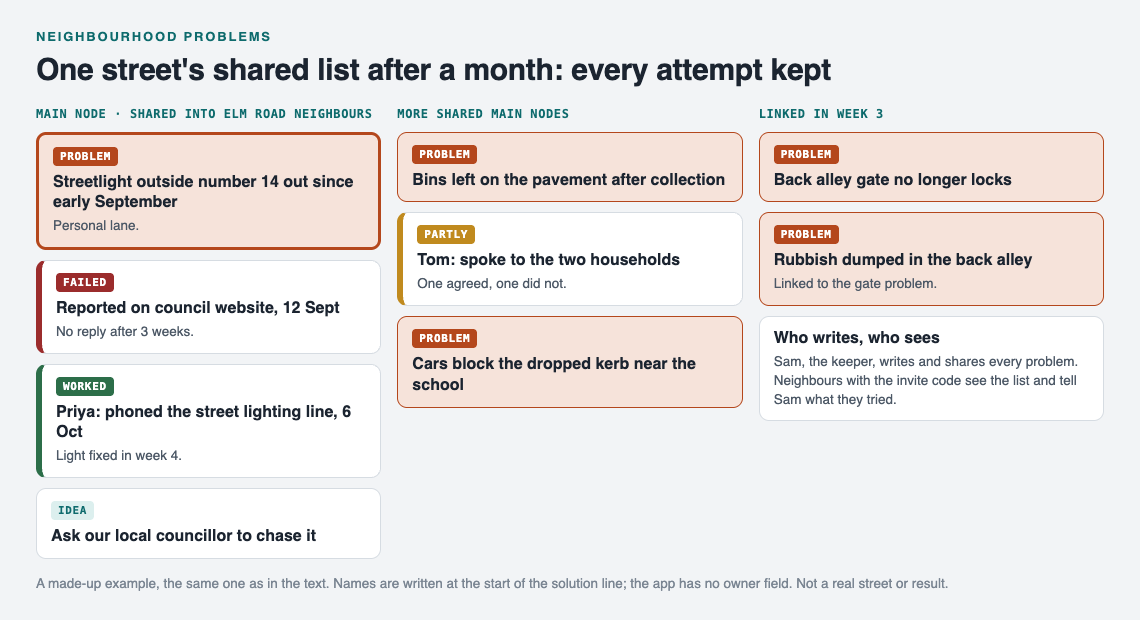
The made-up Elm Road list at the end of week 4.
If they wanted to, they could make one main node public, so people on other streets could link their own problems to it and borrow the approach that worked. Borrowed solutions keep a link back to where they came from.
Frequently asked questions
How do I get neighbours to use a shared list?
Ask for one small thing: tell the keeper when you contact the council or try a fix. Start the list yourself with three real problems so people join something that already has content.
Should the list be public or private?
Start private. Private is the default, and a private network means only people with the invite code see what you share. Make a single main node public only when you want people beyond your street to see it and borrow what worked.
Who should own each neighbourhood problem?
The keeper writes every problem, and names go into the solution lines, such as "Priya phoned on 6 Oct", so everyone knows who to ask. The keeper checks each open problem at the monthly review.
How is this different from a group chat?
A group chat is a stream of messages that scrolls away. Problem Graph keeps each problem in one place with every attempt and its outcome attached, so the history is there when the problem comes back.
Get started
Pick the one problem your street has complained about longest. Write it in one line, share it into a new private network, and add the last thing anyone tried, even if it failed. Then hand out the invite code.
Try Problem Graph: it is free, and you can look around the public network without an account. Write one problem down in a line and attach the first thing you will try.
Comments
No comments yet.
Sign in or make an account to comment.