Network segmentation: keep a breach in one zone
Network segmentation decides how far an attacker gets after the first mistake. If your web server and your database share one flat network, one bug in the web app puts the database a single hop away. Split the network into zones with firewalls between them, and that same bug stays in one zone. This guide follows the OWASP Network Segmentation Cheat Sheet and turns it into a map and a test list for a team running a web app.
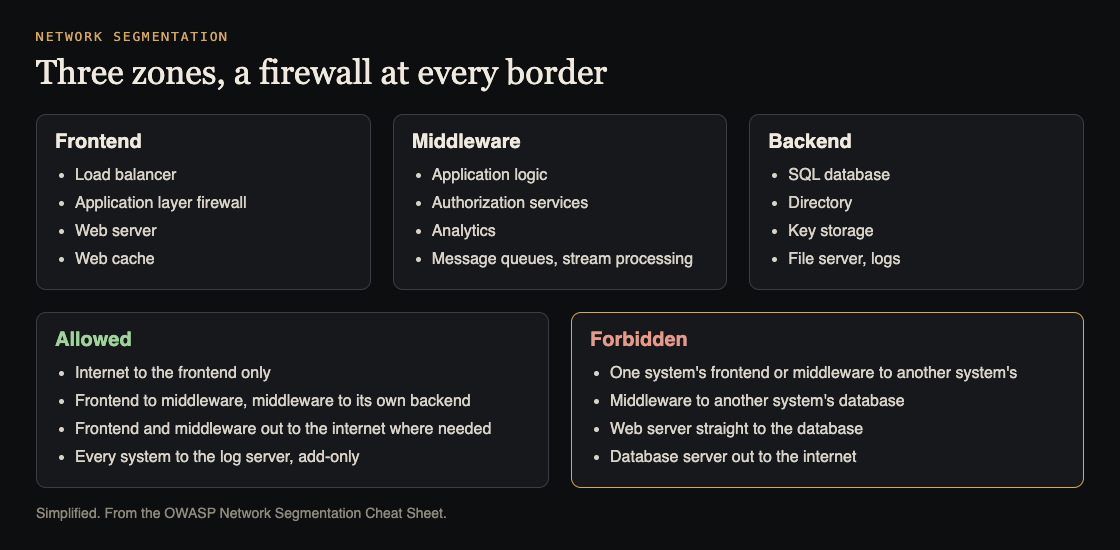
Three zones and the rules between them. Simplified from the OWASP Network Segmentation Cheat Sheet.
What network segmentation protects you from
OWASP calls segmentation the core of defense in depth for modern services. It does not stop the first attack. It slows down what comes after, for example:
- An SQL injection in your app
- A hacked laptop belonging to someone with high privileges
- Another server in your network that was broken into first
- A compromised directory, DNS server or other shared company service
The cheat sheet gives two plain outcomes. An attacker who can run commands on your public web server still cannot reach the database directly. And an attacker who reaches the database server still cannot call out to their own command server on the internet.
The three zones every system needs
OWASP says a system should have at least three security zones. Here is what lives in each.
- Frontend: the load balancer, the application layer firewall, the web server and the web cache. This is the only zone the internet should touch.
- Middleware: the web applications that hold your logic, authorization services, analytics, message queues and stream processing.
- Backend: the SQL database, the directory, the storage for cryptographic keys and the file server.
In the cheat sheet's example company, the frontend zone sits behind the edge firewall as two segments. One holds services reachable from the internet, protected by a web application firewall. The other holds services that the internet cannot reach but that can reach out. Behind an internal firewall, the middleware zone has one segment for applications, and the backend zone has separate segments for databases, directory services and logs.
Each border between zones is a firewall. Traffic that crosses a zone crosses a rule.
Which traffic is allowed between zones and systems
Most companies run more than one system, and those systems talk to each other. OWASP draws the line in two places.
- No reaching across systems at the edge. The frontend and middleware of one system may not talk to the frontend and middleware of a different system.
- No reaching into another system's backend. System A's middleware may not open a connection to system B's database. If A needs B's data, it asks B's application, which checks the request.
The frontend and middleware zones may reach outside networks, such as the internet, where they need to. The backend should not.
That second rule is the one teams break most often, because a direct database connection is quicker to build than an API. It is also what turns one compromised service into many. Our guide to microservices security covers how services should call each other instead.
The trade-off of many apps on one network
Some teams prefer fewer networks with more applications on each. OWASP says that is acceptable if a load balancer sits inside each network and sends traffic to the right app, with only one port open into the network.
Be clear about the price. The cheat sheet says that in this layout segmentation no longer works between those apps. Access control between them moves up to the load balancer, at the HTTP layer. That can be a fine choice, but then the balancer's rules are your segmentation, and they need the same review a firewall would get.
Write the network security policy down
OWASP says the organization must have a written policy describing the firewall rules and the basic allowed access. It is useful to network and IT admins, security staff, auditors, architects and developers, and it works best as simple diagrams. The cheat sheet gives three kinds of example rules to include.
- CI/CD permissions: what the build and deploy system may reach. Our CI/CD security guide covers the pipeline side.
- Secure logging: copy logs to a separate server, for example with syslog, which lets a system add new events but not change old ones. Then an attacker who takes over a system cannot quietly edit its logs.
- Monitoring permissions: what the monitoring system may connect to, written out so nobody opens more than it needs.
A written policy also tells colleagues what access exists and can be requested, which cuts down on one-off firewall holes nobody remembers.
Worked example: map and check your own zones
Take a typical web app: a load balancer, a web app, a background worker, a Postgres database and a log server. Here is a map you can draw in an hour.
- Place each part in a zone. Load balancer in frontend. Web app and worker in middleware. Postgres in backend. The log server in its own backend segment.
- Write the allowed arrows. Internet to load balancer. Load balancer to web app. Web app and worker to Postgres. Every part to the log server, add-only. Nothing else.
- Write the forbidden arrows. Internet to anything but the load balancer. Load balancer to Postgres. Postgres to the internet. Any other system's services to your Postgres.
- Compare with what is real. Read your firewall rules, security groups or cluster network policies, and list every rule that allows more than the map.
- Prove each forbidden arrow. From a shell on the web server, try to reach the database port of a different system. From the database host, try to reach an outside address. Each attempt should fail.
- Record and repeat. Put the map in the written policy, and rerun the checks after every infrastructure change.
Our posts on database security and attack surface analysis pair well with this map.
Get help testing it
whitehatstoic builds web and mobile apps from database to deploy, and runs cybersecurity and AI safety testing on web apps and AI systems: a web app and API review, a written report with fixes, and a retest after you apply them. The work is scoped after a short call. No test finds every weakness, but an outside look at your map often finds the arrow nobody meant to allow.

Frequently asked questions
Does network segmentation stop an attack?
It does not stop the first step. It limits what the attacker can reach next, so one hacked server does not become access to your database or a path out to the internet.
How many zones does a small app need?
OWASP says at least three: frontend, middleware and backend. A small app can start there and add segments, such as a separate one for logs, as it grows.
Is one load balancer in front of many apps still segmented?
Not between those apps. OWASP notes that access control between them then happens at the load balancer, at the HTTP layer, so its rules need careful review.
Get started
Draw your three zones this week, write the allowed and forbidden arrows, and test one forbidden arrow from a real server.
Building something that has to be safe? Book a meeting with whitehatstoic: tell us the product, the deadline and your biggest worry, and we reply with a plan and a price.
Comments
No comments yet.
Sign in or make an account to comment.