Node.js security: harden your server-side JavaScript
Node.js security covers every risk a web app faces, plus a few that come from how Node.js itself works. The OWASP Node.js Security Cheat Sheet says Node.js apps are prone to all kinds of web application vulnerabilities, and its advice is specific to the platform: a single blocking call can stall every user, a query value can arrive as an object instead of a string, and a few built-in functions will run whatever they are given. This guide groups that advice the way you would check a server, and ends with a hardening pass on one route.
Node.js security starts with the event loop
Node.js runs your code on a single thread with an event loop: it waits for nothing, and hands each event to its handler. That design gives high throughput, but OWASP points out the catch. A blocking operation stops every other request until it finishes, so any slow, synchronous work on the main thread becomes a denial of service waiting to happen.
Two common causes are large request bodies and slow regular expressions. A third is subtler: code outside a callback that assumes the callback already ran. The cheat sheet's example deletes a file before the callback has read it, and notes that the same kind of race can let authenticated actions run before authentication finishes. Keep dependent steps inside the same callback or promise chain.
OWASP also suggests flat promise chains or async/await instead of deeply nested callbacks, because errors get lost in the nesting, and watching the loop itself with a module such as toobusy-js, which can tell you when the server is too busy so you can refuse new requests instead of falling over.
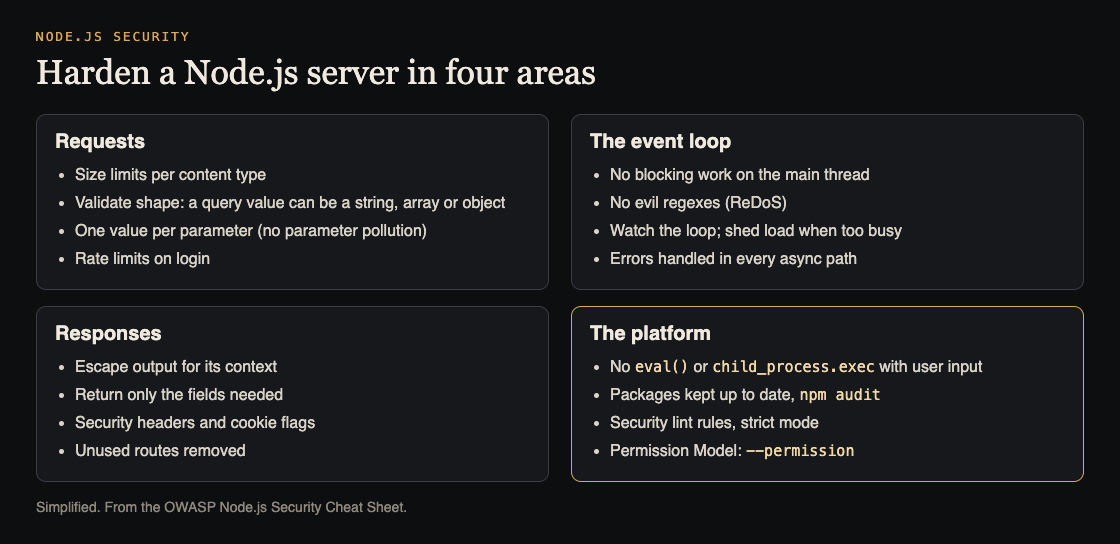
Four areas to check. Simplified from the OWASP Node.js Security Cheat Sheet.
Requests: size limits and the real shape of input
Without a size limit, an attacker can send huge bodies that exhaust memory or disk. OWASP recommends limits per content type rather than one global value, since uploads need more room and JSON parsing blocks the loop. Attackers can change the Content-Type header to dodge a limit, so check that the body really matches the type it claims.
Input shape is the Node.js-specific trap. The cheat sheet shows how Express parses query strings: ?foo=bar gives a string, ?foo=bar&foo=baz gives an array, and ?foo[bar]=baz gives an object. Code that expects a string can get something else entirely. Validate type and shape, not only content; see input validation. Sending the same parameter twice is HTTP parameter pollution, and OWASP mentions the hpp module, which keeps only one value.
Login pages need brute force protection: rate limits per IP, CAPTCHA or account lockout, as in login rate limiting. For forms, OWASP notes the csurf middleware long used against cross-site request forgery has an unfixed hole and is deprecated, so use another approach from the CSRF prevention guidance.
Responses: escape output and return only what is needed
Escape output for the place it lands. OWASP notes that escape-html covers ordinary HTML text and quoted attribute values, but not JavaScript, CSS or URL contexts; for user-supplied HTML that must render, use a maintained sanitizer such as DOMPurify. The context rules are in XSS testing.
Return only the fields a caller needs. User records often hold email addresses, birth dates and password hashes; sending the whole object and letting the front end pick is how personal data leaks. And remove routes nobody uses. Frameworks such as Sails and Feathers generate REST endpoints automatically, and every unused one adds to your attack surface.
Errors and the server's own settings
Unhandled errors can crash a Node.js process or leave it in a bad state. The cheat sheet asks you to handle uncaughtException deliberately, attach a listener for error events on every EventEmitter (an unhandled one becomes an uncaught exception), and pass errors through every asynchronous callback, since Express does not catch errors from async calls inside routes on its own.
On the server side, set httpOnly, Secure and SameSite on session cookies, and send security headers. OWASP mentions the helmet package for headers, recommends X-XSS-Protection: 0 because the old browser filter can cause problems, and points to a strong Content Security Policy instead.
The platform: dangerous functions, packages and permissions
- Dangerous functions.
eval()with user input leads straight to remote code execution, andchild_process.execis just as risky; see command injection. Thefsmodule with unchecked input opens file inclusion and directory traversal. OWASP warns thatnode:vmis not a security mechanism. - Evil regexes. Some regular expressions slow down exponentially on crafted input, the ReDoS attack, and on one thread that hangs everyone.
- Packages. Keep dependencies current;
npm audithas warned about vulnerable packages since npm 6. - Linters and strict mode. Add security rules such as eslint-plugin-security to flag patterns like
eval(), while knowing linters do not replace static analysis tools, and use strict mode so silent errors become real ones. - The Permission Model. Available since Node.js 20 and stable as of 23.5.0,
--permissiondenies file, child process and worker access by default; you allow what you need with flags such as--allow-fs-readand--allow-fs-write. OWASP warns that symbolic links are followed even outside allowed paths.
Worked example: hardening one Express route
Say you have a route, GET /api/users/search?name=..., that looks up users by name and returns them. A hardening pass:
- Check the shape. Call it with
?name=a&name=band?name[x]=y. If the code passes an array or object into the query, add validation that accepts only a short string. - Check the regex. If the name is matched with a regular expression, test it against long crafted input and time the response; replace any pattern that slows sharply.
- Check the output. Look at the JSON it returns. Strip it to the fields the screen shows, never password hashes or emails it does not need.
- Check the limits. Confirm the app sets a body size limit and that the search sits behind a rate limit.
- Check errors. Make the database call fail in a test environment and confirm the route returns a plain error, logs it, and the process keeps running.
- Check the platform. Run
npm audit, add the security lint rules, and try starting the app under--permissionwith only the file paths it needs.
Frequently asked questions
Why does one slow request affect every user in Node.js?
Node.js runs your code on a single thread with an event loop, so blocking work, such as parsing a huge body or a slow regex, holds up every other request until it finishes.
Is the Node.js Permission Model ready to use?
OWASP says it arrived in Node.js 20 and is considered stable as of 23.5.0, enabled with the --permission flag. Check symbolic links in allowed paths, since they are followed.
Should I still use csurf for CSRF protection?
No. The cheat sheet notes a security hole in csurf that its team has not fixed, and the package is deprecated; use another CSRF protection approach.
Get started
Run the six checks on your busiest route this week. If you want an outside review, whitehatstoic's cybersecurity and AI safety testing covers web app and API review, with a written report, fixes and a retest after fixes, and whitehatstoic's full-stack development builds on Next.js, Node and Postgres. No test can promise to find every weakness; the work is scoped after a short call.

Building something that has to be safe? Book a meeting with whitehatstoic: tell us the product, the deadline and your biggest worry, and we reply with a plan and a price.
Comments
No comments yet.
Sign in or make an account to comment.