NoSQL injection: stop bad queries in a MongoDB-style app
NoSQL injection is a way to change what your database query means by sending data in an unexpected shape. If your app runs MongoDB or a similar document database, one login route can be enough to hit it. The OWASP NoSQL Security Cheat Sheet puts it plainly: it is the unsafe construction of query objects or query strings from untrusted input. This post walks through the sheet and ends with a one-afternoon check you can run on your own app.
What NoSQL injection is
With SQL, the classic attack breaks out of a quoted string. Many NoSQL databases take a query as an object, so the trick is different: the attacker sends an object where your code expects a string.
Take a login filter that reads a field from the request body and drops it into the query. A normal request sends {"name": "ana"}. An attacker sends {"name": {"$ne": ""}}. MongoDB reads that as "name is not equal to empty", and every user matches. The sheet makes the same point: building a query object does not prevent operator injection when an untrusted value is itself an object.
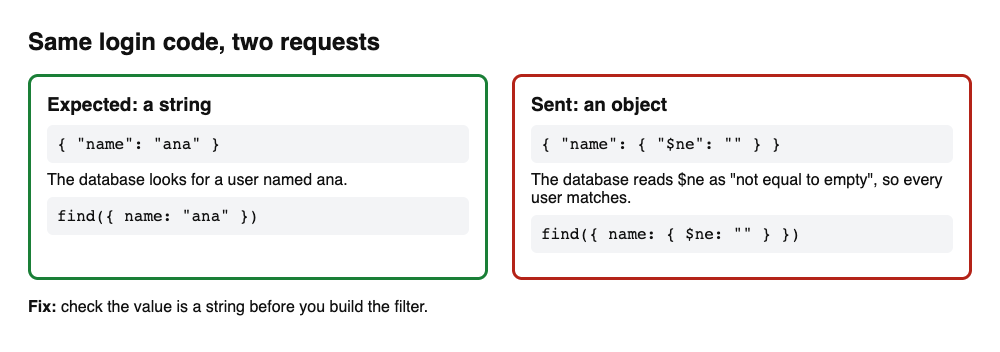
The mistake feels safe because there is no quote to escape. The code works in every normal test and fails only when someone sends a different type. Our SQL injection testing post covers the string version of the same root cause.
Check the type before you build the filter
The sheet's main fix is short: validate the expected scalar type before you build the filter, and do not pass client-supplied objects through as field values. In Node it looks like this:
if (typeof name !== "string") throw new Error("Invalid name");
Only after that check does the code build { name } and call find(). The sheet's Python example does the same with isinstance(email_input, str) before find_one.
Apply the check to every place a client value reaches a query:
- JSON bodies, query strings and URL parameters. Some frameworks turn a query string such as
role[$ne]=admininto a nested object for you, so a query string is not safer than a body. - Fields you thought were fixed, such as an ID, a sort key or a filter name.
- Values that come back from another service or from a model. Treat them as untrusted too.
For the wider habits (length, format, allow-lists), see our input validation post.
Why a quick "$" filter is not enough
It is tempting to reject any request body that contains a dollar sign. The sheet shows this check and then calls it what it is: a denylist, not an allowlist. It also rejects ordinary strings that begin with $, and it does not validate which fields are allowed or what type each one has.
Use it, if at all, as a second layer. The first layer is field-specific validation: you know which fields a route accepts, you know each one's type, and you refuse everything else.
Refuse client-controlled operators and server-side scripts
Some operators are riskier than others. The sheet says to disallow client-controlled query operators such as $where, $regex or $expr unless they are strictly required and validated. It also says never to accept raw JSON fragments from the client as queries.
The worst case is code that runs. The sheet's "dangerous" example builds a query string from input and passes it to eval. Accepting a client-controlled $where expression has a similar effect: it runs untrusted JavaScript inside MongoDB and can use up the server's resources. The sheet's advice is to use standard operators instead, and to turn off server-side scripting when you do not need it.
For search, use the safe door. If readers can search text, the sheet suggests driver APIs such as $text with controlled input, not a regular expression the client writes.
Prefer high-level tools. The sheet recommends ODM or ORM libraries that build queries safely (it names Mongoose, Spring Data and Datastax driver patterns) and says to avoid eval-like functions and raw query execution from untrusted data. A library helps, but the type check above still applies when a value is an object.
Lock the database down
Assume one day a bad query gets through. The sheet's controls limit what it can reach.
- Turn on authentication and roles. Do not run a database without a login. Use role-based access control, and give each job its own user: admin, backup, read-only and application.
- Use least privilege. The sheet says not to use root or admin accounts for application connections. An app user that cannot read other databases turns a serious breach into a smaller one.
- Keep it off the public internet. Bind the service to internal interfaces, not
0.0.0.0, and use private subnets and security groups. Never expose database ports or admin consoles to the public internet. - Encrypt in transit. Require TLS for driver connections and admin consoles.
- Harden the defaults. Change default ports, disable sample users, and turn off or restrict features that run code on the server, such as MongoDB server-side JavaScript.
The sheet adds a warning worth keeping: do not rely only on network controls to protect badly written queries. A private network does not help when the attacker is a logged-in user of your own app. For a fuller list, see our database security post.
Secrets, logs and backups
Three side doors matter as much as the query.
Credentials. Do not hardcode database credentials. Use a secret manager, keep them out of container images and CI logs, and rotate them. Our secrets management post shows how.
Logs. Turn on audit logging for connection attempts, admin actions and failed sign-ins. Alert on spikes in queries, slow queries and large exports. The sheet also lists the commands to watch for: admin actions, $where and map-reduce jobs.
Backups. Encrypt backups at rest and in transfer, restrict who can reach the storage, and test a restore now and then. Keep the database and its drivers patched.
A one-afternoon check you can run
Pick the routes that take input: sign-in, password reset, search and any lookup by ID. Run this list on a test copy of your app, not on production.
- Find the queries. Search the code for every place a request value reaches
find,findOne,updateoraggregate. Note each one in a list. - Check each for a type check. For every entry, can the value be an object? If nothing checks that it is a string, mark it.
- Send an object. On a test copy, send
{"name": {"$ne": ""}}to the route that takes a name. A normal "not found" or a 400 error is what you want. A match is the bug. - Try the query string. Request a list route with
?role[$ne]=adminand see whether the results change. - Search for scripts. Look for
$where,evaland map-reduce in your code, and check whether server-side JavaScript is switched on in the database. - Review the account. Look at the database user your app uses. If it is an admin account, write down the narrower role it should have.
- Add a test. For each fix, keep a test that sends the bad object and expects a refusal.
This pass finds the common mistakes. It does not show that an app is secure, and no test can. Take the list to your next code review, and go back to it after every release that touches a query.
Frequently asked questions
Does NoSQL injection only affect MongoDB?
The OWASP sheet covers MongoDB, CouchDB, Cassandra and similar systems, and its injection example uses MongoDB operators. The shared problem is a query built from untrusted input, so check any database that takes structured queries.
Do Mongoose and other ODMs prevent it?
They help, because they build queries through safer APIs, and the sheet recommends them. They do not remove the need to check that a client value has the type you expect.
Is rejecting any input that contains a dollar sign enough?
No. The sheet calls that check a denylist: it blocks ordinary strings that start with $, and it does not check which fields are allowed or their types. Validate each field instead.
Should I turn off server-side JavaScript?
If your app does not use it, yes. The sheet says to turn off or restrict features that run code on the server, such as MongoDB server-side JavaScript.
Is a private network enough protection?
No. A private network keeps strangers away from the database port, but a bad query that arrives through your app still reaches it. Fix the query code as well.
Get started
Start with the type check on your sign-in route, then the account your app uses to talk to the database. If you want a second pair of eyes, whitehatstoic tests web apps and their APIs for weak spots. Book a meeting with whitehatstoic: tell us the product, the deadline and your biggest worry, and we reply with a plan.
The source for this post is the OWASP NoSQL Security Cheat Sheet.
Comments
No comments yet.
Sign in or make an account to comment.