OAuth 2.0 security: check redirects, tokens and scopes
OAuth 2.0 security decides whether "sign in with an account you already have" is safe or a way into your users' data. OAuth lets your app get limited access to a person's account, or sign them in, without ever seeing their password. The protocol only helps if every part of it is set up with care. This guide follows the OWASP OAuth 2.0 Protocol Cheat Sheet and turns it into checks you can run on your own app.
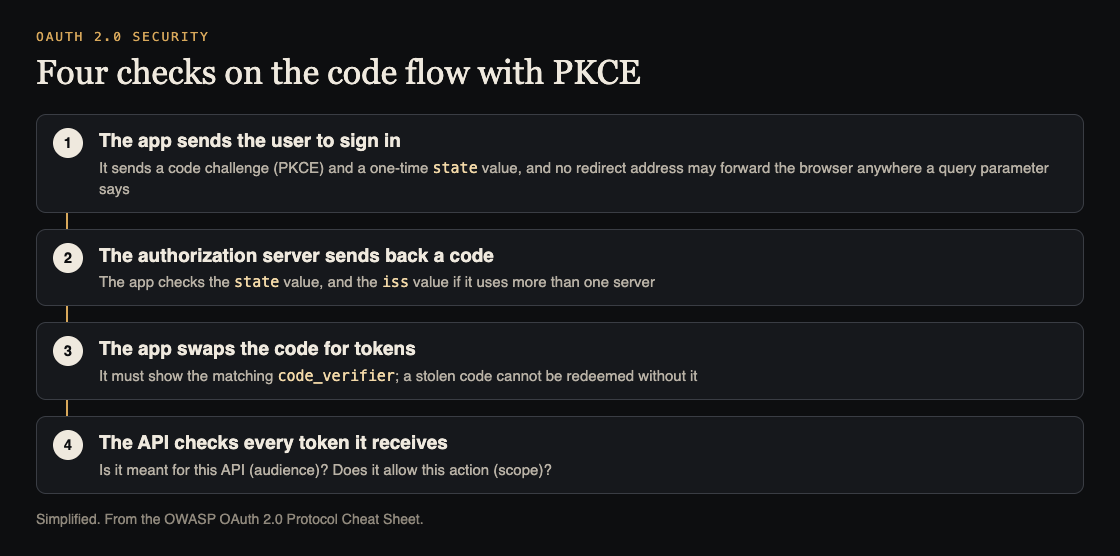
The four places to check. Simplified from the OWASP OAuth 2.0 Protocol Cheat Sheet.
OAuth 2.0 security starts with who does what
OWASP's sheet names three parties, and every check below is about one of them:
- The client is the app that asks for access on a person's behalf. It can run on a server, a desktop or a phone.
- The authorization server signs the person in, asks for their consent, and then issues access tokens.
- The resource server hosts the protected data, such as your API, and accepts requests that carry an access token.
An access token stands in for a username and password. Short-lived tokens are possible, and the resource server does not need to understand many sign-in methods. The common kind is the bearer token, which works for anyone who holds it. OpenID Connect, the usual way to sign people in, is a thin identity layer on top of the same protocol, so these checks apply to it too.
Close every open redirector
The first rule in OWASP's list is about your own pages. Clients and authorization servers must not expose a URL that forwards the user's browser to whatever address a query parameter names. OWASP calls these open redirectors, and says they can leak authorization codes and access tokens.
The reason is the way OAuth ends: the authorization server sends the browser back to your app with a code in the address. If an attacker can steer that return trip through an open redirector, the code travels with it. Our guide to open redirect testing shows how to find these links.
OWASP adds two more points about addresses. Authorization responses must not travel over unencrypted connections. The authorization server must not allow redirect addresses that use the plain http scheme, with one exception: native apps that use loopback redirection.
Use the authorization code flow with PKCE
An authorization code is a one-time value that your app swaps for tokens. The risk is code interception: someone grabs the code on its way back and uses it first. PKCE, short for Proof Key for Code Exchange and pronounced "pixy", closes that gap. Your app invents a secret, the code_verifier, and sends only a challenge made from it with the sign-in request. To redeem the code, it must later show the verifier. OWASP says an attacker cannot redeem a stolen code without it.
The sheet sets these rules:
- The challenge must be specific to one sign-in attempt, and tied to the client and the browser that started it.
- Use a challenge method that does not reveal the verifier in the sign-in request. Otherwise an attacker who can read that request defeats PKCE.
- Authorization servers must support PKCE, and must enforce the verifier whenever a challenge was sent.
- Protect against downgrade: the server should accept a verifier only if a challenge came with the original request.
Use this flow for every kind of client, including single-page apps and native apps. OWASP marks the implicit grant, where the token comes back in the address (response_type=token), as "do not use". RFC 9700 deprecates it and OAuth 2.1 removes it, because tokens in the address can stay in browser history and are readable by scripts on the page. If your app still uses it, plan the move.
Check state, nonce and the issuer value
Three small values protect the return trip, and each one is easy to forget.
- Forged sign-ins. An attacker can try to push their own sign-in result into a victim's browser. PKCE covers this if the server supports it. In OpenID Connect flows the
noncevalue does the job. Otherwise you need a one-time token in thestateparameter, bound to the user's browser. Our guide to CSRF protection covers the same idea for forms. - Mix-ups. If your app talks to more than one authorization server, use the issuer (
iss) value in the response, or theissclaim in the ID token, to confirm which server answered. Without that, give each server its own redirect address. - Look-alike identities. The authorization server must not let a client choose its own
client_id,subor any claim that could be mistaken for a real person.
Keep tokens narrow and tied to their holder
OWASP's sheet says to give each token the least privilege it needs, so a leak does less harm. It lists two limits:
- Audience. A token should be meant for one resource server, or as few as possible. Every resource server must check on every request that the token was meant for it, and refuse it otherwise.
- Resources and actions. The token should also name what it may do and to which data. The
scope,resourceandauthorization_detailsparameters carry this. The resource server must check it on every request as well.
Then think about theft. A bearer token works for whoever holds it, and PKCE only protects the code, not the tokens. For stronger protection, OWASP describes sender-constrained tokens, which are tied to a key the client holds: DPoP (RFC 9449) puts a signed proof on each request, and mutual TLS (RFC 8705) ties the token to the client's certificate. It suggests them for sensitive data, high-value actions and long-lived tokens.
Refresh tokens, which fetch new access tokens, need the same care. They should be sender-constrained, or rotated: each use returns a new refresh token and cancels the old one, so a replayed token is noticed. Using both gives two layers. If your token format is a JWT, our guide to JWT security shows what else to test.
Drop the grants and shortcuts that expose secrets
Two more items sit in the sheet's last sections.
The password grant, where your app collects the person's username and password and passes them on, is not used. OWASP says it exposes the owner's credentials to the client and so widens the attack surface.
For clients that can keep a secret, the authorization server should authenticate them. OWASP prefers methods built on public keys, mutual TLS or private_key_jwt, because then the server holds no shared secret that could leak. Whatever you choose, use TLS from end to end. Where a shared secret does exist, keep it out of your code and logs; our post on secrets management explains how.
Worked example: check one OAuth sign-in in an afternoon
Say your app has a "sign in" button that uses an outside account provider, and it calls your own API with the token it gets back. Work through this on a test copy.
- Draw the flow. Write down the client, the authorization server and your API. Note the flow type and every redirect address in use.
- Find the flow type. Look at the sign-in request address. If you see
response_type=token, you are on the implicit grant. If you seeresponse_type=codebut nocode_challenge, PKCE is missing. - Test the return trip. Start a sign-in, then replay the return address in a fresh browser session. A good app refuses it because the
stateornoncedoes not match. - Test redirects. Look through your app for any page that forwards to an address taken from a query parameter. Each one is an open redirector to fix.
- Test the API. Send it a token that was issued for a different API, or one with a narrower scope than the action needs. It should answer with a refusal each time.
- Check refresh. Use a refresh token twice. If both work, nothing is rotating them.
- Write the fixes in order of risk: PKCE and redirects first, then audience and scope checks, then refresh tokens.
Frequently asked questions
Is OAuth 2.0 the same as OpenID Connect?
No. OAuth 2.0 is about getting access to data. OpenID Connect is an identity layer on top of it that tells your app who signed in. The checks in this guide apply to both.
Do single-page apps need PKCE?
Yes. OWASP says to use the authorization code grant with PKCE for all client types, including single-page and native apps.
Why is the implicit grant a problem?
It returns the access token in the address, where browser history and scripts on the page can reach it, and such tokens cannot be sender-constrained.
Get started
Start with steps 1 and 2 of the worked example: write down the flow and look at the sign-in request. Those two steps show quickly whether you have PKCE and whether any old grant is still in use.
whitehatstoic's cybersecurity and AI safety testing includes a web app and API review, a written report with fixes, and a retest after you apply them. It is scoped after a short call. No test finds every weakness, but a test of your sign-in flow checks the places attackers look first.

Building something that has to be safe? Book a meeting with whitehatstoic: tell us the product, the deadline and your biggest worry, and we reply with a plan and a price.
Comments
No comments yet.
Sign in or make an account to comment.